
Theme
Updated
Drivega
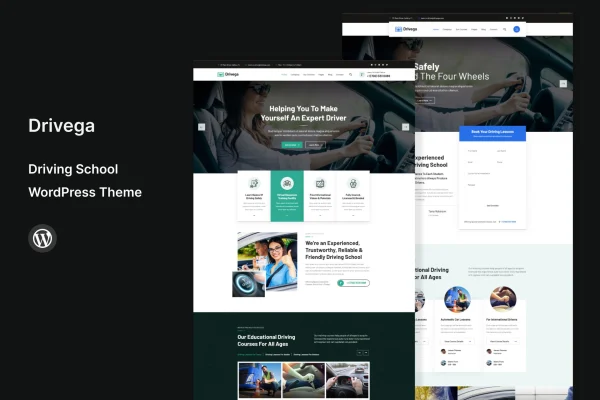
Drivega is a WordPress theme built for driving schools and professional driving instructors. It gives you a ready structure for listing courses, taking student bookings and presenting your instructors, so you can put together a professional school website without writing code.
- Version
- 1.9
- Released
- May 17, 2024
- Developer
- template_path
- Type
- WordPress theme
- Licence
- GPL
- Included in
- Every plan, or $3.99 on its own
What’s new in Drivega 1.9
Version 1.9 · May 17, 2024
Latest
- ChangedMaintenance release.
What it does
Running a driving school means juggling course details, lesson schedules and questions from prospective students. A generic theme leaves you to piece those parts together yourself. This theme starts from the needs of a driving school, with course listings, online booking and appointment scheduling, and contact forms for inquiries all designed into the site. Students can browse lessons, find the course that suits them and request a slot, while you spend less time handling enrollment by phone or email.
The theme works for a small local school with one instructor as well as a business with several instructors on the team. Instructor profiles and testimonial sections let you introduce your staff and share feedback from past students. You can adjust layouts and color schemes to match your branding, and drag and drop page builder compatibility lets you build custom pages visually. Layouts are responsive across desktops, tablets and phones, and the theme is translation ready for schools serving multilingual communities.
Best for
- Local driving schools wanting online course listings and bookings
- Independent driving instructors building a professional website
- Driving schools managing a team of several instructors
Features
Course management
List, categorize and update your driving courses so prospective students can browse your lessons and find the right option for their needs.
Online booking and scheduling
Students can book lessons and schedule appointments online, which cuts down on manual enrollment work and makes signing up more convenient.
Instructor profiles
Dedicated sections let you present each instructor on your team, helping visitors learn who they will be driving with before they book.
Testimonials section
Display feedback from satisfied students on your site so new visitors can read about other people's experiences with your school.
Contact and inquiry forms
Built-in contact forms and inquiry systems give prospective students a direct way to reach you with questions about courses or availability.
Custom layouts and colors
Adjust layouts and color schemes to match your driving school's branding and give the site a consistent, professional appearance.
Page builder compatibility
Works with drag and drop page builders, so you can create unique page layouts visually without any coding knowledge.
Responsive and translation ready
Layouts adapt to desktops, tablets and smartphones, and the theme is translation ready for running your site in other languages.
Questions about Drivega
Can students book driving lessons directly on the site?
Yes. The theme includes online student booking and appointment scheduling, so students can enroll and choose lesson times through your website. This reduces the administrative work of taking bookings by phone or email.
Does Drivega work for a school with multiple instructors?
It does. The theme suits both small local schools and businesses managing several instructors. Instructor profile sections let you introduce each member of your team, and testimonial sections let you share feedback from past students.
Can I change the design to match my school's branding?
Yes. You can customize layouts and color schemes to fit your brand. The theme is also compatible with drag and drop page builders, so you can create your own page layouts without coding.
Can I run my site in a language other than English?
The theme is multilingual and translation ready, which means you can translate it to serve students in other languages or reach diverse communities in your area.
Is Drivega free?
The code of Drivega is licensed under the GPL, so anyone may use, change and share it. GPL Feast is a paid service: a plan or a single purchase gives you the download and automatic updates. The developer's own support, licence key and online services are not included.
Which version of Drivega is this?
Version 1.9, released May 17, 2024. New versions appear here when the developer publishes them, and members get them as automatic updates.
How do I update Drivega?
Install the free GPL Feast Updater on your site and connect it with your API key. It installs new versions of Drivega automatically and keeps a backup, so you can roll back.






