Theme
Updated
Edulerns
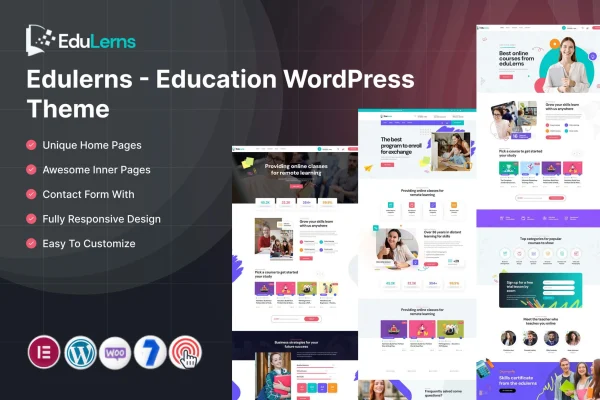
Edulerns is an education WordPress theme by ThemeMascot for schools, colleges, training centers and online course creators. It gives you ready layouts for homepages and inner pages, works with Elementor, and supports LMS plugins such as LearnPress and LifterLMS so you can present courses and manage learning in one site.
- Version
- 8.0
- Released
- Feb 11, 2025
- Developer
- ThemeMascot
- Type
- WordPress theme
- Requires
- Elementor
- Licence
- GPL
- Included in
- Every plan, or $3.99 on its own
What’s new in Edulerns 8.0
Version 8.0 · Feb 11, 2025
Latest
What it does
Education websites have a lot to explain: course catalogs, schedules, instructor details and pricing, all in a way that prospective students can follow. This theme gives you a structure built for that kind of content. You start from one of several homepage and inner page templates, then adjust colors, fonts and header styles from the theme options panel so the site matches your institution's identity. The design is responsive, so pages adapt to desktops, tablets and phones.
The theme requires Elementor, and it also supports WPBakery, so you can build and edit pages visually without writing code. For course delivery it works with LearnPress and LifterLMS, which handle courses, quizzes and student progress. It is translation ready with WPML support and handles right-to-left languages, which helps if your school or training program serves students in more than one language. It suits a single school site as well as an e-learning platform selling courses.
Best for
- Schools and colleges building an institutional website
- Online course creators using LearnPress or LifterLMS
- Training centers publishing course schedules and instructors
Features
Multiple homepage and inner layouts
Choose from various homepage and inner page templates and adjust the structure to fit your school, college or course platform.
LMS plugin compatibility
Works with LearnPress and LifterLMS, so you can run courses, quizzes and student progress tracking alongside the theme's design.
Elementor and WPBakery support
Build and edit custom page designs with a visual drag and drop interface in Elementor or WPBakery, with no coding needed.
Theme options panel
Change colors, fonts, header styles and other settings from one panel so the site reflects your institution's branding.
Course display tools
Display course catalogs, schedules, instructor profiles and pricing plans so prospective students can find the details they need.
Responsive design
Layouts adapt to different screen sizes, so your education site works on desktops, tablets and smartphones.
Multilingual and RTL ready
Supports translation with WPML and right-to-left languages, useful for institutions that teach or publish in more than one language.
Questions about Edulerns
Can I sell or run online courses with this theme?
Yes, through an LMS plugin. The theme is compatible with LearnPress and LifterLMS, which manage courses, quizzes and student progress. The theme also lets you display course catalogs, schedules, instructor profiles and pricing plans.
Which page builder do I need?
Elementor is required. The theme also supports WPBakery. Both let you design and edit pages visually with drag and drop, so you can customize layouts without writing code.
Can I build a site in a language other than English?
Yes. Edulerns is translation ready and supports WPML for multilingual sites. It also handles right-to-left languages, so it can be used for sites in languages such as Arabic or Hebrew.
How much can I change the look of the site?
You can pick from several homepage and inner page templates, then use the theme options panel to change colors, fonts and header styles. Page content and layout can be edited further in Elementor or WPBakery.
Is Edulerns free?
The code of Edulerns is licensed under the GPL, so anyone may use, change and share it. GPL Feast is a paid service: a plan or a single purchase gives you the download and automatic updates. The developer's own support, licence key and online services are not included.
Which version of Edulerns is this?
Version 8.0, released Feb 11, 2025. New versions appear here when the developer publishes them, and members get them as automatic updates.
How do I update Edulerns?
Install the free GPL Feast Updater on your site and connect it with your API key. It installs new versions of Edulerns automatically and keeps a backup, so you can roll back.
What does Edulerns need?
Edulerns needs Elementor installed and active.