Theme
Updated
Eventrox
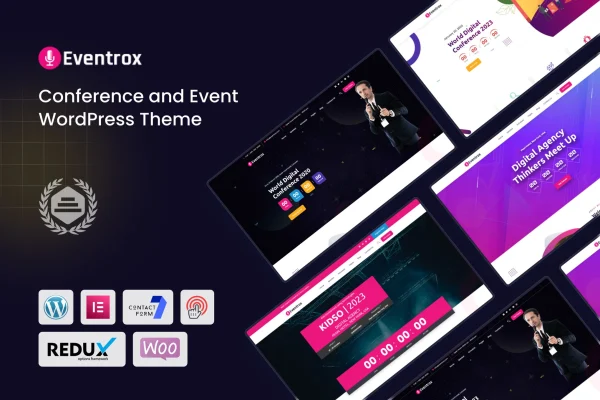
Eventrox is a WordPress theme made for conference and event websites. It works with the Elementor drag and drop page builder and includes layouts for schedules, speakers, venue details and sponsors, so organizers can publish a complete event site without writing code.
- Version
- 1.0
- Developer
- shtheme
- Type
- WordPress theme
- Licence
- GPL
- Included in
- Every plan, or $3.99 on its own
What’s new in Eventrox 1.0.0
Version 1.0.0 · May 27, 2023
Latest
- NewFirst release.
What it does
Event websites have a lot to cover: the program, the people speaking, where it happens, who is sponsoring and how to register. This theme is built around that content. It targets conferences, seminars, meetups, exhibitions and business gatherings, and gives you dedicated layouts and elements for schedules, speakers, venue information and sponsors. A one-click demo importer loads pre-built content, so you start from a finished structure and replace the text and images with your own event details.
Pages are edited in Elementor, which lets you rearrange sections by dragging them into place. The design is responsive and retina ready, and it sits on the Bootstrap framework. For selling tickets or merchandise, the theme supports WooCommerce, and WPML handles multilingual versions of your site. It also works with Gravity Forms, BuddyPress, bbPress, Easy Digital Downloads and WP Easycart, which covers forms, community features and other ways to sell. Documentation is included to help with setup and customization.
Best for
- Conference and seminar organizers
- Meetup, exhibition and business event websites
- Agencies building sites for event clients
Features
Elementor drag and drop editing
Build and adjust page layouts in Elementor by dragging sections into place, so you can create custom event pages without any coding.
One-click demo importer
Import the pre-built demo content in one step and use it as a starting point, then swap in your own event information and images.
Event-focused layouts
Dedicated layouts and elements present schedules, speakers, venue details and sponsors, the core content most conference and event sites need.
Responsive and retina ready
The design adapts to desktops, tablets and phones and is prepared for high-resolution screens, so attendees can read event details on any device.
WooCommerce support
Use WooCommerce to sell event tickets and merchandise directly from your site, keeping sales and event information in one place.
Multilingual sites with WPML
WPML compatibility lets you publish your event site in more than one language for visitors from different countries.
Community and form plugins
Works with Gravity Forms, BuddyPress, bbPress, Easy Digital Downloads and WP Easycart for forms, member communities, forums and digital sales.
Bootstrap framework base
The theme is built on the Bootstrap framework and comes with documentation covering setup and customization.
Questions about Eventrox
Can I sell tickets for my event with this theme?
Yes. The theme supports WooCommerce, which you can use to sell event tickets and merchandise. WooCommerce handles the shop side, while the theme provides the event pages and layouts around it.
Do I need to know how to code to customize it?
No. Eventrox is built for the Elementor drag and drop page builder, so you edit layouts visually. The one-click demo importer also gives you finished pages to adjust instead of building from a blank screen.
Does it have sections for speakers and schedules?
Yes. It includes dedicated layouts and elements for event schedules, speaker profiles, venue details and sponsors, which are the main pieces of information visitors look for on a conference or event site.
Can I run my event site in several languages?
The theme is compatible with WPML, a plugin for multilingual WordPress sites. With WPML you can translate your pages and offer the event site to visitors in different languages.
Is Eventrox free?
The code of Eventrox is licensed under the GPL, so anyone may use, change and share it. GPL Feast is a paid service: a plan or a single purchase gives you the download and automatic updates. The developer's own support, licence key and online services are not included.
Which version of Eventrox is this?
Version 1.0. New versions appear here when the developer publishes them, and members get them as automatic updates.
How do I update Eventrox?
Install the free GPL Feast Updater on your site and connect it with your API key. It installs new versions of Eventrox automatically and keeps a backup, so you can roll back.