Theme
Updated
Fertiora
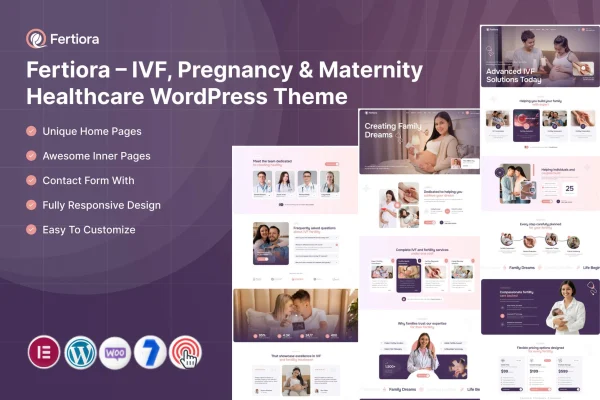
Fertiora is a WordPress theme by ThemeMascot built for IVF clinics, maternity care centers and pregnancy-related services. It gives fertility and maternity professionals a warm, professional site with pre-built service pages, booking tools and a blog, all customizable without code.
- Version
- 1.0
- Released
- Feb 11, 2025
- Developer
- ThemeMascot
- Type
- WordPress theme
- Requires
- Elementor
- Licence
- GPL
- Included in
- Every plan, or $3.99 on its own
What’s new in Fertiora 1.0
Version 1.0 · Feb 11, 2025
Latest
What it does
Clinics and practitioners in fertility and maternity care need a website that feels welcoming to expecting parents while still presenting medical services clearly. This theme is designed around that niche, with pre-built pages for IVF, prenatal and maternity services, plus blog and news sections for articles, success stories and clinic updates. The layout is responsive, so pages adapt to phones, tablets and desktops, and navigation is designed to be simple for visitors of all ages and technical abilities.
The theme works with Elementor, which is required, and adds a theme options panel where you manage design, typography and site functionality from one place. Layouts and color schemes can be adjusted to match your brand without writing code. Built-in booking tools help visitors schedule consultations, and the theme is compatible with WooCommerce and Contact Form 7 if you want to add a shop or contact forms. It suits IVF clinics, hospitals with maternity departments and independent maternity care professionals.
Best for
- IVF and fertility clinics
- Maternity care centers and hospital maternity departments
- Independent prenatal and maternity care professionals
Features
Pre-built service pages
Ready-made pages for presenting IVF, prenatal and maternity services, so you can describe your treatments and care options clearly from the start.
Booking and appointment tools
Built-in booking tools let visitors schedule consultations, helping your clinic organize appointments and manage patient scheduling from the website.
Customizable layouts and colors
Adjust layouts and color schemes to match your clinic's brand identity, with no coding knowledge needed to make the changes.
Theme options panel
A centralized dashboard for managing your site's design, typography and functionality, so most visual settings live in one place.
Responsive design
Pages adapt to smartphones, tablets and desktops, so patients can read about services and book visits on whatever device they use.
Blog and news sections
Publish informative articles, patient success stories and clinic updates to keep expecting parents and prospective patients informed.
Plugin compatibility
Works with WooCommerce and Contact Form 7, so you can add an online shop or contact and inquiry forms to your site.
Accessible, friendly interface
Navigation is designed to be intuitive for visitors of all ages and technical abilities, which matters for a wide patient audience.
Questions about Fertiora
Does Fertiora need a page builder?
Yes. The theme requires Elementor, which you use alongside the theme's options panel to build and adjust pages. Layouts and color schemes can be customized without any coding knowledge.
Can patients book appointments through the site?
The theme includes built-in booking and appointment tools that let visitors schedule consultations. This helps clinics handle scheduling and patient management directly from the website.
Can I sell products or add contact forms?
The theme is compatible with WooCommerce, so you can add a shop for items such as maternity products, and with Contact Form 7 for contact and inquiry forms.
Is this theme only for IVF clinics?
It is designed for IVF, pregnancy and maternity services in general. Clinics, hospitals and individual maternity care professionals can all use the pre-built service pages, blog and booking tools to present their care.
Is Fertiora free?
The code of Fertiora is licensed under the GPL, so anyone may use, change and share it. GPL Feast is a paid service: a plan or a single purchase gives you the download and automatic updates. The developer's own support, licence key and online services are not included.
Which version of Fertiora is this?
Version 1.0, released Feb 11, 2025. New versions appear here when the developer publishes them, and members get them as automatic updates.
How do I update Fertiora?
Install the free GPL Feast Updater on your site and connect it with your API key. It installs new versions of Fertiora automatically and keeps a backup, so you can roll back.
What does Fertiora need?
Fertiora needs Elementor installed and active.