Theme
Updated
Gazette
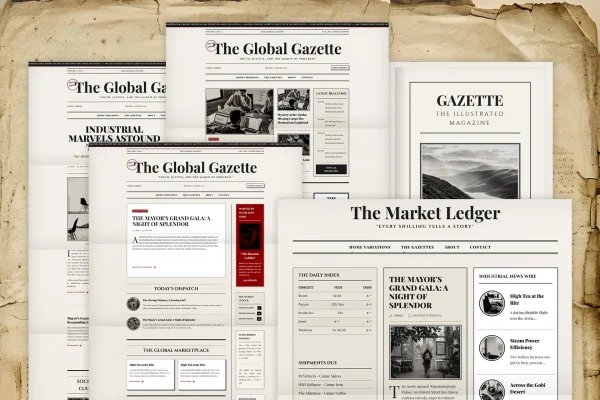
Gazette is a WordPress theme built for news and magazine websites. It gives publishers and bloggers a clean, modern layout with customizable homepage sections, typography options and widget areas, so articles, stories and media are easy to present and easy to read.
- Version
- 1.0.1
- Released
- Feb 11, 2025
- Developer
- ThemeGuri
- Type
- WordPress theme
- Licence
- GPL
- Included in
- Every plan, or $3.99 on its own
What’s new in Gazette 1.0.1
Version 1.0.1 · Feb 11, 2025
Latest
What it does
Running a news or magazine site means organizing a steady flow of articles so readers can find what matters. This theme handles that with a clean layout and homepage sections you can arrange yourself, such as breaking news, editor's picks and category blocks. A theme options panel lets you adjust these sections and other settings without writing code, which makes it approachable for beginners as well as experienced site owners.
The design is responsive, so pages adapt to desktops, tablets and phones. Typography options let you set how headlines and body text look, and multiple widget areas give you room for trending posts, ads or newsletter signups. Built-in social media integration supports sharing, and the theme handles images, videos and galleries for richer stories. It suits personal blogs and larger online publications alike.
Best for
- Online newspapers and digital news publications
- Magazine websites covering multiple topics or categories
- Bloggers who want a news-style layout
Features
Customizable homepage sections
Arrange homepage blocks to feature breaking news, editor's picks and specific categories in the order and style that fits your publication.
Typography options
Choose how headlines and article text are presented, giving your news or magazine site a consistent and readable look across every page.
Responsive layout
Pages adjust to desktops, tablets and mobile devices, so readers get a clean reading experience on whatever screen they use.
Multiple widget areas
Place dynamic content such as trending posts, ad spots or newsletter signups in several widget areas around your site's layout.
Social media integration
Built-in social features make it easier for readers to share your articles and stories on their social networks.
Theme options panel
Adjust layout and design settings from an easy options panel, with no coding required, which keeps customization simple for beginners.
Multimedia content support
Add images, videos and galleries to your posts to tell stories with more than text and keep articles visually engaging.
Questions about Gazette
Can I choose what appears on the homepage?
Yes. The homepage is built from customizable sections, so you can feature breaking news, editor's picks and chosen categories. You set these up through the theme options panel without needing to write any code.
Will my site look right on phones and tablets?
The theme uses a responsive design that adapts to desktops, tablets and mobile devices. Layouts, headlines and images adjust to the screen size so readers can browse and read articles comfortably on any device.
Is this theme only for large publications?
No. It works for personal blogs as well as larger online publications. The clean layout and simple options panel suit solo writers, while homepage sections and widget areas help bigger sites organize lots of content.
Can I add ads or newsletter signups?
Yes. Multiple widget areas let you place dynamic content such as ads, newsletter signups and trending posts in different parts of your layout, alongside your articles and other content.
Is Gazette free?
The code of Gazette is licensed under the GPL, so anyone may use, change and share it. GPL Feast is a paid service: a plan or a single purchase gives you the download and automatic updates. The developer's own support, licence key and online services are not included.
Which version of Gazette is this?
Version 1.0.1, released Feb 11, 2025. New versions appear here when the developer publishes them, and members get them as automatic updates.
How do I update Gazette?
Install the free GPL Feast Updater on your site and connect it with your API key. It installs new versions of Gazette automatically and keeps a backup, so you can roll back.