Theme
Updated
Medyc
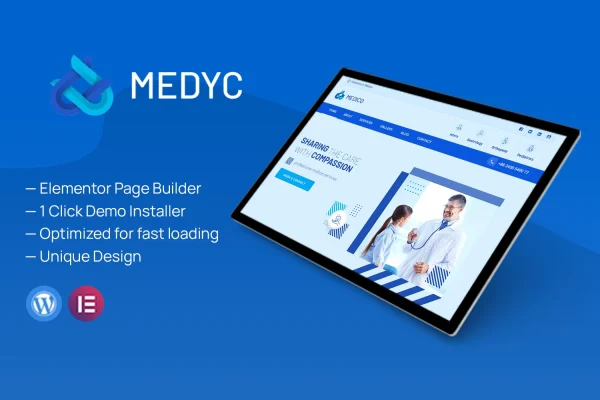
Medyc is a medical WordPress theme by ThemeGuri, built for healthcare websites. It gives hospitals, clinics, dental practices and individual practitioners a clean, modern design with appointment booking, service listings and pre-built templates for setting up a professional practice site.
- Version
- 1.0
- Released
- Apr 19, 2024
- Developer
- ThemeGuri
- Type
- WordPress theme
- Licence
- GPL
- Included in
- Every plan, or $3.99 on its own
What’s new in Medyc 1.0
Version 1.0 · Apr 19, 2024
Latest
What it does
Healthcare websites need to do a few practical things well: explain what services are offered, let patients book appointments and make it easy to get in touch. This theme brings those pieces together in one design made for the medical field. Pre-built templates cover the homepage and inner pages, so you start from a finished layout and replace the content with your own. The interface is intended to be approachable for site owners who have limited technical experience.
The theme suits hospitals, clinics, dental practices and medical professionals who want a site that looks credible and works on any screen. Service listings let you lay out specialties clearly, while the booking system and contact form integration handle patient scheduling and inquiries. You can adjust color schemes and typography to match your clinic's branding, and the responsive layout adapts to phones, tablets and desktops. The theme is also built to display consistently across popular web browsers.
Best for
- Hospitals and multi-department clinics
- Dental practices and specialty clinics
- Independent doctors and medical professionals
Features
Appointment booking system
Patients can schedule appointments through the site, and you can manage those bookings, which cuts down on back-and-forth phone calls for routine scheduling.
Medical service listings
Present your medical offerings and specialties in clear listings so visitors can quickly see which treatments and services your practice provides.
Pre-built templates
Ready-made templates simplify setup and customization, giving you a structured starting point for a healthcare site instead of building every page from scratch.
Customizable homepage and inner pages
Adjust the homepage and inner pages to arrange your content the way your practice needs, from service details to team and contact information.
Contact form integration
Built-in support for contact forms lets patients send inquiries directly from your site, keeping communication with your practice simple and direct.
Color and typography options
Choose from multiple color schemes and typography settings to match the site to your clinic's existing branding and visual identity.
Responsive, cross-browser layout
The design adapts to phones, tablets and desktops, and is built for consistent display across popular web browsers so patients can reach information anywhere.
Questions about Medyc
Can patients book appointments through a site built with this theme?
Yes. The theme includes an appointment booking system for patient scheduling and management, so visitors can request appointments online and you can keep track of those bookings from your site.
Is Medyc only for hospitals, or will it work for a small practice?
It is designed for a range of healthcare sites, including hospitals, clinics, dental practices and individual medical professionals. The customizable homepage and inner pages let you scale the layout to the size of your practice.
Can I match the theme to my clinic's branding?
Yes. Medyc offers multiple color schemes and typography options, and the homepage and inner pages are customizable, so you can align the look of the site with your clinic's colors and style.
Do I need technical skills to set it up?
The theme is built with a clean, intuitive interface and pre-built templates aimed at users with minimal technical expertise. You start from finished layouts and swap in your own text, images and service details.
Is Medyc free?
The code of Medyc is licensed under the GPL, so anyone may use, change and share it. GPL Feast is a paid service: a plan or a single purchase gives you the download and automatic updates. The developer's own support, licence key and online services are not included.
Which version of Medyc is this?
Version 1.0, released Apr 19, 2024. New versions appear here when the developer publishes them, and members get them as automatic updates.
How do I update Medyc?
Install the free GPL Feast Updater on your site and connect it with your API key. It installs new versions of Medyc automatically and keeps a backup, so you can roll back.