Theme
Updated
Gosaas
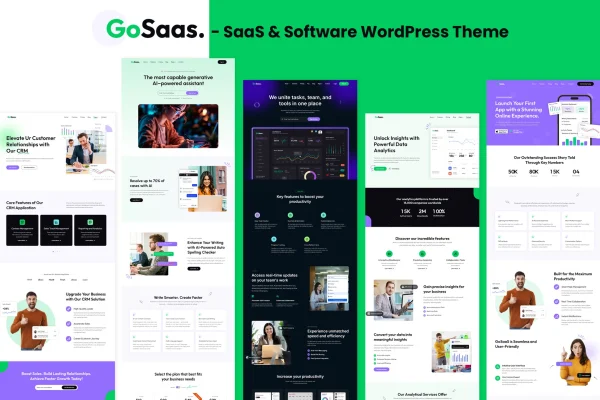
Gosaas is a WordPress theme built for SaaS companies, software developers and tech startups. It gives you ready-made pages and sections for presenting software products, subscription plans and services, and you can adjust layouts with a drag and drop page builder instead of writing code.
- Version
- 1.0
- Released
- Feb 11, 2025
- Developer
- shtheme
- Type
- WordPress theme
- Licence
- GPL
- Included in
- Every plan, or $3.99 on its own
What’s new in Gosaas 1.0.0
Version 1.0.0 · Jan 1, 2026
Latest
- NewFirst release.
What it does
Software businesses tend to need the same set of pages: a product overview, a feature breakdown, a pricing page, customer testimonials and a way to capture leads. This theme includes sections for each of those, so you start from a layout that already fits a SaaS or software site. Pre-built demo content gives you sample pages to import and then edit with your own copy, screenshots and plans, which saves you from designing every page from a blank canvas.
Customization happens through a drag and drop page builder, and the header and footer can be adjusted to match your branding and navigation. The design is responsive, so pages adapt to desktops, tablets and phones. The theme works with WooCommerce, WPML and Contact Form 7, and it is translation ready with RTL support, which helps if you plan to publish in more than one language or in a right-to-left script.
Best for
- SaaS companies presenting subscription plans
- Software developers marketing their products
- Tech startups building a first company website
Features
SaaS-focused page sections
Includes sections for feature highlights, client testimonials and product presentations, laid out with software and subscription businesses in mind.
Multiple pricing table styles
Choose from several pricing table designs to lay out your subscription plans so visitors can compare tiers clearly.
Drag and drop page builder
Rearrange and customize page layouts visually, without coding, so you can adjust the look of each page yourself.
Pre-built demo content
Start from ready-made pages and sections designed for SaaS and software sites, then replace the sample content with your own.
Lead generation forms
Built-in contact and newsletter subscription forms let you collect inquiries and sign-ups directly from your pages.
Customizable header and footer
Adjust the navigation and branding areas at the top and bottom of your site to match your company identity.
Translation ready with RTL
Prepare your site for other languages and right-to-left scripts, and pair it with WPML for multilingual content.
Responsive layout
Pages adapt to different screen sizes so your site displays properly on desktops, tablets and smartphones.
Questions about Gosaas
Can I build a pricing page for my subscription plans with this theme?
Yes. The theme includes multiple pricing table styles, so you can present your plans side by side and pick the design that suits your brand. You can place them alongside feature highlights and testimonials on the same page.
Do I need coding skills to customize the layout?
No. Gosaas uses a drag and drop page builder for arranging and editing layouts, and the header and footer can be customized for your branding. The pre-built demo content also gives you finished pages to adapt instead of building from scratch.
Does it work with WooCommerce and multilingual plugins?
The theme is compatible with WooCommerce, WPML and Contact Form 7. It is also translation ready and supports RTL languages, which makes it a workable choice for sites aimed at audiences in several languages.
Can I collect leads or newsletter sign-ups on my site?
Yes. The theme has integrated lead generation forms, including contact forms and newsletter subscription forms, so visitors can reach out or sign up without leaving the page they are reading.
Is Gosaas free?
The code of Gosaas is licensed under the GPL, so anyone may use, change and share it. GPL Feast is a paid service: a plan or a single purchase gives you the download and automatic updates. The developer's own support, licence key and online services are not included.
Which version of Gosaas is this?
Version 1.0, released Feb 11, 2025. New versions appear here when the developer publishes them, and members get them as automatic updates.
How do I update Gosaas?
Install the free GPL Feast Updater on your site and connect it with your API key. It installs new versions of Gosaas automatically and keeps a backup, so you can roll back.