
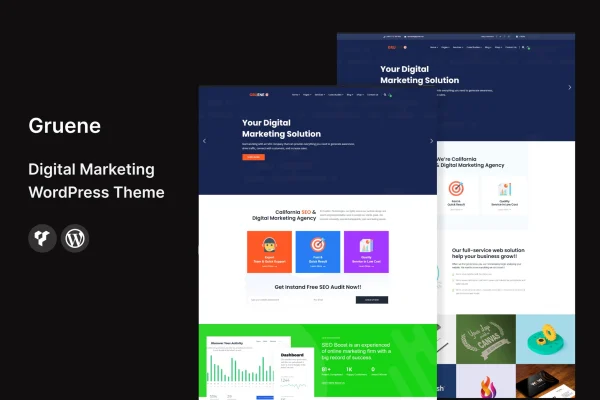
Theme
Updated
Gruene
Gruene is a WordPress theme built for digital marketing agencies and independent marketing professionals. It gives you a clean, minimalist layout, ready-made marketing pages and customization tools, so you can present your services, case studies and client testimonials without writing code.
- Version
- 2.6
- Released
- Jun 4, 2024
- Developer
- template_path
- Type
- WordPress theme
- Licence
- GPL
- Included in
- Every plan, or $3.99 on its own
What’s new in Gruene 2.6
Version 2.6 · Jun 4, 2024
Latest
- ImprovedAll Plugins are up to date.
- ImprovedWooCommerce is up to date.
What it does
Marketing agencies need a site that explains their services clearly and shows proof of past work. This theme starts you off with a clean, modern design and pre-built pages for services, portfolios, blogs and contact forms. You can fill those in with your own content instead of designing every page from a blank screen. The layout is responsive, so pages adjust to desktops, tablets and phones, and the graphics are retina ready to stay sharp on high-resolution screens.
Customization happens through visual tools that let you change colors, fonts, layouts and content to match your brand, with no coding required. That makes it workable for beginners while still giving experienced site builders room to adjust things. The theme is described as compatible with popular plugins such as Yoast SEO, WPForms and Elementor, and it follows an SEO-friendly structure. It suits a new agency launch as well as a refresh of an existing marketing site.
Best for
- Digital marketing agencies building or refreshing their website
- Freelance marketers presenting services and case studies
- Marketing consultants who want a no-code customizable site
Features
Clean minimalist design
A modern, uncluttered layout gives agency sites a professional look and keeps the focus on your services, case studies and client testimonials.
Responsive layout
Pages adapt to desktops, tablets and smartphones, so visitors get a properly arranged site whatever device they use to browse.
No-code customization
Change colors, fonts, layouts and content through built-in tools, letting you match your brand identity without editing any code.
Pre-built marketing pages
Ready-made templates for services, portfolios, blogs and contact forms give you a starting structure for the pages most agency sites need.
Plugin compatibility
Works with popular plugins including Yoast SEO, WPForms and Elementor, so you can add SEO tools, forms and page building to your site.
SEO-friendly structure
The theme is built following common SEO practices, giving your content a sensible structure for search engines to read.
Retina ready graphics
Visuals are prepared for high-resolution displays, keeping logos, icons and images crisp on modern screens and devices.
Questions about Gruene
Do I need coding skills to customize this theme?
No. The theme includes customization tools for changing colors, fonts, layouts and content without code. That means beginners can adapt it to their brand, while people with more experience can still fine-tune the design to suit their agency.
What pages come ready to use?
The theme includes pre-built templates for services, portfolios, blogs and contact forms. These cover the main pages a marketing agency usually needs, so you can add your own text, images and case studies instead of building each layout from scratch.
Does Gruene work with Elementor and other plugins?
Yes. Gruene is described as compatible with popular plugins such as Yoast SEO, WPForms and Elementor. That lets you add SEO settings, contact forms and page building tools alongside the theme's own layouts and design options.
Will my site look right on phones and tablets?
The theme uses a fully responsive layout that adjusts to desktops, tablets and smartphones. Its graphics are also retina ready, so images and icons stay sharp on high-resolution screens.
Is Gruene free?
The code of Gruene is licensed under the GPL, so anyone may use, change and share it. GPL Feast is a paid service: a plan or a single purchase gives you the download and automatic updates. The developer's own support, licence key and online services are not included.
Which version of Gruene is this?
Version 2.6, released Jun 4, 2024. New versions appear here when the developer publishes them, and members get them as automatic updates.
How do I update Gruene?
Install the free GPL Feast Updater on your site and connect it with your API key. It installs new versions of Gruene automatically and keeps a backup, so you can roll back.






