Theme
Updated
Hellomouse
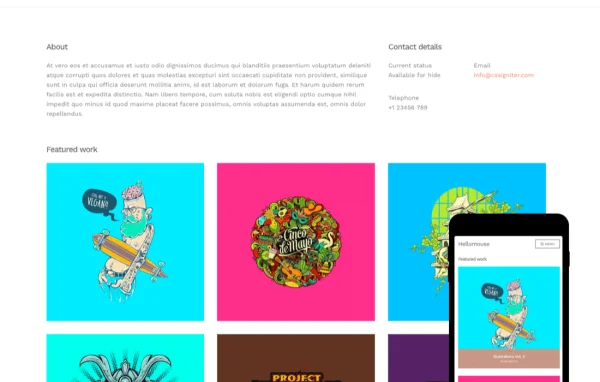
Hellomouse is a WordPress theme built for photographers, designers and other creatives who need a portfolio site. Its minimalist design keeps attention on your images and projects, and its customization options let you adjust the look without writing code.
Install this firstPlease download the Ignition Framework Plugin from here, which is needed by CSS Ignitor Themes.
Go to product- Version
- 1.1.1
- Developer
- CSSIgniter
- Type
- WordPress theme
- Licence
- GPL
- Included in
- Every plan, or $4.79 a year on its own
What’s new in Hellomouse 1.1.1
Version 1.1.1
Latest
What it does
Many portfolio sites get in the way of the work they are meant to present. Busy layouts, heavy decoration and cluttered menus pull the eye away from the photos or designs. This theme takes the opposite approach with a clean, minimalist layout that gives your images the space they need. It suits professional photographers, graphic designers and other artists who want visitors to look at the work first and everything else second.
You can personalize colors, fonts and layouts through simple customization options, so the site can match your style and brand with no coding. Several gallery and portfolio display styles give you different ways to present your images, and built-in blog layouts let you write about projects, tutorials or your creative process. The layout is responsive, so your portfolio adapts to desktops, tablets and phones, and the theme works with popular plugins when you want to add features later.
Best for
- Professional photographers building an online portfolio
- Graphic designers presenting client and personal projects
- Artists who want a portfolio with a blog
Features
Minimalist portfolio design
A clean, uncluttered layout keeps your creative work front and center, so visitors focus on your photos and projects instead of the page design.
No-code customization options
Adjust colors, fonts, layouts and other settings through easy-to-use options, giving your site a personal look without touching any code.
Multiple gallery styles
Choose from several gallery and portfolio display styles to present your images in the format that best fits each project or collection.
Built-in blog layouts
Integrated blog layouts let you publish stories, tutorials or behind-the-scenes posts about your creative process right alongside your portfolio.
Responsive, mobile-friendly layout
The layout adapts to different screen sizes, so your portfolio displays properly on desktops, tablets and smartphones alike.
Works with popular plugins
The theme is compatible with popular plugins, so you can add new functionality to your site as your creative business grows.
Setup documentation
Thorough documentation walks you through setting up the theme and customizing it to suit your portfolio.
Questions about Hellomouse
Do I need coding skills to customize this theme?
No. Hellomouse includes easy-to-use customization options for colors, fonts, layouts and more, so you can shape the look of your site to match your style and brand without editing any code.
Can I display my photos in different ways?
Yes. The theme offers multiple gallery and portfolio display styles, which gives you flexibility in how you present images. You can pick the style that suits a particular project, series or collection of work.
Can I run a blog alongside my portfolio?
Yes. The theme includes integrated blog layouts, so you can share stories, tutorials or posts about your creative process on the same site as your portfolio, keeping everything in one place.
Will my portfolio look right on phones?
The theme uses a fully responsive, mobile-friendly layout that adjusts to different devices and screen sizes, so visitors browsing on a smartphone or tablet can view your work comfortably.
Is Hellomouse free?
The code of Hellomouse is licensed under the GPL, so anyone may use, change and share it. GPL Feast is a paid service: a plan or a single purchase gives you the download and automatic updates. The developer's own support, licence key and online services are not included.
Which version of Hellomouse is this?
Version 1.1.1. New versions appear here when the developer publishes them, and members get them as automatic updates.
How do I update Hellomouse?
Install the free GPL Feast Updater on your site and connect it with your API key. It installs new versions of Hellomouse automatically and keeps a backup, so you can roll back.
More from CSSIgniter