Theme
Updated
Herringbone
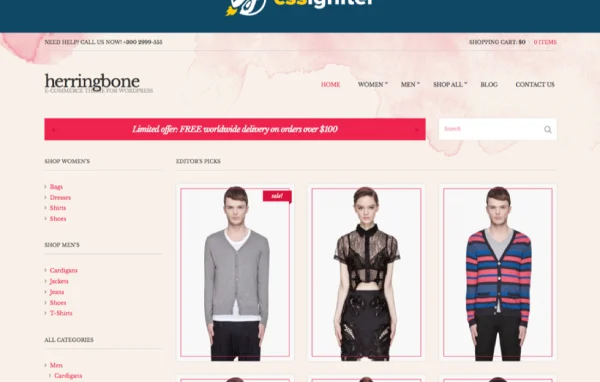
Herringbone is a WordPress theme from CSSIgniter built with fashion eCommerce sites in mind. It pairs a clean, timeless design with WooCommerce compatibility and Customizer controls, so you can present products and content in a tidy, readable layout that also works for blogs and portfolios.
Install this firstPlease download the Ignition Framework Plugin from here, which is needed by CSS Ignitor Themes.
Go to product- Version
- 2.7.11
- Released
- Jan 23, 2023
- Developer
- CSSIgniter
- Type
- WordPress theme
- Licence
- GPL
- Included in
- Every plan, or $4.79 a year on its own
What’s new in Herringbone 2.7.11
Version 2.7.11 · Jan 23, 2023
Latest
- FixedTwitter libraries would throw deprecation warnings for PHP 8.x.
- FixedImplicit conversion warning in PHP 8.
- NewMinified assets.
- FixedReplaced aliased is_integer() with is_int().
- ImprovedUpdated language file.
- ImprovedCompatibility with WooCommerce 7.3.0.
- ImprovedTheme version to 2.7.11.
What it does
Fashion shops need a site that lets clothing and accessories take center stage without clutter getting in the way. This theme gives you a distraction-free layout with a strong focus on typography and visual hierarchy, so product photos and written content stay easy to read. It works with WooCommerce for product displays and checkout, and the responsive layout adapts to phones, tablets and desktops.
You shape the look through the theme Customizer, adjusting colors, fonts and layouts without editing code. Several pre-built page templates and blog layouts give you a starting point, which helps if you want a finished appearance quickly. The theme is translation ready, supports right-to-left languages and follows accessibility practices, which makes it a reasonable fit for stores, personal blogs and portfolios serving a wide audience.
Best for
- Fashion and clothing shops running WooCommerce
- Style bloggers wanting a clean, typography-focused layout
- Creatives building an elegant portfolio site
Features
Clean, distraction-free design
A simple layout with attention to typography and visual hierarchy keeps your products and posts at the center of each page.
WooCommerce compatibility
Works with WooCommerce so you can set up an online store with product displays and a checkout process that match the theme's style.
Theme Customizer controls
Change colors, fonts, layouts and other design settings from the Customizer, with no need to write or edit code.
Pre-built layouts
Several pre-designed page templates and blog layouts help you get a polished site in place without building every page from scratch.
Responsive layout
Pages adjust to different screen sizes, so your store and blog display properly on smartphones, tablets and desktop computers.
Translation and RTL support
The theme is translation ready and supports right-to-left languages, useful for sites that serve readers in several languages.
Accessibility-ready build
Designed following accessibility practices to give visitors with disabilities a more inclusive experience when browsing your site.
Questions about Herringbone
Can I use this theme to run an online clothing store?
Yes. The theme is designed with fashion eCommerce in mind and is compatible with WooCommerce, so you can display products and handle checkout in a layout that fits the rest of your site.
Do I need coding skills to change the design?
No. The theme Customizer lets you adjust colors, fonts, layouts and more through WordPress settings. Pre-built page templates and blog layouts also give you a ready starting point.
Is it only for shops, or can I run a blog with it?
It works for blogs and portfolios too. It includes blog layouts and puts emphasis on typography and readability, so written content and images are presented clearly alongside or without a store.
Will it work for a site in a right-to-left language?
Yes. The theme is translation ready and supports right-to-left languages, so you can adapt it for audiences who read in languages such as Arabic or Hebrew.
Is Herringbone free?
The code of Herringbone is licensed under the GPL, so anyone may use, change and share it. GPL Feast is a paid service: a plan or a single purchase gives you the download and automatic updates. The developer's own support, licence key and online services are not included.
Which version of Herringbone is this?
Version 2.7.11, released Jan 23, 2023. New versions appear here when the developer publishes them, and members get them as automatic updates.
How do I update Herringbone?
Install the free GPL Feast Updater on your site and connect it with your API key. It installs new versions of Herringbone automatically and keeps a backup, so you can roll back.
More from CSSIgniter