Theme
Updated
Hestia Pro
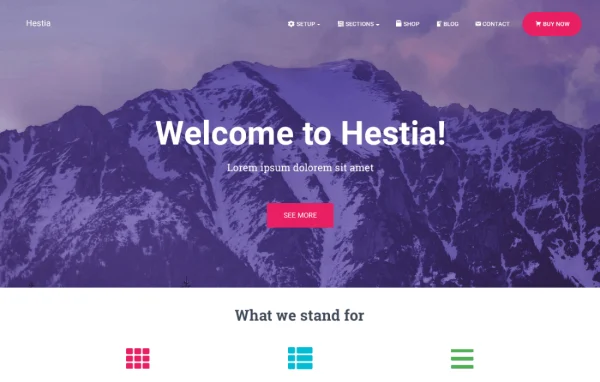
Hestia Pro by Themeisle is a multipurpose WordPress theme built around a clean material design look. It suits business sites, startups and creative portfolios, and lets you shape the homepage, header and blog from the WordPress Customizer without writing code.
- Version
- 3.3.6
- Released
- Sep 7, 2026
- Developer
- Themeisle
- Type
- WordPress theme
- Licence
- GPL
- Included in
- Every plan, or $6.39 a year on its own
What’s new in Hestia Pro 3.3.6
Version 3.3.6 · Sep 7, 2026
Latest
- ImprovedImproved the accessibility of the setup wizards plugin recommendation accordions for screen reader users.
- FixedFixed the sticky navigation bar overlapping the WordPress admin bar on small screens.
- FixedFixed a crash when changing the footer layout in the Customizer.
- ImprovedImproved stability by preventing fatal errors when a theme class file is missing or unreadable.
- FixedFixed front-page repeater fields being uneditable in the mobile Customizer while preserving drag-to-reorder from item headers.
- FixedFixed frontend errors when White Label files are missing.
- FixedFixed checkout pages showing a WooCommerce deprecation notice.
- FixedFixed the missing disclosure marker in Details blocks on the frontend.
What it does
Many site owners want a modern, professional look without building every section by hand. This theme gives you a ready homepage made of sections you can reorder, show or hide, plus starter sites you can import with one click as a base for your project. It works for single-page sites and larger multi-page builds, and the layout is responsive so pages adapt to phones, tablets and desktops.
Most of the setup happens in the WordPress Customizer, where you see changes as you make them. You can adjust homepage sections, blog layouts, header styles and mobile menus, or swap a static header for a slider or video. If you prefer a page builder, the theme works with Elementor, Gutenberg, Brizy, Beaver Builder, Visual Composer, SiteOrigin and Divi Builder. For shops, WooCommerce support comes with two store designs to choose from.
Best for
- Small businesses and startups wanting a modern site
- Creative professionals building portfolio websites
- Store owners setting up a WooCommerce shop
Features
Material design styling
The theme uses a clean material design look across pages, giving business, startup and portfolio sites a modern, consistent interface from the start.
Customizer based controls
Adjust homepage sections, blog layouts and other site elements from the WordPress Customizer, with a live preview of each change as you work.
Flexible homepage sections
Reorder, show or hide homepage sections as needed, and add new areas through the available hooks for finer control over how content is presented.
Two WooCommerce store designs
WooCommerce support includes two built-in store designs, so you can set up an online shop that matches the rest of your site.
Page builder compatibility
Build pages with Elementor, Gutenberg, Brizy, Beaver Builder, Visual Composer, SiteOrigin or Divi Builder, depending on the editor you already know.
One-click starter sites
Import a professionally designed starter site with one click, then replace the demo content with your own text, images and branding.
Header customization options
Fine-tune the header, including mobile menus, cart icons and transparent header styling, to get the look you want on every page.
Slider and video headers
Replace a static homepage header with a slider or a video to give visitors a more dynamic introduction to your brand.
Hestia Pro older versions
- 3.3.5Aug 82 improvements, 1 fix
- 3.3.4May 234 improvements, 2 fixes
- 3.3.3Dec 11, 20251 improvement
- 3.1.1Jan 12, 2024
- 3.0.23Apr 18, 2023
Members and buyers of this product can download older versions.
Questions about Hestia Pro
Can I use Hestia Pro with Elementor or another page builder?
Yes. The theme works with Elementor, Gutenberg, Brizy, Beaver Builder, Visual Composer, SiteOrigin and Divi Builder. You can design pages in your preferred builder while the theme handles the overall styling, header and layout options.
Is this theme a good fit for an online store?
It supports WooCommerce and includes two store designs built for ecommerce. The header can also show a cart icon, which helps shoppers reach their cart from any page on the site.
How much control do I have over the homepage?
Quite a lot. You can reorder, show or hide homepage sections from the Customizer, use a slider or video header instead of a static image, and add new areas through the available hooks.
Do I have to build my site from scratch?
No. You can import one of the starter sites with one click and use it as a starting point. From there, you edit the content and adjust styling in the Customizer or your page builder.
Is Hestia Pro free?
The code of Hestia Pro is licensed under the GPL, so anyone may use, change and share it. GPL Feast is a paid service: a plan or a single purchase gives you the download and automatic updates. The developer's own support, licence key and online services are not included.
Which version of Hestia Pro is this?
Version 3.3.6, released Sep 7, 2026. New versions appear here when the developer publishes them, and members get them as automatic updates.
How do I update Hestia Pro?
Install the free GPL Feast Updater on your site and connect it with your API key. It installs new versions of Hestia Pro automatically and keeps a backup, so you can roll back.
More from Themeisle




Plugin
Plugin