Theme
Updated
Igloo
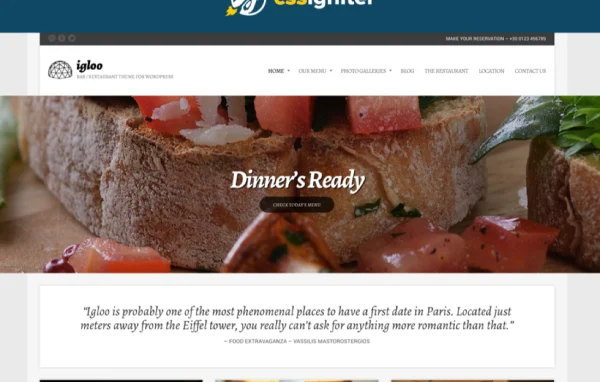
Igloo is a WordPress theme by CSSIgniter built for cafes, bars and restaurant websites. It gives food businesses a clean layout for presenting dishes, menus and atmosphere, with header, footer, color and font controls plus page building through the block editor or Elementor.
Install this firstPlease download the Ignition Framework Plugin from here, which is needed by CSS Ignitor Themes.
Go to product- Version
- 1.9.1
- Released
- Jan 23, 2023
- Developer
- CSSIgniter
- Type
- WordPress theme
- Licence
- GPL
- Included in
- Every plan, or $4.79 a year on its own
What’s new in Igloo 1.9.1
Version 1.9.1 · Jan 23, 2023
Latest
- FixedDeprecation warning "Required parameter follows optional parameter" in PHP 8.
- FixedPanel issue where template bound metaboxes would not work in the block editor
- FixedTweets widget would throw a notice when used inside the Block Widgets editor.
- ImprovedThe classic widget editor is now loaded by default (i.e. the Block Widgets editor is disabled).
- NewIn Panel > Site Options > Other, added checkbox to enable the Block Widgets editor.
- FixedFuture-proof support for One Click Demo Import, by replacing older 'pt-ocdi/*' hook names with the more recent 'ocdi/' ones.
- ImprovedWhen resetting the panel settings, the panel defaults are now loaded later, by calling load_ci_defaults() inside the 'admin_menu' action, in ci_create_menu().
- FixedWarning would get thrown when resetting the panel settings.
What it does
Restaurant and cafe owners usually need a site that presents the menu, shows off the space through photos and gives visitors the basic information they came for. This theme is designed around that kind of business. It offers a clean design with customizable menus, photo galleries and smooth scrolling, and the responsive layout adapts to phones, tablets and desktops. A demo content import lets you start from a prepared site and replace the text and images with your own.
Customization runs through the WordPress Customizer, where you can adjust header and footer layouts, color schemes, logos and typography from Google Fonts with live previews. For page layouts you can work in the block editor with the GutenBee blocks or build with Elementor using drag and drop. A global sections system lets you design a section once and reuse it across pages. WooCommerce compatibility means you can add a shop for menu items, merchandise or gift cards.
Best for
- Restaurants wanting a clean site for menus and photos
- Cafes and bars that want to sell merchandise or gift cards
- Freelancers building hospitality sites with Elementor or blocks
Features
Flexible header options
Set the header's color scheme, fonts, layout and logo from the Customizer, with real-time previews so you can see changes before you publish them.
Customizable footers
Build footer sections with your own colors, typography, layout and links, so the bottom of every page carries the details your visitors look for.
Block editor with GutenBee blocks
Create pages in the WordPress block editor using extra GutenBee blocks, which lets you assemble layouts without writing code.
Elementor compatibility
Design page layouts with Elementor's drag and drop editor if you prefer it over the block editor, giving you control over the look of each page.
WooCommerce support
Add an online store with WooCommerce to sell menu items, merchandise or gift cards alongside the rest of your restaurant or cafe site.
Reusable global sections
Design content sections once and place them on pages across the site, which keeps repeated elements consistent and saves editing time.
Custom colors and Google Fonts
Create color palettes that match your brand and choose Google Fonts with typography controls for headings, body text and special sections.
Demo content import
Import the pre-built demo content to get a working layout in place, then swap in your own menus, photos and text.
Questions about Igloo
Can I build pages with Elementor, or only the block editor?
You can use either. Igloo works with the WordPress block editor, extended with GutenBee blocks, and it is also compatible with Elementor for drag and drop page design. Pick whichever editor you are more comfortable with.
Can I sell things online with this theme?
Yes. The theme is compatible with WooCommerce, so you can set up a store to sell menu items, merchandise or gift cards. WooCommerce handles the checkout and inventory management side of the shop.
Will my site start out looking like the demo?
The theme includes a one-click demo import that brings in pre-built demo content. That gives you a ready layout to work from, and you can then replace the sample text, images and menus with your own.
How much control do I get over colors and fonts?
You can create custom color schemes in the Customizer and apply them to areas like the header and footer. Google Fonts are available too, with typography settings for headings, body text and special sections.
Is Igloo free?
The code of Igloo is licensed under the GPL, so anyone may use, change and share it. GPL Feast is a paid service: a plan or a single purchase gives you the download and automatic updates. The developer's own support, licence key and online services are not included.
Which version of Igloo is this?
Version 1.9.1, released Jan 23, 2023. New versions appear here when the developer publishes them, and members get them as automatic updates.
How do I update Igloo?
Install the free GPL Feast Updater on your site and connect it with your API key. It installs new versions of Igloo automatically and keeps a backup, so you can roll back.
More from CSSIgniter