Theme
Updated
Jinx
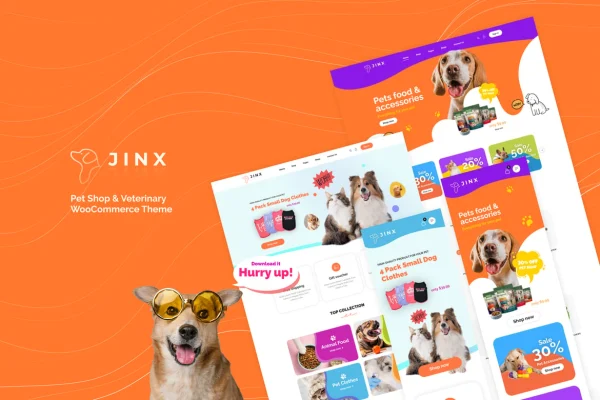
Jinx is a WordPress theme built for pet shops, veterinary clinics and other animal care businesses. It pairs a WooCommerce storefront for pet supplies with a built-in appointment booking system, so one site can sell products and take bookings for consultations or treatments.
- Version
- 1.1.0
- Released
- Aug 15, 2026
- Developer
- LA-Studio
- Type
- WordPress theme
- Licence
- GPL
- Included in
- Every plan, or $3.99 on its own
What’s new in Jinx 1.1.0
Version 1.1.0 · Aug 15, 2026
Latest
What it does
Pet businesses often need two things from a website: a place to sell food, toys and supplies, and a way for clients to book a vet visit. This theme covers both. It works with WooCommerce for product listings, checkout and payments, and it includes appointment scheduling so clients can book consultations or treatments directly on your site. The design uses a friendly, welcoming look that suits pet owners and animal lovers.
You start from one of several pre-designed homepage and shop layouts, then adjust them to match your brand without writing code. Shoppers can narrow products by size, type, brand and price, and the layouts adapt to phones, tablets and desktops. A blog section gives you space for pet care tips and clinic news, and the theme supports multiple currencies and translation, which helps if you serve customers in more than one language.
Best for
- Pet supply stores selling online with WooCommerce
- Veterinary clinics that want online appointment booking
- Groomers and animal care businesses with a retail side
Features
WooCommerce store support
Manage product listings, checkout and payment options for pet supplies and veterinary services through WooCommerce, all within the theme's shop design.
Veterinary appointment booking
Built-in scheduling lets clients book consultations or treatments directly through your website, without a separate booking page elsewhere.
Pre-designed homepages and shops
Pick from multiple homepage and shop layout templates and tailor them to your brand identity with no coding knowledge required.
Product filtering and sorting
Customers can filter and sort pet products by size, type, brand and price to find what they need on larger catalogs.
Responsive layouts
Pages adjust to smartphones, tablets and desktop screens so visitors can browse products and book visits on any device.
Blog and news section
Publish pet care tips, veterinary advice and store updates in a built-in blog area that fits the rest of the site design.
Multi-currency and translation ready
Sell in multiple currencies and translate the site to reach customers who speak different languages or live in other countries.
Social media integration
Connect your site to popular social platforms to promote products and services and stay in touch with your customers.
Jinx older versions
- 1.0.9Jul 30, 2025
- 1.0.7Feb 26, 2025
Members and buyers of this product can download older versions.
Questions about Jinx
Can clients book vet appointments through the site?
Yes. The theme includes a built-in appointment scheduling system, so clients can book consultations or treatments directly through your website. That makes it a good match for clinics that also want to sell products online.
Does this theme need WooCommerce?
The store features are built around WooCommerce, which handles product listings, checkout and payments. If you plan to sell pet supplies or services online, you will run the shop side of the site through WooCommerce.
Can I change the layouts without coding?
Yes. You can choose from multiple pre-designed homepage and shop templates and adjust them to reflect your brand identity without any coding knowledge, so you can get a polished storefront in place quickly.
Will it work for customers in other countries?
The theme supports multiple currencies and is translation ready. You can show prices in more than one currency and translate the site's text, which helps if your pet shop serves customers in different regions or languages.
Is Jinx free?
The code of Jinx is licensed under the GPL, so anyone may use, change and share it. GPL Feast is a paid service: a plan or a single purchase gives you the download and automatic updates. The developer's own support, licence key and online services are not included.
Which version of Jinx is this?
Version 1.1.0, released Aug 15, 2026. New versions appear here when the developer publishes them, and members get them as automatic updates.
How do I update Jinx?
Install the free GPL Feast Updater on your site and connect it with your API key. It installs new versions of Jinx automatically and keeps a backup, so you can roll back.