Theme
Updated
Veera
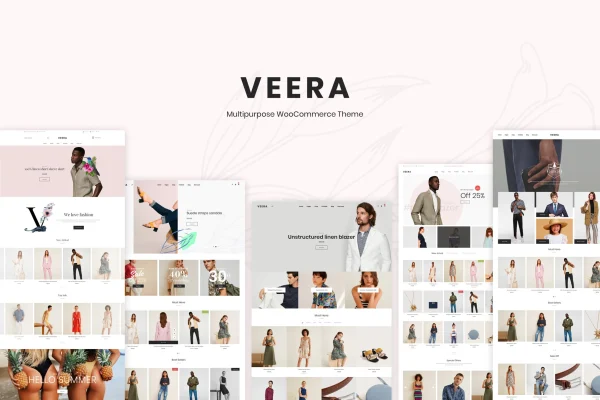
Veera is a multipurpose WooCommerce theme by LA-Studio for building online stores. It pairs a clean, modern design with multiple pre-designed layouts, demo content and a theme options panel, so shop owners can shape a storefront for almost any product niche without writing code.
- Version
- 1.9.0
- Released
- Aug 14, 2026
- Developer
- LA-Studio
- Type
- WordPress theme
- Licence
- GPL
- Included in
- Every plan, or $3.99 on its own
What’s new in Veera 1.9.0
Version 1.9.0 · Aug 14, 2026
Latest
What it does
Setting up an online store often means choosing between a theme that looks good and one that handles shop pages well. This theme is built around WooCommerce, so product galleries, the shopping cart and checkout pages are styled as part of the design. It works for fashion apparel, electronics, beauty products and smaller niche shops, giving each product a tidy, professional presentation.
Getting started is easier thanks to the pre-designed layouts and demo content, which give you a working base to adjust. From the theme options panel you can change colors, fonts and layouts, and pick from several header and footer styles. Shoppers get product quick view and a wishlist, and the responsive layout adapts to desktop, tablet and mobile. Translation and right-to-left language support help stores that serve customers in other languages.
Best for
- Fashion, beauty and electronics shops running WooCommerce
- Store owners who want to customize without coding
- Agencies building WooCommerce stores for clients in varied niches
Features
Multiple pre-designed layouts
Choose from several ready layouts with demo content to start your store quickly, then adapt the design to fit fashion, electronics, beauty or other niches.
Theme options panel
Adjust colors, fonts and layouts from a visual options panel, so you can match your brand without touching any code.
WooCommerce shop pages
Product galleries, the shopping cart and checkout pages are designed to fit the theme, giving your store a consistent look from browsing to purchase.
Responsive design
Layouts adjust to desktop, tablet and mobile screens, so customers can browse and buy comfortably on whatever device they use.
Header and footer styles
Pick from multiple header and footer styles to set up navigation and footer areas that suit your brand and store structure.
Quick view and wishlist
Shoppers can preview products in a quick view window and save favorite items to a wishlist while they keep browsing your catalog.
Translation and RTL support
Translate your store into other languages, including right-to-left scripts, so you can serve customers in different regions.
Veera older versions
- 1.8.0May 18, 2025
- 1.7.0Feb 26, 2025
- 1.3.1Jun 8, 2023
Members and buyers of this product can download older versions.
Questions about Veera
What kinds of stores does this theme suit?
It is a multipurpose WooCommerce theme, so it adapts to many niches. Its multiple layouts work for stores selling fashion apparel, electronics, beauty products and niche items, and you can adjust colors, fonts and layouts to fit your own brand.
Do I need coding skills to customize Veera?
No. The theme options panel lets you change colors, fonts and layouts visually. You can also choose between several header and footer styles, and the included demo content gives you a starting point to edit.
Will my store work well on phones and tablets?
Yes. The design is fully responsive, so pages adjust to desktop, tablet and mobile screens. Product pages, the cart and checkout keep a clean layout on smaller devices.
Can I run my store in a language other than English?
Yes. Veera supports translation, so you can present your store in other languages, and it includes right-to-left support for languages such as Arabic or Hebrew.
Is Veera free?
The code of Veera is licensed under the GPL, so anyone may use, change and share it. GPL Feast is a paid service: a plan or a single purchase gives you the download and automatic updates. The developer's own support, licence key and online services are not included.
Which version of Veera is this?
Version 1.9.0, released Aug 14, 2026. New versions appear here when the developer publishes them, and members get them as automatic updates.
How do I update Veera?
Install the free GPL Feast Updater on your site and connect it with your API key. It installs new versions of Veera automatically and keeps a backup, so you can roll back.