Theme
Updated
Jobaria
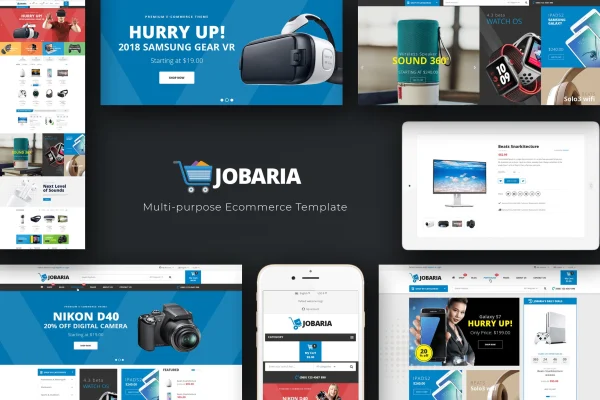
Jobaria by Plaza-Themes is a WordPress theme built for technology and digital businesses. It pairs a clean white design with black and blue accents, and it gives tech stores, agencies and product sites ready layouts, product carousels and mega menus to present their offerings.
- Version
- 1.0.9
- Released
- Aug 13, 2026
- Developer
- Plaza-Themes
- Type
- WordPress theme
- Licence
- GPL
- Included in
- Every plan, or $3.99 on its own
What’s new in Jobaria 1.0.9
Version 1.0.9 · Aug 13, 2026
Latest
What it does
Setting up a tech store or agency site often means piecing together product grids, menus and sliders until the layout feels right. This theme starts you off with five homepage layouts and an admin panel where you can change colors, fonts, layouts and content without writing code. The design uses a white background with black and blue highlights, and it is responsive and retina ready, so pages adjust to desktops, tablets and phones.
For shops, it works with WooCommerce and lets you highlight new, featured, most viewed and discounted products in tabs and carousels. Horizontal mega menus handle internal links, while vertical mega menus list product categories. A large slideshow with animated transitions can feature promotions at the top of the page. WPML support helps with multilingual sites, and the theme works with Visual Composer and Bootstrap. Developers also get PSD and LESS files for deeper visual changes, plus blog and portfolio tools in the admin panel.
Best for
- Online electronics and tech gadget stores
- Digital agencies and technology companies
- Multilingual product sites running WooCommerce
Features
Five homepage layouts
Choose from five distinct homepage designs to present technology products and services in the format that suits your brand.
Admin panel customization
Adjust colors, fonts, layouts and content from the theme's admin panel without touching code, which keeps routine design changes simple.
Product tabs and carousels
Display new, featured, most viewed and discounted products in interactive tabs and carousels so shoppers can browse groups of items quickly.
Horizontal and vertical mega menus
Use horizontal mega menus for internal links and vertical mega menus for product categories, giving visitors two clear ways to find what they need.
Large animated slideshow
Feature your latest promotions and products in a large slideshow with animations and transitions at the top of your pages.
WooCommerce and WPML support
Run an online store with WooCommerce compatibility and build multilingual versions of your site with WPML support for audiences in other languages.
PSD and LESS files included
Developers get PSD and LESS files to customize visuals and style elements further, along with compatibility with Visual Composer and Bootstrap.
Blog and portfolio tools
Publish blog posts and build portfolios directly from the admin panel to present your work and share updates with visitors.
Questions about Jobaria
Can I run an online store with Jobaria?
Yes. The theme is compatible with WooCommerce and includes product display options such as tabs and carousels for new, featured, most viewed and discounted items. Vertical mega menus can also list your product categories for easier browsing.
Does the theme support multiple languages?
It supports WPML, so you can create multilingual versions of your website. This suits tech businesses that want to reach customers who speak different languages without building separate sites.
Do I need coding skills to customize the design?
No coding is needed for common changes. The admin panel lets you adjust colors, fonts, layouts and content. Developers who want to go further can work with the included PSD and LESS files.
Which page builder does Jobaria work with?
The theme is compatible with Visual Composer for building layouts, and it is built on Bootstrap for responsive design. It also ships with five homepage layouts you can use as a starting point.
Is Jobaria free?
The code of Jobaria is licensed under the GPL, so anyone may use, change and share it. GPL Feast is a paid service: a plan or a single purchase gives you the download and automatic updates. The developer's own support, licence key and online services are not included.
Which version of Jobaria is this?
Version 1.0.9, released Aug 13, 2026. New versions appear here when the developer publishes them, and members get them as automatic updates.
How do I update Jobaria?
Install the free GPL Feast Updater on your site and connect it with your API key. It installs new versions of Jobaria automatically and keeps a backup, so you can roll back.