Theme
Updated
June
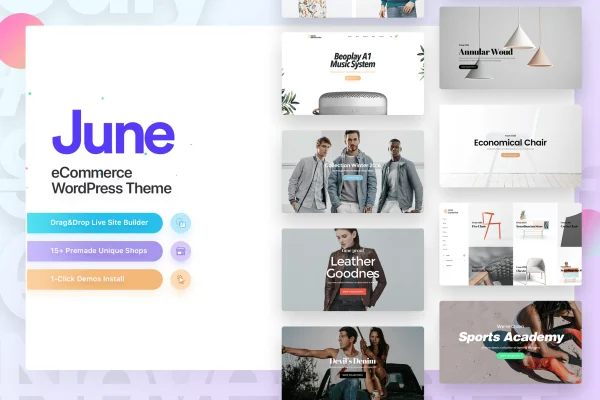
June is a WordPress theme built for fashion shops running on WooCommerce. It pairs a drag and drop shop builder with front-end live editing, so you can lay out product pages, catalogs and storefronts visually without writing code.
- Version
- 2.3
- Developer
- code-less
- Type
- WordPress theme
- Licence
- GPL
- Included in
- Every plan, or $3.99 on its own
What’s new in June 2.3
Version 2.3
Latest
What it does
Setting up a fashion store usually means wrestling a general theme into shape, then adjusting product grids, cart pages and layouts by hand. This theme starts from a fashion and lifestyle focus instead. It works with WooCommerce for product catalogs, shopping carts and payments, and it ships with premade demo sites designed for clothing and lifestyle brands. You can import a demo as a starting point, then swap in your own products, images and text while keeping a consistent look across the shop.
Editing happens through a drag and drop builder with front-end live editing, so you see changes on the page as you make them. A library of hundreds of customizable blocks and elements covers the pieces of a store and its supporting pages. The layouts are responsive and retina ready for phones, tablets and desktops. It is compatible with WPBakery Page Builder and WPML for multilingual sites, and it also suits blogs, portfolios, corporate sites and product catalogs.
Best for
- Fashion boutiques and clothing brands selling with WooCommerce
- Lifestyle and accessories shops wanting a fashion-oriented storefront
- Freelancers building store sites for fashion clients
Features
Drag and drop shop builder
Build and rearrange store pages visually with a drag and drop builder, so you can adjust layouts without touching theme code.
Front-end live editing
Make changes directly on the front end of your site and see how pages look to shoppers while you edit them.
WooCommerce integration
Set up product catalogs, shopping carts and payment systems through WooCommerce, styled to match the rest of the theme.
Fashion-focused demo sites
Start from premade demos designed for fashion and lifestyle brands, then replace the sample content with your own products and photos.
Hundreds of blocks and elements
Pick from a large library of customizable blocks and elements to assemble homepages, product sections and supporting pages.
Responsive, retina ready layouts
Pages adapt to desktops, tablets and smartphones, and the design is prepared for high resolution retina screens.
WPBakery and WPML compatibility
Works with WPBakery Page Builder for extra layout options and with WPML when you want to run your store in several languages.
Multiple site types
Beyond online stores, the theme can be used for blogs, portfolios, corporate sites and product catalogs.
Questions about June
Do I need to know how to code to customize this theme?
No. Layouts are built with a drag and drop shop builder and front-end live editing, and you can start from a premade fashion demo. Hundreds of customizable blocks and elements let you adjust pages visually.
Can I sell products with it?
Yes. June is built to work with WooCommerce, which handles product catalogs, shopping carts and payment systems. The theme provides the store design and layouts on top of WooCommerce.
Can I run a multilingual fashion store with June?
The theme is compatible with WPML, a WordPress plugin for multilingual sites. Using it alongside June lets you offer your store and content in more than one language.
Is it only for online shops?
Its focus is fashion ecommerce, but it can also be used for blogs, portfolios, corporate sites and product catalogs. That makes it useful if your brand needs editorial or company pages next to the shop.
Is June free?
The code of June is licensed under the GPL, so anyone may use, change and share it. GPL Feast is a paid service: a plan or a single purchase gives you the download and automatic updates. The developer's own support, licence key and online services are not included.
Which version of June is this?
Version 2.3. New versions appear here when the developer publishes them, and members get them as automatic updates.
How do I update June?
Install the free GPL Feast Updater on your site and connect it with your API key. It installs new versions of June automatically and keeps a backup, so you can roll back.
More from code-less