Theme
Updated
Junno
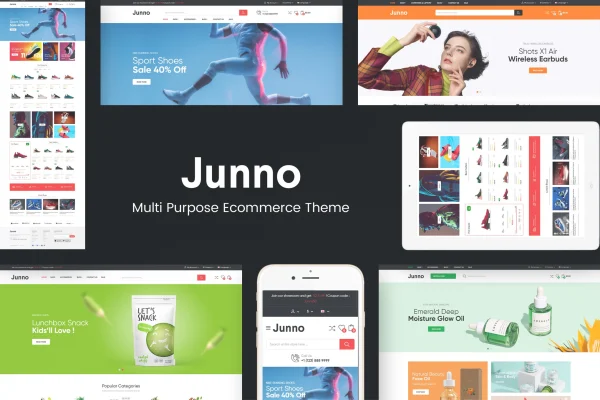
Junno is a multipurpose WooCommerce WordPress theme for building online stores. It gives you 4 homepage layouts, a drag-and-drop Layout Composer and shop features like product sliders, quick view and a wishlist button, so you can set up a store that fits many kinds of products.
- Version
- 1.0.5
- Released
- Feb 10, 2024
- Developer
- Plaza-Themes
- Type
- WordPress theme
- Licence
- GPL
- Included in
- Every plan, or $3.99 on its own
What’s new in Junno 1.0.5
Version 1.0.5 · Feb 10, 2024
Latest
What it does
Setting up a shop often means stitching together a theme, a page builder and extra add-ons for product displays. This theme bundles those pieces into one package built around WooCommerce. You start from one of 4 homepage layouts, then adjust sections with the drag-and-drop Layout Composer instead of writing code. It works for a range of store types, such as a boutique, an electronics shop or a lifestyle brand, and it runs on the Bootstrap framework with a responsive, retina-ready design.
On the shop side, you can feature discounted products with countdown timers, highlight bestsellers and featured items, and add product sliders for specific categories. Shoppers get quick view, add to cart and wishlist buttons, which help them browse without leaving the page they are on. A full-width slideshow adapts to mobile screens, and a blog section gives you a place for promotions and store news. WPML compatibility supports multilingual stores, and PSD files plus LESS stylesheets let designers fine-tune the look.
Best for
- WooCommerce stores selling fashion, electronics or lifestyle products
- Store owners who want to customize layouts without coding
- Multilingual shops using WPML
Features
Four homepage layouts
Choose from 4 distinct homepage layouts as a starting point, then adapt the design to match the products and brand of your store.
Drag-and-drop Layout Composer
Arrange and customize page sections with the built-in Layout Composer, so you can shape your layouts without needing to write any code.
WooCommerce product displays
Show discounted products with countdown timers, list bestsellers and featured items, and add product sliders that pull from specific categories.
Quick view and wishlist
Quick view, add to cart and wishlist buttons let shoppers check product details and save or buy items while they keep browsing.
Mobile-ready slideshow
Display full-width slideshows on your homepage that adjust to different screen sizes, from desktop monitors down to phones.
Built-in blog section
Publish promotions, store updates and other articles in a blog section that fits the overall design of your shop.
WPML and Bootstrap support
The theme is compatible with WPML for multilingual stores and is built on the Bootstrap framework with a responsive, retina-ready layout.
PSD files and LESS stylesheets
Designers and developers get PSD files and LESS stylesheets for deeper changes to the visual style of the theme.
Questions about Junno
Do I need coding skills to customize the layout?
No. The theme includes a drag-and-drop Layout Composer that lets you build and rearrange page sections visually. Developers who want to go further can work with the included LESS stylesheets and PSD files.
Which kinds of stores does this theme suit?
It is a multipurpose WooCommerce theme, so it fits many niches. Examples it is designed around include boutiques, electronics stores and lifestyle shops, and the 4 homepage layouts give you different starting points.
Can I promote sale items and bestsellers on the homepage?
Yes. You can display discounted products with countdown timers, along with bestsellers, featured items and category-specific product sliders, all drawn from your WooCommerce catalog.
Will Junno work for a store in more than one language?
Yes. The theme is compatible with WPML, which you can use to translate your store and run it in multiple languages.
Is Junno free?
The code of Junno is licensed under the GPL, so anyone may use, change and share it. GPL Feast is a paid service: a plan or a single purchase gives you the download and automatic updates. The developer's own support, licence key and online services are not included.
Which version of Junno is this?
Version 1.0.5, released Feb 10, 2024. New versions appear here when the developer publishes them, and members get them as automatic updates.
How do I update Junno?
Install the free GPL Feast Updater on your site and connect it with your API key. It installs new versions of Junno automatically and keeps a backup, so you can roll back.