Theme
Updated
Kalliope
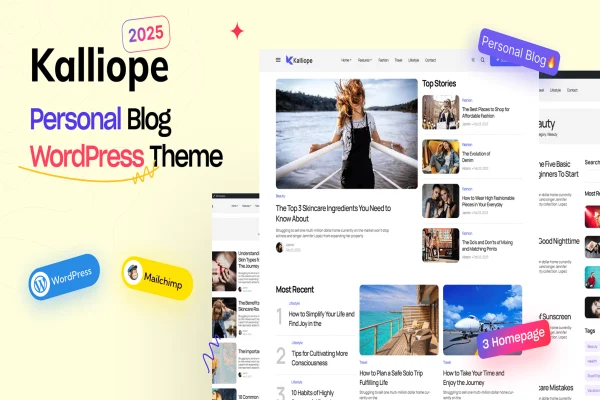
Kalliope is a WordPress theme built for modern blogs. It gives writers a clean, polished layout for posts and pages, with responsive design, grid and list views, typography controls and live design editing through the theme Customizer.
- Version
- 2.9
- Released
- Feb 11, 2025
- Developer
- Promising-Themes
- Type
- WordPress theme
- Licence
- GPL
- Included in
- Every plan, or $3.99 on its own
What’s new in Kalliope 2.9
Version 2.9 · Feb 11, 2025
Latest
What it does
Many bloggers want a site that looks considered and current without spending hours on design work or touching code. Kalliope addresses that with a clean, modern layout made for reading. Posts can appear in grid or list views, so you can pick the arrangement that suits your writing, whether that means image-led lifestyle posts or longer text-focused articles. The responsive design adapts the layout to different screen sizes, so readers on phones, tablets and desktops all get a usable page.
Most of the styling happens in the WordPress theme Customizer, where you can change colors, backgrounds, widgets and other design elements and see the result in real time. Typography controls let you choose from a range of Google Fonts and adjust sizes and styles to match your brand. Widget-ready sidebars and footers give you places for recent posts, social feeds or ads, and built-in share buttons and follow icons connect the blog to your social profiles.
Best for
- Lifestyle bloggers who want a polished, modern look
- Tech writers publishing regular articles and reviews
- Creative writers who prefer simple, code-free design control
Features
Responsive layout
The theme adjusts to different screen sizes, so your posts and pages stay readable on desktops, tablets and smartphones without separate mobile setup.
Grid and list views
Choose between multiple layout options, including grid and list views, to control how your posts and pages are presented to readers.
Google Fonts typography
Select from a variety of Google Fonts and adjust font sizes and styles to improve readability and keep your blog consistent with your brand.
Live Customizer editing
Edit colors, backgrounds, widgets and other design elements in the theme Customizer and preview the changes in real time, with no coding needed.
Social sharing and follow icons
Built-in share buttons and follow icons link your blog to your social profiles and let readers pass your posts along.
Widget-ready sidebars and footers
Place extra content such as recent posts, social feeds or advertisements in the sidebar and footer widget areas.
Clean, semantic code
The theme is built with clean, semantic code and a lightweight approach, giving your blog a tidy foundation to grow on.
Questions about Kalliope
Can I change the look of the blog without writing code?
Yes. The theme works with the WordPress Customizer, where you can edit colors, backgrounds, widgets and other design elements and see each change in real time. Typography and layout choices are also handled through settings, so no coding knowledge is needed.
What layout options does Kalliope offer for posts?
Kalliope includes multiple layout options, including grid and list views. Grid suits image-heavy posts, while list views work well for text-focused writing. You can pick the style that best fits how you publish.
Will my blog work well on phones?
The theme follows responsive design principles, so its layout adapts to different screen sizes. Readers visiting from smartphones, tablets or desktop computers all get a version of the page sized for their device.
Can I add social links and extra content to the sidebar?
Yes. The theme has built-in share buttons and follow icons for your social profiles, plus widget-ready sidebars and footers where you can place recent posts, social feeds or advertisements.
Is Kalliope free?
The code of Kalliope is licensed under the GPL, so anyone may use, change and share it. GPL Feast is a paid service: a plan or a single purchase gives you the download and automatic updates. The developer's own support, licence key and online services are not included.
Which version of Kalliope is this?
Version 2.9, released Feb 11, 2025. New versions appear here when the developer publishes them, and members get them as automatic updates.
How do I update Kalliope?
Install the free GPL Feast Updater on your site and connect it with your API key. It installs new versions of Kalliope automatically and keeps a backup, so you can roll back.
You might also like