Theme
Updated
Learn
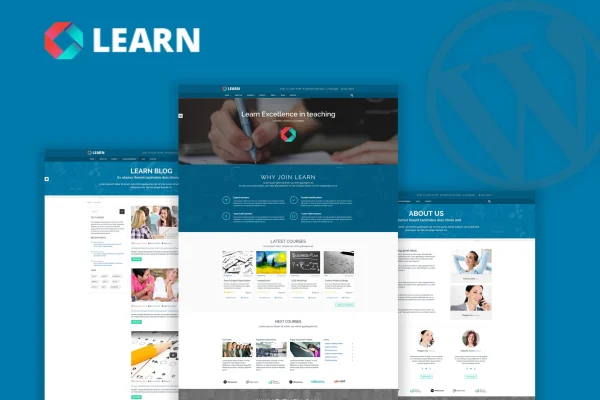
Learn by OceanThemes is an education and eLearning WordPress theme for building an online course website. It lets you organize courses, lessons, quizzes and questions, then offer them as free or paid content through WooCommerce.
- Version
- 1.0.9.2
- Developer
- OceanThemes
- Type
- WordPress theme
- Licence
- GPL
- Included in
- Every plan, or $3.99 on its own
What’s new in Learn 1.0.9.2
Version 1.0.9.2
Latest
What it does
Running courses online means handling more than a nice homepage. You need a place to structure lessons, test students with quizzes, publish a schedule of live sessions and take payments. This theme brings those pieces together in one design built for education sites. Course and quiz management sits alongside WooCommerce compatibility for selling courses, and support for The Events Calendar lets you list webinars, workshops and live classes on the same site.
On the design side, you start from one of four homepage layouts and can import full demo content with a single click. Pages are built with WPBakery Page Builder, which offers drag and drop editing and over 30 elements, and Revolution Slider is included for sliders featuring courses or announcements. A theme options panel, unlimited color styles and a Bootstrap based responsive, retina ready layout round it out. It suits small tutoring businesses as well as larger eLearning platforms.
Best for
- Schools and training centers offering online classes
- Instructors selling free and paid online courses
- Tutoring businesses running webinars and live workshops
Features
Course and quiz management
Create and organize courses, lessons, quizzes and questions so students can work through structured, interactive learning content on your site.
Sell courses with WooCommerce
WooCommerce compatibility lets you sell courses online, and you can offer a mix of free and paid courses from the same catalog.
Four homepage layouts
Pick from four pre-designed homepage layouts to match your branding and teaching style instead of designing the front page from a blank canvas.
WPBakery Page Builder
Build and edit pages with drag and drop tools and over 30 web elements, so layouts can be changed without writing code.
Revolution Slider included
Create sliders to feature courses, testimonials or announcements at the top of your pages or anywhere you need them.
Events calendar support
Works with The Events Calendar so you can promote webinars, workshops and live classes through a calendar on your website.
One-click demo import
Import the full demo content with one click to get a working starting point, then swap in your own courses and text.
Multilingual and translation ready
Translate the theme with PO files, and use WPML compatibility to run a multilingual eLearning website for students in different languages.
Questions about Learn
Can I sell courses with this theme?
Yes. The theme is compatible with WooCommerce, which handles the eCommerce side of selling courses. You can offer some courses for free and charge for others, so it works for a mixed catalog of open and paid content.
Does it handle quizzes as well as lessons?
It does. The theme includes tools to create and organize courses, lessons, quizzes and questions, so you can pair course material with assessments and give students a structured path through each course.
What page builder does Learn use?
Learn is built around WPBakery Page Builder, which gives you drag and drop editing and over 30 web elements. Revolution Slider is also included for building sliders, and a theme options panel covers appearance settings like colors.
Can I run my education site in more than one language?
Yes. The theme is translation ready with PO file support, and it is compatible with WPML for building multilingual sites. That lets you serve students in several languages from one website.
Is Learn free?
The code of Learn is licensed under the GPL, so anyone may use, change and share it. GPL Feast is a paid service: a plan or a single purchase gives you the download and automatic updates. The developer's own support, licence key and online services are not included.
Which version of Learn is this?
Version 1.0.9.2. New versions appear here when the developer publishes them, and members get them as automatic updates.
How do I update Learn?
Install the free GPL Feast Updater on your site and connect it with your API key. It installs new versions of Learn automatically and keeps a backup, so you can roll back.
More from OceanThemes