
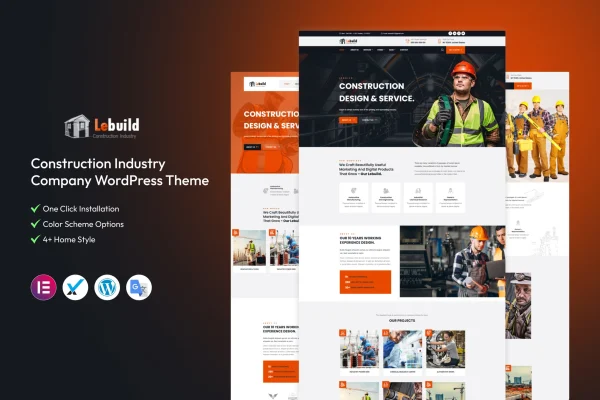
Theme
Updated
Lebuild
Lebuild is a WordPress theme built for construction companies and contractors. It gives you a modern, clean design with ready layouts for projects, services and team members, so you can present your work and make it easy for potential clients to reach you.
- Version
- 2.0.0
- Released
- Apr 19, 2024
- Developer
- template_path
- Type
- WordPress theme
- Licence
- GPL
- Included in
- Every plan, or $3.99 on its own
What’s new in Lebuild 2.0.0
Version 2.0.0 · Apr 19, 2024
Latest
What it does
Construction businesses need a website that explains what they do, shows the jobs they have finished and introduces the people behind the work. Lebuild is designed around those needs. It includes project layouts for displaying your portfolio, pre-built service pages for describing the work you offer, and team member profiles for presenting your staff and their credentials. Both larger construction firms and smaller contractor services can use it to put their experience in front of visitors.
Customization happens through a drag-and-drop builder, so you can adjust page layouts without writing code. Typography and color options let you match fonts and colors to your brand. The theme is responsive, so pages adapt to desktops, tablets and phones, and it is built to work across major browsers. Contact forms are included, giving visitors a direct way to send inquiries from the site.
Best for
- Construction companies wanting a professional company website
- Small contractors and independent builders
- Agencies building sites for construction clients
Features
Project display templates
Multiple layout options let you present your construction projects and portfolio in a way that suits the kind of work you want potential clients to see.
Team member profiles
Dedicated profile sections introduce your workforce, with room to describe each person's expertise and credentials so visitors know who is behind the projects.
Pre-built service pages
Ready-made service pages help you lay out the range of construction services you provide, making it easier for visitors to understand what your company does.
Drag-and-drop builder
Build and rearrange page layouts through a visual drag-and-drop interface, so you can customize the site to fit your brand without coding skills.
Typography and color options
Adjust fonts and colors throughout the theme to line up with your brand identity and keep a consistent look across every page.
Responsive layout
Pages adapt to the screen they are viewed on, so your site displays properly on desktops, tablets and mobile phones.
Contact forms
Built-in contact forms give potential clients a quick way to get in touch about a project or ask questions about your services.
Cross-browser compatibility
The theme is built to work across major web browsers, giving visitors a consistent experience whichever browser they use.
Questions about Lebuild
Can I display my past construction projects with Lebuild?
Yes. The theme includes project templates with multiple layout options, so you can present your completed jobs and portfolio in the format that fits your work best and give potential clients a clear picture of what you have built.
Does the theme have a way to introduce my team?
It does. Lebuild includes team member profiles where you can present the people in your company along with their expertise and credentials. This helps visitors get to know the staff behind your projects and services.
Do I need coding skills to customize the theme?
No. The theme comes with a drag-and-drop builder for arranging page layouts, plus typography and color options for matching your brand. You can make these changes through the visual interface without writing code.
Will my site work on phones and tablets?
Yes. The theme uses a responsive design, so pages adjust to desktops, tablets and mobile phones. It is also built for compatibility with major browsers, so visitors get a consistent experience across devices.
Is Lebuild free?
The code of Lebuild is licensed under the GPL, so anyone may use, change and share it. GPL Feast is a paid service: a plan or a single purchase gives you the download and automatic updates. The developer's own support, licence key and online services are not included.
Which version of Lebuild is this?
Version 2.0.0, released Apr 19, 2024. New versions appear here when the developer publishes them, and members get them as automatic updates.
How do I update Lebuild?
Install the free GPL Feast Updater on your site and connect it with your API key. It installs new versions of Lebuild automatically and keeps a backup, so you can roll back.






