Theme
Updated
Liarch
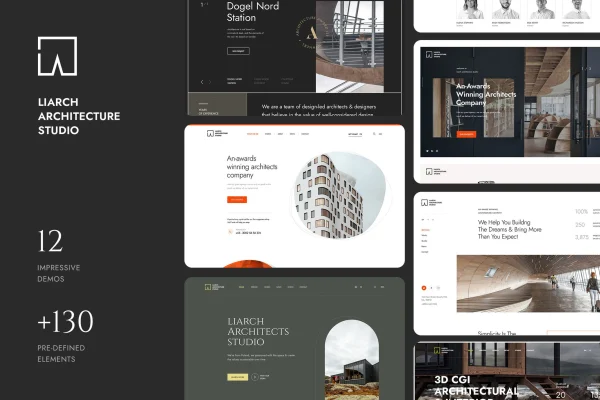
Liarch is a WordPress theme built for architecture and interior design websites. It gives architects, designers and firms a modern, clean layout for presenting projects, with portfolio sections, multiple layouts and a drag and drop page builder for shaping pages without code.
- Version
- 1.1
- Released
- Jan 11, 2025
- Developer
- paul_tf
- Type
- WordPress theme
- Licence
- GPL
- Included in
- Every plan, or $3.99 on its own
What’s new in Liarch 1.1
Version 1.1 · Jan 11, 2025
Latest
What it does
Architecture and interior design studios usually sell through their past work, so their websites need to put projects front and center. This theme is designed around that need. It includes dedicated portfolio sections for displaying architectural and interior work in high resolution, along with a contemporary design style that suits creative practices. The layout is responsive and retina ready, so project images and pages adapt to different devices and screen sizes.
Setting up a site starts with a one-click demo import, which loads sample content you can then replace with your own. From there, a drag and drop page builder lets you adjust pages without writing code. You can choose from multiple layouts, pick between several header and footer styles, and set typography and colors to match your brand. The theme is also WPML compatible, which makes it a reasonable fit for studios that want to present their work in more than one language.
Best for
- Architects presenting completed and ongoing projects
- Interior designers building an online portfolio
- Design firms wanting a multilingual studio website
Features
Portfolio sections
Dedicated portfolio areas let you display architectural and interior design projects in high resolution, giving each piece of work a clear place on the site.
Multiple customizable layouts
A range of layout options lets you arrange pages to suit your studio's style and brand instead of settling for a single fixed structure.
Drag and drop page builder
Build and adjust pages through a visual drag and drop interface, so you can change content and structure without touching any code.
One-click demo import
Import the demo content in one step to get a working starting point, then swap in your own text, images and projects.
Header and footer styles
Choose from multiple header and footer styles to give your site a consistent structure from the top of each page to the bottom.
Typography and color options
Styling controls for fonts and colors help you keep the site in line with your brand identity across every page.
Responsive and retina ready
The design adapts to phones, tablets and desktops, and supports high-density screens so project images stay sharp.
WPML compatible
Works with WPML, so you can build a multilingual version of your site for clients who speak different languages.
Questions about Liarch
Do I need to know how to code to build my site with this theme?
No. The theme includes a drag and drop page builder for editing pages visually, plus a one-click demo import that gives you a ready starting point. Layouts, headers, footers, typography and colors can all be adjusted through the theme's options.
Can I display my projects in a dedicated portfolio?
Yes. Liarch includes dedicated portfolio sections made for architectural and interior design projects, with support for high-resolution images. This makes it suitable for studios that rely on showing past work to attract new clients.
Will the site work for visitors on phones and tablets?
The theme is responsive and retina ready, so pages adapt to different screen sizes and images display clearly on high-density screens, whether visitors are on a phone, tablet or desktop.
Can I run my site in more than one language?
Yes. The theme is WPML compatible, which means you can use WPML to translate your pages and portfolio content and offer a multilingual version of your website.
Is Liarch free?
The code of Liarch is licensed under the GPL, so anyone may use, change and share it. GPL Feast is a paid service: a plan or a single purchase gives you the download and automatic updates. The developer's own support, licence key and online services are not included.
Which version of Liarch is this?
Version 1.1, released Jan 11, 2025. New versions appear here when the developer publishes them, and members get them as automatic updates.
How do I update Liarch?
Install the free GPL Feast Updater on your site and connect it with your API key. It installs new versions of Liarch automatically and keeps a backup, so you can roll back.