Theme
Updated
Listee Theme
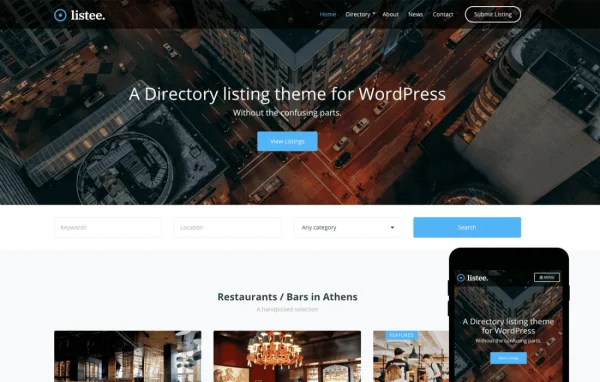
Listee by CSSIgniter is a directory WordPress theme built for listing businesses, services or classified ads. It gives you search filters, Google Maps integration and flexible design controls so you can set up a listing site and manage its entries without writing code.
Install this firstPlease download the Ignition Framework Plugin from here, which is needed by CSS Ignitor Themes.
Go to product- Version
- 1.2.0
- Released
- Sep 17, 2025
- Developer
- CSSIgniter
- Type
- WordPress theme
- Licence
- GPL
- Included in
- Every plan, or $4.79 a year on its own
What’s new in Listee Theme 1.2.0
Version 1.2.0 · Sep 17, 2025
Latest
- FixedDefault sample content import name is now named the same as the theme.
- ImprovedOnboarding v1.3.2 (fixes some sample content import edge cases).
- FixedWrong gettext domain on some strings.
- FixedChanged version to 1.2.0
- NewRequiresIgnition: 3.5.0
What it does
Running a directory means presenting many entries in a way visitors can search and browse. This theme handles that job for local business directories, service listings, classified ad sites and niche marketplaces. Visitors can narrow results with search filters and see locations through Google Maps integration. If you want to sell products tied to your listings, the theme works with WooCommerce, so you can add a shop with inventory management and checkout alongside your directory content.
Design work happens through familiar tools. You can build pages with the WordPress block editor and the GutenBee custom blocks, or use Elementor for drag and drop layouts. Headers and footers have their own settings for colors, layout, fonts and logos, with live previews in the Customizer. The Ignition global sections framework lets you design a section once and reuse it across the site, and a one-click demo import gives you a starting point to adjust.
Best for
- Local business directories and city guides
- Service listing and classified ad websites
- Niche marketplaces that sell products alongside listings
Features
Search filters and maps
Built-in search filters help visitors find the listings they want, and Google Maps integration displays where businesses and services are located.
Flexible header settings
Adjust the header's colors, layout, fonts and logo so the top of every page matches your brand identity.
Customizable footers
Change footer color schemes, layouts, fonts and links, with live previews so you can see each change before saving it.
Block editor and GutenBee
Create pages with the native WordPress block editor, extended by GutenBee custom blocks for adding dynamic content and extra layout options.
Elementor page building
Design pages with Elementor's drag and drop editor if you prefer a visual builder over the block editor.
WooCommerce shop support
Add a store to your directory with WooCommerce to sell products, manage inventory and offer a checkout to your visitors.
Reusable global sections
The Ignition global sections framework lets you build a section once in the block editor or Elementor and apply it throughout the site.
Colors, fonts and demo import
Set custom color palettes, choose from Google Fonts in the Customizer, and import full demo content and settings in one click.
Listee Theme older versions
- 1.1.1Sep 11, 20242 improvements, 4 fixes, 1 removal
- 1.1.0Apr 18, 20236 new, 1 improvement, 4 fixes
Members and buyers of this product can download older versions.
Questions about Listee Theme
Can I build pages with Elementor or only the block editor?
You can use either. The theme supports the native WordPress block editor with GutenBee custom blocks, and it also works with Elementor for drag and drop page design. Global sections can be built with both tools and reused across the site.
Will visitors be able to search listings and see locations on a map?
Yes. The theme includes search filters so visitors can narrow down listings, plus Google Maps integration for showing where the listed businesses or services are located.
Can I sell products from my directory site?
Yes. The theme is WooCommerce ready, so you can turn your directory into a shop as well, selling products, managing inventory and providing a checkout for customers.
Is there a way to start from a ready-made layout?
A one-click demo import brings in full demo content and settings. From there you can replace the sample listings, adjust colors and fonts in the Customizer and edit headers and footers to suit your brand.
Is Listee Theme free?
The code of Listee Theme is licensed under the GPL, so anyone may use, change and share it. GPL Feast is a paid service: a plan or a single purchase gives you the download and automatic updates. The developer's own support, licence key and online services are not included.
Which version of Listee Theme is this?
Version 1.2.0, released Sep 17, 2025. New versions appear here when the developer publishes them, and members get them as automatic updates.
How do I update Listee Theme?
Install the free GPL Feast Updater on your site and connect it with your API key. It installs new versions of Listee Theme automatically and keeps a backup, so you can roll back.
More from CSSIgniter