Theme
Updated
Loadeo
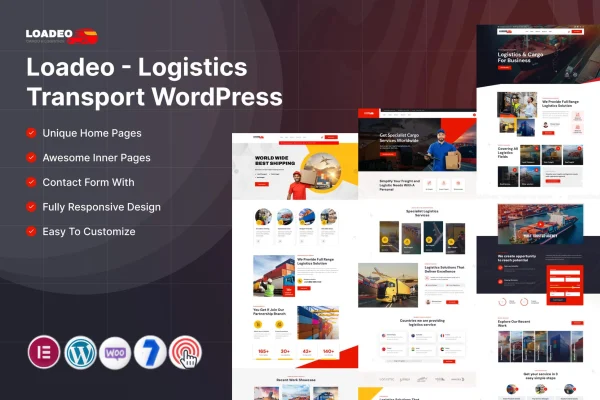
Loadeo is a WordPress theme by ThemeMascot, built for logistics, transport and freight businesses. It gives these companies a professional website with dedicated service sections, contact and quote forms, and layouts that adapt to phones, tablets and desktops.
- Version
- 6.0
- Released
- Feb 11, 2025
- Developer
- ThemeMascot
- Type
- WordPress theme
- Requires
- Elementor
- Licence
- GPL
- Included in
- Every plan, or $3.99 on its own
What’s new in Loadeo 6.0
Version 6.0 · Feb 11, 2025
Latest
What it does
Logistics companies need a website that explains their services clearly and makes it simple for clients to get in touch or request a quote. This theme is designed around that job. It includes sections for presenting freight options, delivery services and transport solutions, plus contact and quote forms aimed at logistics inquiries. Layouts and color schemes can be adjusted to match your brand without writing code, and the responsive design keeps pages readable on any screen size.
The theme works with Elementor, which you will need on your site. A one-click demo import brings in pre-designed demo content and layouts, so you start from a finished structure and then replace the text and images with your own. It is also compatible with WooCommerce, which lets you add online booking or sell freight-related products and services. Typography and icon options help you keep the design consistent across pages. Documentation is included to guide you through building the site.
Best for
- Freight and shipping companies
- Delivery and courier services
- Transport and logistics businesses wanting online booking
Features
Service display sections
Dedicated sections let you present freight options, delivery services and transport solutions so visitors can quickly see what your company offers.
Contact and quote forms
Built-in forms designed for logistics businesses make it easy for potential clients to send inquiries or request quotes for shipments and transport jobs.
Customizable layouts and colors
Adjust layouts and color schemes to match your brand style, with no coding skills needed to make the site look like your own.
Responsive design
Pages adapt to smartphones, tablets and desktops, so your service details and forms stay usable however visitors reach your site.
One-click demo import
Import pre-designed demo content and layouts in one step, giving you a complete starting point that you can then edit with your own content.
WooCommerce compatibility
Works with WooCommerce, so you can add online booking or sell freight-related products and services directly from your website.
Typography and icon options
Typography settings and icon integration help keep text readable and give service pages a clean, professional look throughout the site.
Questions about Loadeo
Do I need a page builder to use this theme?
Yes. The theme requires Elementor, so you will need it active on your site. The demo layouts and page designs are built to work with it, and you edit your content through Elementor after importing the demo.
Can customers request a quote through the site?
Yes. The theme includes integrated contact and quote forms designed for logistics businesses. Visitors can send inquiries or ask for a quote directly from your pages, which gives you a simple way to collect leads from people interested in your services.
Can I take bookings or sell services online?
The theme is compatible with WooCommerce. With WooCommerce added, you can set up online booking or sell freight-related products and services on the same site that presents your company and its transport options.
Will I need coding skills to customize the design?
No. Layouts and color schemes can be changed to match your brand without coding. The one-click demo import also gives you ready-made pages to start from, and documentation is included to help you along.
Is Loadeo free?
The code of Loadeo is licensed under the GPL, so anyone may use, change and share it. GPL Feast is a paid service: a plan or a single purchase gives you the download and automatic updates. The developer's own support, licence key and online services are not included.
Which version of Loadeo is this?
Version 6.0, released Feb 11, 2025. New versions appear here when the developer publishes them, and members get them as automatic updates.
How do I update Loadeo?
Install the free GPL Feast Updater on your site and connect it with your API key. It installs new versions of Loadeo automatically and keeps a backup, so you can roll back.
What does Loadeo need?
Loadeo needs Elementor installed and active.