Theme
Updated
Makali
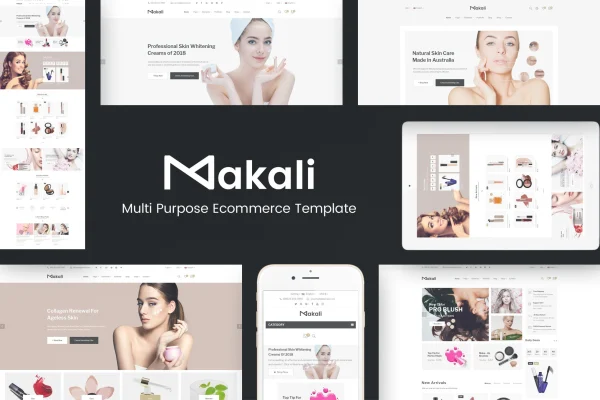
Makali is a WordPress theme built for online beauty and cosmetics shops running WooCommerce. It gives your store a clean white layout, a mega menu, a large header slideshow and a daily deal module, so products and promotions are easy to find and browse.
- Version
- 1.4.7
- Released
- May 8, 2025
- Developer
- Plaza-Themes
- Type
- WordPress theme
- Licence
- GPL
- Included in
- Every plan, or $3.99 on its own
What’s new in Makali 1.4.7
Version 1.4.7 · May 8, 2025
Latest
What it does
Beauty and cosmetics stores usually carry many small products across lots of categories, and shoppers need a clear way to move between them. This theme answers that with a spacious white background, an organized layout and coordinated color schemes that keep product photos in focus. A mega menu groups your categories in one place, while a large slideshow at the top of the page gives you room for new arrivals, featured items and seasonal offers.
The theme works with WooCommerce for product management, payments and order tracking, and it is compatible with Visual Composer for page building and WPML for multilingual content. It is built on the Bootstrap framework with a responsive, mobile-first layout and retina ready graphics. You can adjust colors, fonts and layouts to match your brand, and layered PSD files are included if you want to rework the design in Photoshop. It suits both small boutique shops and larger cosmetics brands.
Best for
- Online cosmetics and makeup stores
- Skincare and beauty boutiques selling with WooCommerce
- Beauty brands needing a multilingual storefront
Features
WooCommerce store support
Works with WooCommerce so you can manage products, process payments and track orders from a theme designed around a beauty shop layout.
Mega menu navigation
An organized mega menu lets you group many product categories so shoppers can reach the section they want from a single menu.
Large header slideshow
A wide slideshow in the header displays featured products, special offers and seasonal promotions at the top of your store pages.
Daily deal module
Lets you run time-sensitive offers on selected products, giving shoppers a clear window in which a particular deal is available.
Custom colors, fonts and layouts
Theme options let you change colors, fonts, layouts and other settings so the storefront reflects your own brand identity.
Visual Composer and WPML
Compatible with Visual Composer for building pages and with WPML for running your store's content in more than one language.
Responsive and retina ready
Built on the Bootstrap framework with a mobile-first layout and retina ready graphics for desktops, laptops, tablets and smartphones.
Layered PSD files included
Layered Photoshop files come with the theme, giving designers a starting point for deeper visual changes and custom mockups.
Makali older versions
- 1.4.6Feb 3, 2024
Members and buyers of this product can download older versions.
Questions about Makali
Does this theme work with WooCommerce?
Yes. It is designed as a WooCommerce theme for beauty and cosmetics stores, with support for product management, payment processing and order tracking, plus store features like a mega menu, header slideshow and daily deal module.
Can I run my beauty store in more than one language?
The theme is compatible with WPML, the multilingual plugin, so you can offer your store content in several languages for shoppers in different regions.
Will the store look right on phones and tablets?
It uses a responsive, mobile-first layout built on the Bootstrap framework, so pages adapt to smartphones, tablets, laptops and desktops. Graphics are retina ready for sharp display on high-resolution screens.
How much can I change the design?
You can adjust colors, fonts, layouts and more through the theme options, build pages with Visual Composer, and use the included layered PSD files for more detailed design changes in Photoshop.
Is Makali free?
The code of Makali is licensed under the GPL, so anyone may use, change and share it. GPL Feast is a paid service: a plan or a single purchase gives you the download and automatic updates. The developer's own support, licence key and online services are not included.
Which version of Makali is this?
Version 1.4.7, released May 8, 2025. New versions appear here when the developer publishes them, and members get them as automatic updates.
How do I update Makali?
Install the free GPL Feast Updater on your site and connect it with your API key. It installs new versions of Makali automatically and keeps a backup, so you can roll back.