Theme
Updated
Marion
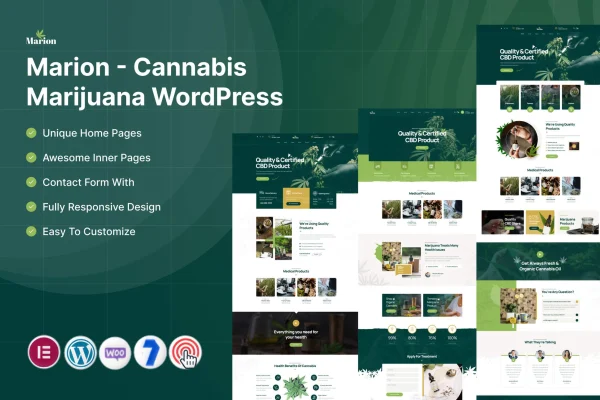
Marion is a WordPress theme by ThemeMascot, built for cannabis businesses, dispensaries and marijuana product retailers. It gives you a modern, responsive site with multiple layouts, product display tools and WooCommerce support, so you can present your products, services and brand story without writing code.
- Version
- 7.0
- Released
- Feb 11, 2025
- Developer
- ThemeMascot
- Type
- WordPress theme
- Requires
- Elementor
- Licence
- GPL
- Included in
- Every plan, or $3.99 on its own
What’s new in Marion 7.0
Version 7.0
Latest
- ChangedVersion bump.
What it does
Cannabis shops and dispensaries need a website that explains what they sell, tells their story and often takes orders too. Marion is designed around that kind of business. It includes a range of homepage and inner page templates, product galleries for strains and accessories, and a built-in blog for articles on products, industry news or cannabis culture. The responsive design adjusts the layout for desktops, tablets and phones.
The theme requires Elementor, which you use to edit layouts with drag and drop. A one-click demo import loads sample content so you can start from a finished design and replace the text, images and products with your own. For selling online, WooCommerce integration lets you list marijuana products and accept orders from your site. Marion suits new dispensaries building their first site as well as established retailers moving more of their business online.
Best for
- Cannabis dispensaries building or rebuilding their website
- Marijuana product retailers selling online with WooCommerce
- Agencies designing sites for cannabis industry clients
Features
Multiple page layouts
Choose from a variety of homepage and inner page templates to match your brand identity and the way your cannabis business presents itself.
Responsive design
Pages adapt to desktops, tablets and mobile phones, so visitors can browse your products and content comfortably on any screen size.
WooCommerce store support
Set up an online store with WooCommerce to display and sell marijuana products directly from your website, with product pages and checkout.
Product galleries
Present cannabis strains, accessories or services with gallery layouts and detailed product descriptions that help visitors understand what you offer.
Elementor page editing
Built to work with Elementor, so you can rearrange sections and edit page layouts using drag and drop instead of code.
One-click demo import
Import the demo content in a single step, then swap in your own text, images and products to get your site running sooner.
Built-in blog
Publish industry news, product updates and cannabis culture articles to inform your audience and keep regular customers coming back.
Questions about Marion
Can I sell products online with this theme?
Yes. Marion includes WooCommerce integration, so you can list marijuana products, accessories or other items and sell them directly from your site. The product galleries and description layouts help present each item clearly to shoppers.
Do I need Elementor to use Marion?
Yes, the theme requires Elementor. You use it to edit page layouts with drag and drop, which means you can adjust sections, text and images on your pages without writing any code.
Can I make my site look like the demo?
Marion offers a one-click demo import that loads the sample content and layouts. Once imported, you can replace the placeholder text, images and products with your own and adjust the design to fit your brand.
Will the site work on phones and tablets?
The theme uses a responsive design, so layouts adjust to desktops, tablets and mobile phones. Visitors can browse products, read blog posts and view your pages comfortably on whatever device they use.
Is Marion free?
The code of Marion is licensed under the GPL, so anyone may use, change and share it. GPL Feast is a paid service: a plan or a single purchase gives you the download and automatic updates. The developer's own support, licence key and online services are not included.
Which version of Marion is this?
Version 7.0, released Feb 11, 2025. New versions appear here when the developer publishes them, and members get them as automatic updates.
How do I update Marion?
Install the free GPL Feast Updater on your site and connect it with your API key. It installs new versions of Marion automatically and keeps a backup, so you can roll back.
What does Marion need?
Marion needs Elementor installed and active.