Theme
Updated
MateBook
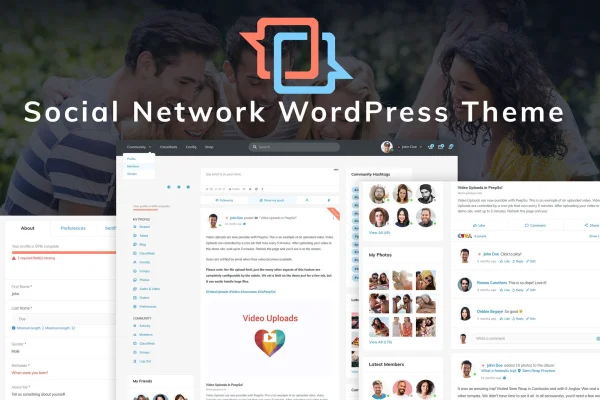
MateBook is a WordPress theme designed for social networking sites. It is built to work with the free PeepSo plugin, so you can run a Facebook-style community with member streams, friends lists and groups right inside your WordPress site.
- Version
- 1.3
- Released
- Nov 9, 2022
- Developer
- Monkeysan
- Type
- WordPress theme
- Licence
- GPL
- Included in
- Every plan, or $3.99 on its own
What’s new in MateBook 1.3
Version 1.3 · Nov 9, 2022
Latest
- FixedSave settings in Firefox
What it does
Running a community on WordPress usually means pairing a social plugin with a theme that was never designed for it, which can leave profiles, feeds and group pages looking out of place. This theme is a micro-niche design made specifically for social networking. It is styled around PeepSo's social features, so the stream, friends, groups and shop pages share one consistent look. That makes it a fit for niche communities, interest-based groups or brand networks that want members to post, connect and interact.
The layout is responsive and retina-ready, and it is built with valid HTML5 code and cross-browser support that reaches back to Internet Explorer 11. You can personalize the look with custom SVG icons and Google Fonts. Interface touches such as carousels, push messages and sticky menus help members move around the site while scrolling. The theme includes 404 and Coming Soon pages, ships with POT files for translation, and comes with online documentation to guide you through building your site.
Best for
- Niche communities and interest-based groups
- Brands building a member engagement network
- Site owners running PeepSo on WordPress
Features
Designed around PeepSo
The theme is based on the free PeepSo plugin, giving you a Facebook-style social network inside WordPress with styling made for its social features.
Dedicated social pages
Includes separate layouts for Friends, Stream, Groups and Shop pages, so members can connect, follow activity, join groups and browse products.
Responsive and retina-ready
The layout adapts to desktops, tablets and mobile devices and displays sharply on high-resolution screens, so members get a consistent view on any device.
Custom icons and Google Fonts
Custom SVG icons and Google Fonts support let you adjust the visual style of your community so it matches your brand.
Carousels and push messages
Interface elements such as carousels and push messages give members more ways to see content and receive notices while using the site.
Sticky menus
Navigation menus stay visible as visitors scroll, so members can reach other sections of the network without returning to the top of the page.
Translation ready
POT files are included, so you can translate the theme and run your social network in the language your members speak.
Utility pages included
Ready-made 404 and Coming Soon pages cover the basics for broken links and for sites that are still being prepared for launch.
Questions about MateBook
Which plugin does this theme use for the social network features?
The theme is based on the free PeepSo plugin. PeepSo provides the social networking functions, such as streams, friends and groups, and the theme supplies the design and page layouts that present those features in a consistent style.
What kinds of pages come with the theme?
It includes dedicated Friends, Stream, Groups and Shop pages for the social side of your site. It also has utility pages for 404 errors and a Coming Soon page you can show before launch.
Will my community look right on phones and tablets?
Yes. The layout is fully responsive and retina-ready, so it adjusts to desktops, tablets and mobile devices. It is also built for cross-browser compatibility, with support reaching back to Internet Explorer 11.
Can I run my social network in another language?
The theme ships with POT files, which you can use to translate its text strings. That lets you localize the site for members who use a language other than English.
Is MateBook free?
The code of MateBook is licensed under the GPL, so anyone may use, change and share it. GPL Feast is a paid service: a plan or a single purchase gives you the download and automatic updates. The developer's own support, licence key and online services are not included.
Which version of MateBook is this?
Version 1.3, released Nov 9, 2022. New versions appear here when the developer publishes them, and members get them as automatic updates.
How do I update MateBook?
Install the free GPL Feast Updater on your site and connect it with your API key. It installs new versions of MateBook automatically and keeps a backup, so you can roll back.
You might also like