Theme
Updated
Maxima
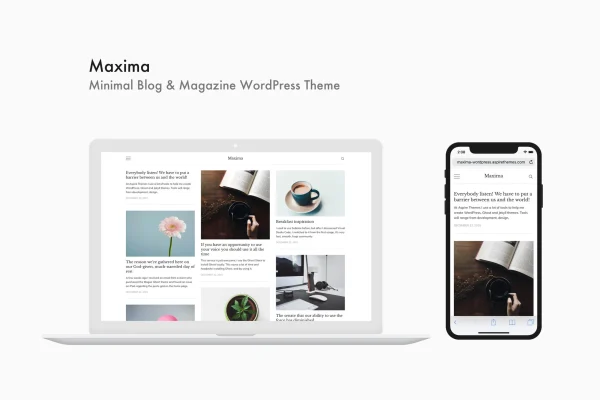
Maxima is a minimal WordPress theme built for blogs, online magazines and editorial sites. It gives your writing a clean, uncluttered layout that adapts to phones, tablets and desktops, with options to adjust colors, typography and layouts to match your brand.
- Version
- 1.2.4
- Developer
- aspirethemes
- Type
- WordPress theme
- Licence
- GPL
- Included in
- Every plan, or $3.99 on its own
What’s new in Maxima 1.2.4
Version 1.2.4
Latest
What it does
Many blog themes pile on sliders, widgets and decorative effects that pull attention away from the words on the page. Maxima takes the opposite approach. Its design keeps the focus on your posts, using simple, carefully placed elements and plenty of breathing room. The result suits personal bloggers, writers and small editorial teams who want a polished reading experience without a busy interface getting in the way of their content.
The theme uses a responsive layout, so pages adjust to the screen they are viewed on, and its codebase is kept lightweight with unnecessary features left out. You can change colors, typography and layouts to fit your style. A ready-to-use .pot file makes translation into other languages straightforward, and developers get SASS and JS source files for deeper changes or extensions to the theme.
Best for
- Personal bloggers who prefer a clean, minimal look
- Online magazines and editorial publications
- Developers customizing blog themes for client sites
Features
Clean, minimal design
Thoughtfully crafted elements and an uncluttered layout keep attention on your articles and give your blog or magazine a professional, focused look.
Responsive layout
Pages adapt to smartphones, tablets and desktop screens, so readers get a consistent layout no matter which device they use to visit your site.
Lightweight codebase
The theme leaves out unnecessary features and extra code, keeping its structure lean and focused on what a blog or magazine actually needs.
Color and typography options
Adjust colors, typography and layouts so the theme matches your brand identity or personal style without having to rebuild the design from scratch.
Translation ready
A ready-to-use .pot file is included, making it practical to translate your site into other languages for readers in different regions.
SASS and JS source files
Developers can work with the included SASS and JS files to modify styles and scripts or extend the theme for custom projects.
Built for blogs and magazines
The layout is designed around personal blogs, online magazines and editorial websites that publish regular written content for an audience.
Questions about Maxima
Will this theme work for an online magazine as well as a personal blog?
Yes. Maxima is designed for both personal blogs and online magazines, along with other editorial websites. Its minimal layout keeps the focus on articles, which suits publications that put written content first as much as it suits individual writers.
Can I change the colors and fonts to match my brand?
You can. The theme lets you tailor colors, typography and layouts so the site fits your brand identity. For changes beyond those options, developers can edit the included SASS and JS files directly.
Can I translate my site into another language?
The theme includes a ready-to-use .pot file, which is the standard starting point for translating a WordPress theme. You can use it to translate the theme's text into the languages your readers speak.
How does the site look on phones and tablets?
The layout is responsive, so it adjusts to the screen size of smartphones, tablets and desktops. Readers get a layout that fits their device, whichever one they use to read your posts.
Is Maxima free?
The code of Maxima is licensed under the GPL, so anyone may use, change and share it. GPL Feast is a paid service: a plan or a single purchase gives you the download and automatic updates. The developer's own support, licence key and online services are not included.
Which version of Maxima is this?
Version 1.2.4. New versions appear here when the developer publishes them, and members get them as automatic updates.
How do I update Maxima?
Install the free GPL Feast Updater on your site and connect it with your API key. It installs new versions of Maxima automatically and keeps a backup, so you can roll back.
You might also like