
Theme
Updated
Meeton
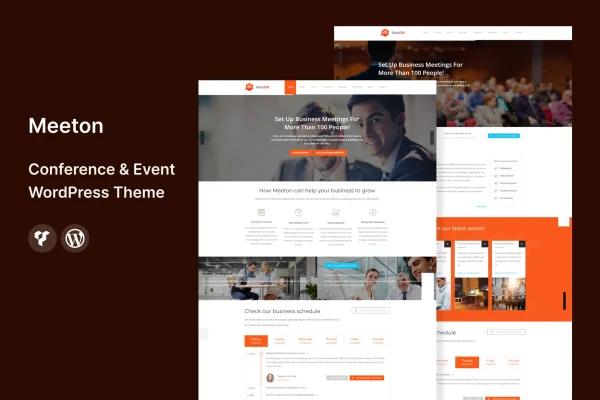
Meeton is a WordPress theme built for conference and event websites. It gives organizers of conferences, seminars and workshops ready layouts for schedules, speaker profiles, ticket options and venue details, so attendees can find what they need in one place.
- Version
- 3.2
- Released
- Aug 13, 2024
- Developer
- template_path
- Type
- WordPress theme
- Licence
- GPL
- Included in
- Every plan, or $3.99 on its own
What’s new in Meeton 3.2
Version 3.2 · Aug 13, 2024
Latest
What it does
Event sites have to carry a lot of information: the agenda, who is speaking, how to register and where to show up. This theme organizes all of that into dedicated sections. You get a schedule layout with time slots, sessions and breaks, speaker profiles with bios, photos and social links, and space for ticket options and venue information. Countdown timers and call to action buttons help point visitors toward registration.
To get started, you can import one of several pre-designed demo layouts and adjust it for your event type. Colors, fonts and layout elements are changed through the WordPress Customizer, with no coding required. The design is responsive across desktops and phones, and it supports multiple languages and right-to-left text. It is described as compatible with WooCommerce, Elementor and WPML, and registrations can run through built-in booking forms or connected ticketing platforms.
Best for
- Conference organizers building a dedicated event website
- Seminar and workshop hosts who need schedules and registration
- Agencies creating multilingual sites for event clients
Features
Event schedule layout
Display your agenda with customizable time slots, sessions and breaks so attendees can see what happens and when throughout the event.
Speaker profile sections
Give keynote speakers and presenters their own profiles with bios, photos and social links, so visitors can learn who is taking the stage.
Ticketing and booking forms
Handle registrations with built-in booking forms, or connect the site to a ticketing platform to manage attendee sign-ups and ticket sales.
Countdown timer and buttons
Add a countdown to your event date and place call to action buttons that send visitors straight to registration or ticket pages.
Importable demo layouts
Start from pre-designed templates for different event types, import them in full, then edit the content and design to match your event.
Customizer styling options
Change colors, fonts and layout elements through the WordPress Customizer without writing code, so the site matches your event branding.
Multilingual and RTL support
Run the site in multiple languages and use right-to-left text layouts for audiences who read languages such as Arabic or Hebrew.
Responsive design
Pages adapt to desktops, tablets and smartphones, so schedules, speaker details and ticket information stay readable on any screen.
Questions about Meeton
Can I show a full agenda with multiple sessions?
Yes. The schedule layout lets you set customizable time slots, sessions and breaks, so you can lay out a full conference day or a shorter workshop program in a clear, readable format for attendees.
Does the theme handle ticket sales and registrations?
It includes built-in booking forms for managing registrations, and it can connect with ticketing platforms. It is also described as compatible with WooCommerce, which suits event organizers who want to sell tickets through their own site.
Will it work with Elementor and WPML?
The theme is listed as compatible with Elementor, WooCommerce and WPML. Combined with its multilingual and right-to-left support, that makes it a reasonable fit for event sites that need page building or content in several languages.
Do I need to code to customize the design?
No. Colors, fonts and layout elements are adjusted through the WordPress Customizer. You can also begin from one of the importable demo layouts and edit it rather than building every page from scratch.
Is Meeton free?
The code of Meeton is licensed under the GPL, so anyone may use, change and share it. GPL Feast is a paid service: a plan or a single purchase gives you the download and automatic updates. The developer's own support, licence key and online services are not included.
Which version of Meeton is this?
Version 3.2, released Aug 13, 2024. New versions appear here when the developer publishes them, and members get them as automatic updates.
How do I update Meeton?
Install the free GPL Feast Updater on your site and connect it with your API key. It installs new versions of Meeton automatically and keeps a backup, so you can roll back.






