Theme
Updated
Micare
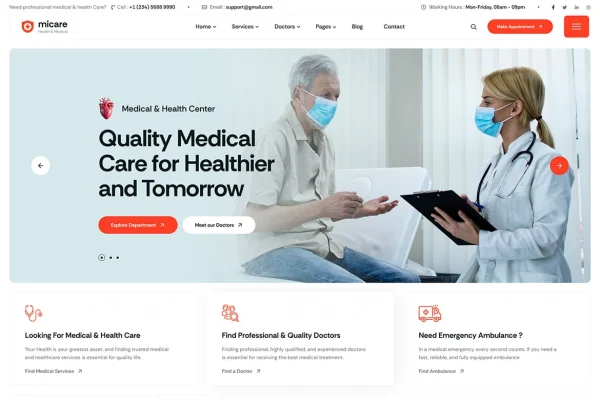
Micare is a WordPress theme built for the medical and healthcare field. It gives clinics, hospitals, dental practices and other health service providers a clean, modern layout for presenting services, staff, patient testimonials and appointment information in one place.
- Version
- 1.0.1
- Released
- Feb 12, 2026
- Developer
- themesflat
- Type
- WordPress theme
- Licence
- GPL
- Included in
- Every plan, or $3.99 on its own
What’s new in Micare 1.0.1
Version 1.0.1 · Feb 12, 2026
Latest
- FixedPage title background image & mobile logo update.
What it does
Healthcare websites have a specific job: patients want to see what services are offered, who the doctors and staff are, and how to book a visit. This theme is designed around that need. Its homepage sections cover medical services, team profiles, patient testimonials and latest news, so the information visitors look for most is easy to find. The responsive layout adapts to desktops, tablets and smartphones, which matters when many patients check a clinic from their phone.
Customization happens through a theme options panel where you can adjust colors, fonts and layouts without editing code. For scheduling, the theme works with built-in or third-party booking systems. It also supports multilingual sites and right-to-left scripts, and it is compatible with plugins such as WooCommerce, Contact Form 7 and WPML. That makes it a practical fit for a small practice site as well as a larger clinic or hospital presence.
Best for
- Clinics and hospitals building a patient-facing website
- Dental practices and other health service providers
- Agencies creating sites for healthcare clients
Features
Clean medical design
A clean, modern layout made for healthcare providers, giving clinics and hospitals a professional look that suits patient-facing websites.
Responsive layout
Pages adapt to desktops, tablets and smartphones, so patients can read about services and staff on whatever device they use.
Customizable homepage sections
Dedicated homepage sections present your medical services, team profiles, patient testimonials and latest news, and you can adjust them to fit your practice.
Appointment booking support
The theme works with built-in or third-party booking systems, so you can add appointment scheduling for patients to your site.
Theme options panel
Change colors, fonts, layouts and other settings from an options panel without touching any code.
Multilingual and RTL support
Build sites in multiple languages and in right-to-left scripts, which helps practices serving patients who speak different languages.
Popular plugin compatibility
Compatible with plugins such as WooCommerce, Contact Form 7 and WPML for adding a shop, contact forms or translations.
Micare older versions
- 1.0.0Aug 23, 20251 improvement
Members and buyers of this product can download older versions.
Questions about Micare
Can patients book appointments through a site built with this theme?
Yes. The theme supports appointment booking through built-in or third-party booking system compatibility, so you can add scheduling to your site and give patients a clear way to request visits.
Do I need coding skills to customize the design?
No. An intuitive theme options panel lets you change colors, fonts, layouts and more without touching code. Homepage sections for services, team, testimonials and news can also be customized to match your practice.
Will Micare work for a multilingual healthcare website?
It includes multilingual and right-to-left script support and is compatible with WPML, so you can serve patients in several languages, including those that read right to left.
Can I sell products like health supplies on my site?
The theme is compatible with WooCommerce, which you can use to add a shop. It also works with Contact Form 7 if you want contact or inquiry forms alongside your store.
Is Micare free?
The code of Micare is licensed under the GPL, so anyone may use, change and share it. GPL Feast is a paid service: a plan or a single purchase gives you the download and automatic updates. The developer's own support, licence key and online services are not included.
Which version of Micare is this?
Version 1.0.1, released Feb 12, 2026. New versions appear here when the developer publishes them, and members get them as automatic updates.
How do I update Micare?
Install the free GPL Feast Updater on your site and connect it with your API key. It installs new versions of Micare automatically and keeps a backup, so you can roll back.