Theme
Updated
Miva
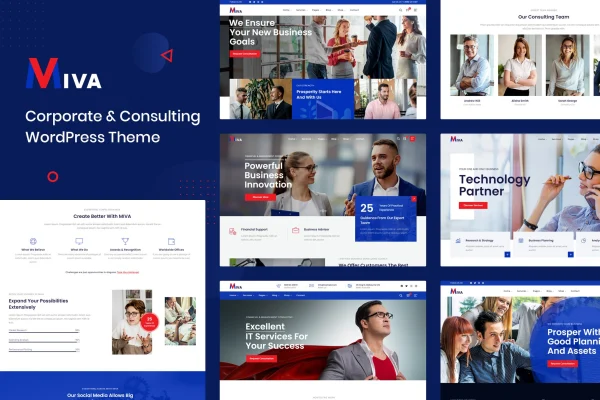
Miva is a WordPress theme by RadiantThemes built for consulting firms, corporate businesses and professional service providers. It gives you a responsive business layout, demo content to start from, and header, footer and typography controls so you can shape the site around your brand without writing code.
- Version
- 2.0
- Released
- Aug 13, 2026
- Developer
- radiantthemes
- Type
- WordPress theme
- Licence
- GPL
- Included in
- Every plan, or $3.99 on its own
What’s new in Miva 2.0
Version 2.0 · Aug 13, 2026
Latest
What it does
Consulting and professional service businesses need a site that explains their services clearly and looks credible on any screen. This theme handles that groundwork with a fully responsive layout built on the Bootstrap framework and retina ready graphics for high-resolution displays. A one-click demo importer loads ready-made content, so you begin with complete pages and swap in your own text, images and branding instead of building every section from a blank screen.
Page design works through the Elementor page builder with drag and drop editing, and Slider Revolution is included for sliders and visual presentations. Header and footer builders let you arrange logos, icons and menus, while the font uploader and Google Fonts support keep typography consistent. The theme is WooCommerce ready if you want to sell services or digital products, and theme options can be exported and imported between sites or kept as backups.
Best for
- Business consulting firms and independent consultants
- Startups and corporate companies needing a professional website
- Agencies building sites for professional service clients
Features
One-click demo importer
Import professionally made demo content in one step, giving you a complete starting site that you can then customize with your own business details and branding.
Header and footer builders
Build custom header and footer layouts with flexible options for logos, icons and menus, so navigation and footer sections match the way your business presents itself.
Slider Revolution included
The theme ships with the Slider Revolution plugin, which you can use to create sliders and visual presentations that highlight services or main business messages.
Elementor page builder support
Design and edit pages with Elementor using drag and drop controls, which lets you adjust layouts and content without touching code.
Custom and Google fonts
Choose from the Google Fonts library or upload your own font files to keep typography consistent with your brand across every page.
Maintenance and coming soon modes
Switch on a maintenance or coming soon page while you prepare your launch or work on changes behind the scenes.
Theme options import and export
Transfer settings, widgets and custom page templates between sites or save them as a backup, which helps when managing several client sites.
Multiple post formats
Publish blog posts in standard, image, video, quote and audio formats so articles and updates can be presented in different ways.
Questions about Miva
Can I build and edit pages with Elementor?
Yes. Miva is compatible with the Elementor page builder, so you can create and adjust page layouts with drag and drop editing. The demo content gives you finished pages to start from, which you can then change to suit your services and brand.
Can I sell services or products with this theme?
The theme is WooCommerce ready, so you can add a shop to sell services or digital products. This suits consultants who want to offer bookable packages, guides or other digital items alongside their main business pages.
How much control do I have over the header and footer?
There are dedicated header and footer builders with multiple layout options. You can arrange elements such as logos, icons and menus to create navigation and footer sections that fit your site, all without writing code.
Does it work well on phones and high-resolution screens?
Yes. The layout is fully responsive and built on the Bootstrap framework, so pages adapt to desktops, tablets and smartphones. Graphics are retina ready, which keeps visuals sharp on high-resolution displays.
Is Miva free?
The code of Miva is licensed under the GPL, so anyone may use, change and share it. GPL Feast is a paid service: a plan or a single purchase gives you the download and automatic updates. The developer's own support, licence key and online services are not included.
Which version of Miva is this?
Version 2.0, released Aug 13, 2026. New versions appear here when the developer publishes them, and members get them as automatic updates.
How do I update Miva?
Install the free GPL Feast Updater on your site and connect it with your API key. It installs new versions of Miva automatically and keeps a backup, so you can roll back.