Theme
Updated
Modak
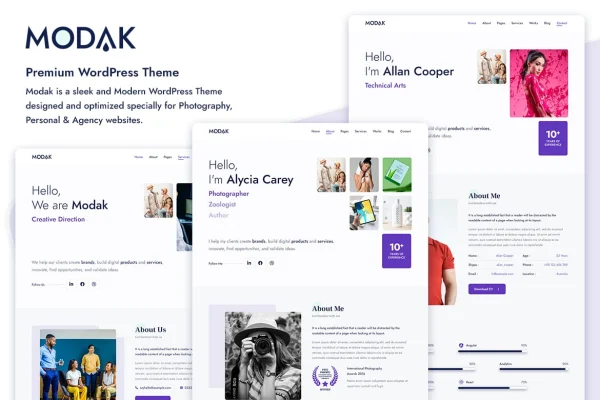
Modak is a one page WordPress theme built for agencies, photographers and personal portfolio sites. It presents your content in a single scrolling layout with a clean design, and it works with the Elementor drag and drop page builder so you can shape pages without writing code.
- Version
- 1.3.0
- Released
- Apr 9, 2026
- Developer
- tansh
- Type
- WordPress theme
- Licence
- GPL
- Included in
- Every plan, or $3.99 on its own
What’s new in Modak 1.3.0
Version 1.3.0 · Apr 9, 2026
Latest
- FixedPHP Notice - Function _load_textdomain_just_in_time
- ImprovedStyling for customizer accordion icons
What it does
Many small agencies, photographers and freelancers need one well-organized page more than a sprawling site. This theme covers that need with a one page layout where your sections sit in order, from introduction to portfolio to contact details. The layout is responsive and built on Bootstrap, so it adapts to desktops, tablets and phones. It is also cross browser compatible and W3C validated, which keeps the markup in line with web standards.
You can start from the demo content using the one-click import, then adjust it through the live Customizer, where edits preview in real time. Colors, fonts, icons and layouts are all adjustable, and Google Fonts integration widens your typography choices. Three header layouts let you pick a style that suits your brand. Page building happens in Elementor, and a child theme is included to keep your changes safe. The code is clean and well commented, and the theme is translation ready for sites in other languages.
Best for
- Creative and corporate agencies wanting a single page site
- Photographers presenting a portfolio
- Freelancers building a personal resume or portfolio site
Features
One page layout
Presents your agency, portfolio or personal content in a single scrolling page, organized into sections that visitors move through in order.
Responsive Bootstrap layout
Built on Bootstrap so the design adjusts to different screen sizes, from large desktop monitors down to mobile phones.
Elementor compatibility
Works with the Elementor drag and drop page builder, so you can build and rearrange page sections without editing code.
Live Customizer preview
Change colors, fonts, icons and layouts in the WordPress Customizer and see each edit previewed in real time before you publish.
Three header layouts
Choose between three header styles to match the look of your brand and the kind of content your page presents.
One-click demo import
Import the demo content in one step to get a ready-made starting point, then replace the text and images with your own.
Translation ready with child theme
Translate the theme into other languages, and use the included child theme to keep your customizations separate from the parent theme files.
Clean, validated code
Well-commented code makes changes easier for developers, and the theme is W3C validated and cross browser compatible.
Questions about Modak
Can I build pages with Elementor in this theme?
Yes. The theme is compatible with the Elementor drag and drop page builder, so you can create and customize page sections visually. You can also adjust colors, fonts, icons and layouts through the live Customizer with a real-time preview.
Will the site look right on phones and tablets?
The layout is responsive and built on Bootstrap, so it adapts to different screen sizes, from desktops to mobile phones. The theme is also described as cross browser compatible for consistent display in popular browsers.
Is there demo content to start from?
Yes. A one-click demo data import loads the sample content, giving you a working one page layout that you can then edit with your own text, images and branding.
Can I use Modak for a site in another language?
The theme is translation ready, so you can translate its text into other languages. Google Fonts integration also gives you a wide choice of typefaces to suit your content.
Is Modak free?
The code of Modak is licensed under the GPL, so anyone may use, change and share it. GPL Feast is a paid service: a plan or a single purchase gives you the download and automatic updates. The developer's own support, licence key and online services are not included.
Which version of Modak is this?
Version 1.3.0, released Apr 9, 2026. New versions appear here when the developer publishes them, and members get them as automatic updates.
How do I update Modak?
Install the free GPL Feast Updater on your site and connect it with your API key. It installs new versions of Modak automatically and keeps a backup, so you can roll back.