Theme
Updated
Modhu
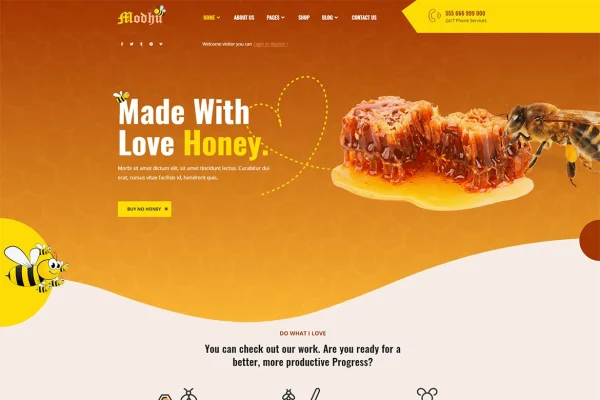
Modhu is a WordPress theme built for beekeeping and honey businesses. It gives apiaries, honey producers and organic food sellers a site with niche-specific layouts, a WooCommerce store and ready-made pages for services, blog and contact details.
- Version
- 1.0.3
- Released
- Feb 11, 2023
- Developer
- themesflat
- Type
- WordPress theme
- Licence
- GPL
- Included in
- Every plan, or $3.99 on its own
What’s new in Modhu 1.0.3
Version 1.0.3 · Feb 11, 2023
Latest
- ImprovedChange demo link updated one click installer demo import
What it does
Most general business themes need a lot of reworking before they suit a honey farm or apiary. This theme starts from that niche, with layouts and content blocks designed around honey products and beekeeping processes. You get 3 homepage layouts, 3 header styles and 2 footer designs to choose from, plus more than 16 inner page variants covering services, about us, blog, contact and other common pages. Getting started mostly means swapping in your logo, contact details and branding.
For selling, the theme works with WooCommerce, so you can list jars of honey and related goods and take orders directly on your site. It is compatible with Elementor and Gutenberg, which lets you edit pages with drag-and-drop tools instead of code. WPML compatibility helps if you want to offer the site in more than one language. The design is responsive and retina ready, so it adapts to phones, tablets and desktops, and it is built to work across modern browsers.
Best for
- Beekeepers and apiaries wanting a professional website
- Honey producers selling jars online through WooCommerce
- Organic food shops featuring honey products
Features
Beekeeping and honey layouts
Content blocks and page layouts are designed around honey products and beekeeping processes, so the site suits an apiary or honey brand from the start.
Three homepage layouts
Choose between 3 distinct homepage designs to set the overall look of your site, then adjust content and branding to match your business.
Header and footer options
The theme includes 3 header styles and 2 footer designs, giving you some flexibility in how navigation and site details appear on every page.
Over 16 inner pages
Ready-to-use page variants cover services, about us, blog, contact and more, so you can build out a full site without designing each page.
WooCommerce store support
Set up an online shop with WooCommerce to sell honey and related products directly to your customers from your own website.
Elementor and Gutenberg editing
Customize pages with Elementor or the Gutenberg block editor using drag-and-drop tools, with no coding needed for everyday changes.
Multilingual with WPML
Compatibility with WPML lets you translate your content and serve customers in more than one language.
Responsive and retina ready
Layouts adapt to desktops, tablets and smartphones, and high-resolution graphics stay sharp on retina screens.
Questions about Modhu
Can I sell my honey directly from a site built with this theme?
Yes. The theme works with WooCommerce, so you can create product listings for honey and related goods and take orders from customers on your own site. The design includes layouts and content blocks meant to present honey products clearly.
Do I need to know how to code to customize it?
No. The theme is compatible with Elementor and the Gutenberg block editor, both of which let you edit pages with drag-and-drop tools. To get going, you mainly update your logo, contact details and branding on the included pages.
How many page designs come with Modhu?
You get 3 homepage layouts, 3 header styles and 2 footer designs. There are also more than 16 inner page variants, covering pages such as services, about us, blog and contact.
Can I run the site in more than one language?
The theme is compatible with WPML, a multilingual plugin for WordPress. With it you can translate your pages and products so visitors can browse the site in their preferred language.
Is Modhu free?
The code of Modhu is licensed under the GPL, so anyone may use, change and share it. GPL Feast is a paid service: a plan or a single purchase gives you the download and automatic updates. The developer's own support, licence key and online services are not included.
Which version of Modhu is this?
Version 1.0.3, released Feb 11, 2023. New versions appear here when the developer publishes them, and members get them as automatic updates.
How do I update Modhu?
Install the free GPL Feast Updater on your site and connect it with your API key. It installs new versions of Modhu automatically and keeps a backup, so you can roll back.