Theme
Updated
Moller
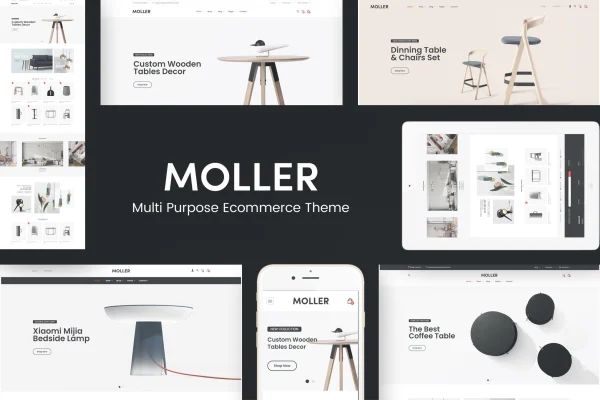
Moller is a WordPress theme by Plaza-Themes built for furniture stores and home decor businesses. It works with WooCommerce to run your shop and gives you four homepage layouts, sliders and drag and drop page editing to shape a clean, minimal storefront.
- Version
- 1.0.1
- Released
- Jul 24, 2021
- Developer
- Plaza-Themes
- Type
- WordPress theme
- Licence
- GPL
- Included in
- Every plan, or $3.99 on its own
What’s new in Moller 1.0.1
Version 1.0.1 · Jul 24, 2021
Latest
- ImprovedUpdated Wordpress 5.8
What it does
Selling furniture online means showing large, detailed product photos and organizing a catalog so shoppers can browse comfortably on any screen. This theme is designed around that need. It uses a clean, minimalist look with a responsive, retina ready layout, and it runs on WooCommerce for product management, cart, checkout and payment options. A fixed navigation menu keeps your categories within reach as visitors scroll through long pages.
Building pages happens through Visual Composer, a drag and drop editor, so you can arrange layouts and content without writing code. Revolution Slider is included for homepage banners and promotions, and product slider shortcodes let you feature new, bestselling, featured or discounted items. The theme sits on the Bootstrap framework, supports multilingual sites through WPML and ships with layered PSD files for designers who want to adjust the graphics.
Best for
- Online furniture stores built on WooCommerce
- Home decor shops wanting a clean, minimal storefront
- Designers building multilingual retail sites for furniture clients
Features
Four homepage layouts
Pick from four distinct homepage designs and adjust each one to suit your brand style and the range of furniture or decor you sell.
WooCommerce shop support
Runs your store on WooCommerce, covering product management, the cart, checkout and payment options for a complete online furniture shop.
Visual Composer page building
Edit and build pages with Visual Composer's drag and drop interface, arranging layouts and content blocks without touching any code.
Revolution Slider included
Create image sliders with customizable effects for your homepage, using them to feature new collections, popular pieces or current promotions.
Product slider shortcodes
Display featured, new, bestseller or discounted products in slider modules that you can place on the homepage or other pages.
Responsive and retina ready
The layout adapts from desktops to smartphones and supports high resolution screens, so product images stay sharp on modern displays.
Multilingual with WPML
Compatible with WPML, so you can translate your store and serve shoppers in more than one language from the same site.
Branding and PSD files
Upload your logo and set site identity from the admin panel, and use the included layered PSD files to customize theme graphics.
Questions about Moller
Do I need to know how to code to customize the pages?
No. The theme uses Visual Composer, a drag and drop editor, so you can arrange layouts, text and image blocks, and sliders through a visual interface. Logo and site identity settings are handled from the admin panel.
Can I sell products directly with this theme?
Yes. Moller is built to work with WooCommerce, which handles product management, the cart, checkout and payment options. Product slider shortcodes help you highlight featured, new, bestselling or discounted items.
Will the store work in more than one language?
The theme is compatible with WPML, a plugin for running multilingual WordPress sites. That lets you translate your furniture store and present it to shoppers in several languages.
How many homepage designs come with Moller?
There are four distinct homepage layouts. You can choose the one closest to your brand and then adjust it with Visual Composer and Revolution Slider to match your products and promotions.
Is Moller free?
The code of Moller is licensed under the GPL, so anyone may use, change and share it. GPL Feast is a paid service: a plan or a single purchase gives you the download and automatic updates. The developer's own support, licence key and online services are not included.
Which version of Moller is this?
Version 1.0.1, released Jul 24, 2021. New versions appear here when the developer publishes them, and members get them as automatic updates.
How do I update Moller?
Install the free GPL Feast Updater on your site and connect it with your API key. It installs new versions of Moller automatically and keeps a backup, so you can roll back.