Theme
Updated
Neera
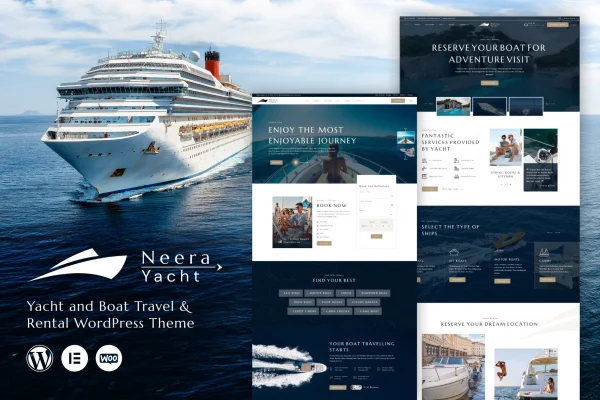
Neera is a WordPress theme built for boat travel and rental businesses. It gives you customizable layouts, flexible ways to display your fleet and built-in booking forms, so visitors can browse your boats, compare rental packages and request a reservation from one site.
- Version
- 1.0.9
- Released
- Aug 15, 2026
- Developer
- venusweb
- Type
- WordPress theme
- Licence
- GPL
- Included in
- Every plan, or $3.99 on its own
What’s new in Neera 1.0.9
Version 1.0.9
Latest
- ImprovedPortfolio security updated.
- ImprovedCompatible with latest WordPress Version.
- ImprovedCompatible with latest WordPress Version.
What it does
Boat rental companies need a website that puts their boats front and center and makes it easy for people to ask for a booking. This theme is designed around that job. You can build pages that highlight different boat types, rental packages and travel itineraries, then present them with image galleries, grids and sliders. Booking forms sit within the site, so a visitor who finds the right boat can send a reservation request without hunting for contact details.
The layouts are customizable, which lets you adjust the look to match your brand, whether you run a small local rental operation or organize longer trips at sea. The design is responsive, so pages adapt to phones, tablets and desktops. The theme is also described as compatible with popular WordPress plugins for things like contact forms, maps and payment gateways, which helps when you want to add those functions to your rental site.
Best for
- Local boat rental companies
- Boat tour and sea voyage operators
- Yacht charter and luxury cruise businesses
Features
Customizable layouts
Adjust the look and structure of your pages to fit your brand and give each boat type, rental package or itinerary its own presentation.
Built-in booking forms
Easy-to-use booking forms let visitors request a reservation directly on your site after browsing your boats and packages.
Fleet display options
Present your boats and rental options in flexible grids and sliders so visitors can scroll through the fleet and compare choices.
Image galleries
Interactive galleries give you space for high-resolution photos of your boats and the destinations your trips visit.
Responsive design
Pages adapt to smartphones, tablets and desktops, so customers can browse boats and fill out booking forms on any screen size.
Plugin compatibility
Works with popular WordPress plugins for added functions such as contact forms, maps and payment gateways.
Setup documentation
Detailed guides walk you through setting up and customizing the theme for your boat rental or travel site.
Questions about Neera
Can customers book a boat directly on my site?
Yes. The theme includes easy-to-use booking forms that visitors can fill out to request a reservation. They sit alongside your fleet and package pages, so someone can pick a boat and send a booking request without leaving your site.
How can I display several different boats?
Neera offers multiple fleet display options, including flexible grids and sliders. You can use them to present different boat types and rental options, and pair them with image galleries so visitors can see each boat before choosing.
Will the site work on phones and tablets?
The theme uses a responsive, mobile-ready design. Layouts adjust to smartphones, tablets and desktops, so visitors can browse your fleet, view galleries and use the booking forms on whatever device they have.
Can I add maps, contact forms or payments?
The theme is described as compatible with popular WordPress plugins that handle contact forms, maps and payment gateways. You would add those plugins to bring the matching functions to your boat rental site.
Is Neera free?
The code of Neera is licensed under the GPL, so anyone may use, change and share it. GPL Feast is a paid service: a plan or a single purchase gives you the download and automatic updates. The developer's own support, licence key and online services are not included.
Which version of Neera is this?
Version 1.0.9, released Aug 15, 2026. New versions appear here when the developer publishes them, and members get them as automatic updates.
How do I update Neera?
Install the free GPL Feast Updater on your site and connect it with your API key. It installs new versions of Neera automatically and keeps a backup, so you can roll back.
More from venusweb