
Theme
Updated
Neriva
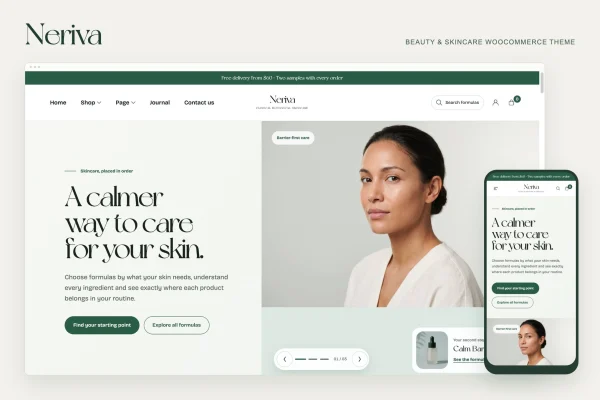
Neriva is a WordPress theme built for beauty and skincare shops running on WooCommerce. It gives cosmetics and skincare sellers an elegant storefront with clear navigation, responsive layouts and settings you can customize to match your brand.
- Version
- 1.0.1
- Released
- Feb 11, 2025
- Developer
- ecomnius
- Type
- WordPress theme
- Licence
- GPL
- Included in
- Every plan, or $3.99 on its own
What’s new in Neriva 1.0.1
Version 1.0.1 · Feb 11, 2025
Latest
What it does
Selling beauty and skincare products online depends a lot on presentation. Shoppers want to see products clearly, find what they need quickly and browse comfortably on any device. A general-purpose theme often needs heavy adjustment before it suits this kind of store. Neriva starts from a design aimed at the beauty niche, so the look and structure already fit cosmetics, skincare and similar product lines.
The theme works with WooCommerce, the WordPress plugin that handles products, carts and checkout. Neriva supplies the visual layer on top: an elegant design, user-friendly navigation and responsive layouts that adapt to phones, tablets and desktops. Its customizable features let you adjust the store to your own branding, which makes it a sensible fit for new beauty shops and for existing stores that want a design focused on their market.
Best for
- Online skincare shops built on WooCommerce
- Cosmetics and makeup brands selling direct to customers
- Freelancers building stores for beauty clients
Features
Beauty and skincare design
The overall look is created with beauty and skincare products in mind, giving cosmetics and skincare stores a styled starting point instead of a generic layout.
WooCommerce store support
Built as a WooCommerce theme, so your product catalog, cart and checkout run through WooCommerce while Neriva handles how the store looks.
Responsive layouts
Layouts adjust to different screen sizes, so shoppers can browse products and move through your store comfortably on mobile phones, tablets and desktop computers.
User-friendly navigation
Navigation is designed to be easy to follow, helping customers find product categories and move around the store without confusion.
Customizable features
Customization options let you adapt the theme's appearance so the storefront reflects your own brand rather than looking like every other shop.
Elegant product presentation
An elegant visual style gives beauty products a clean, polished setting that suits the way cosmetics and skincare brands usually present themselves.
Questions about Neriva
Does Neriva work with WooCommerce?
Yes. Neriva is a WooCommerce theme, so it is designed to run alongside the WooCommerce plugin. WooCommerce manages your products, cart and checkout, while the theme controls the design and layout of your beauty or skincare store.
Will my store look good on phones?
The theme uses responsive layouts that adapt to the screen they are viewed on. Customers browsing on a phone, tablet or desktop should see a layout sized for their device, which matters for beauty shoppers who often browse on mobile.
Can I change the design to match my brand?
Neriva includes customizable features, so you can adjust the appearance of your store to suit your branding. This helps your shop feel like your own while keeping the elegant beauty-focused style the theme starts with.
Is this theme only for skincare stores?
It is designed for beauty and skincare products, so it suits shops selling skincare, cosmetics and related beauty items. Stores in very different niches may find the styling less fitting for their products.
Is Neriva free?
The code of Neriva is licensed under the GPL, so anyone may use, change and share it. GPL Feast is a paid service: a plan or a single purchase gives you the download and automatic updates. The developer's own support, licence key and online services are not included.
Which version of Neriva is this?
Version 1.0.1, released Feb 11, 2025. New versions appear here when the developer publishes them, and members get them as automatic updates.
How do I update Neriva?
Install the free GPL Feast Updater on your site and connect it with your API key. It installs new versions of Neriva automatically and keeps a backup, so you can roll back.
You might also like