Theme
Updated
ZURIX
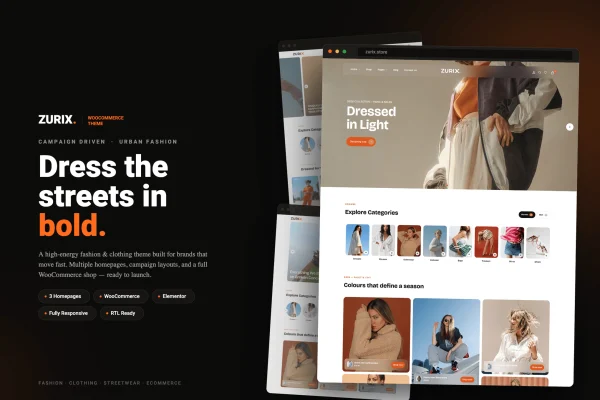
ZURIX is a WordPress theme for WooCommerce stores that sell urban fashion and streetwear. It is built around campaigns, so you can put collections, limited editions and product drops front and center while still running a full shop with cart, checkout and product pages.
- Version
- 1.0.1
- Released
- Feb 11, 2025
- Developer
- ecomnius
- Type
- WordPress theme
- Licence
- GPL
- Included in
- Every plan, or $3.99 on its own
What’s new in ZURIX 1.0.1
Version 1.0.1 · Feb 11, 2025
Latest
What it does
Fashion brands often sell in waves: a capsule collection, a seasonal campaign, a limited drop. A generic store theme can make it awkward to give each of those moments its own spotlight. This theme takes a campaign-driven approach, with layouts meant for highlighting special collections and promotions, plus countdown timers for limited-time offers. The look leans sleek and urban, aimed at streetwear labels that want their store to match the style of their clothes.
Under the design, the theme works with WooCommerce for the cart, checkout and product management. You can adjust colors, fonts, layouts and product display settings to fit your brand, and pick from several pre-built homepage variations. Product filters help shoppers narrow down what they want, and social links connect the store to Instagram, Facebook and other networks. A one-click demo import gives you ready-made content to start from, and the layouts respond to phones, tablets and desktops.
Best for
- Streetwear brands running seasonal campaigns and product drops
- Urban fashion labels selling collections through WooCommerce
- Freelancers building online stores for clothing clients
Features
Campaign-driven layouts
Layouts built to highlight special collections, promotions, limited editions and themed product drops, so each campaign gets a clear place in your store.
Campaign countdown timers
Add countdown timers to limited-time offers so shoppers can see exactly how long a promotion or drop will stay available.
WooCommerce shop support
Works with WooCommerce for the shopping cart, checkout and product management, giving you the standard store features inside a fashion-focused design.
Product filters
Filters let customers narrow your catalog and find specific items faster, which helps when you carry many sizes, styles or collections.
Brand customization settings
Change colors, fonts, layouts and product display settings to match your label's identity without starting a design from scratch.
Multiple homepage variations
Choose from several pre-built homepage layouts and pick the one that best fits your brand's personality and product range.
Social media connections
Link your store to Instagram, Facebook and other social networks so visitors can follow your brand beyond the shop.
One-click demo import
Import ready-made demo content in one step to get a working store layout in place, then swap in your own products and images.
Questions about ZURIX
Does this theme work with WooCommerce?
Yes. It is a WooCommerce theme, with support for the shopping cart, checkout and product management. Its layouts and product display settings are designed around selling fashion items through a WooCommerce store.
Can I promote a limited drop or sale with it?
Yes. The campaign-driven layouts are made to spotlight limited editions, special promotions and themed product drops, and you can add countdown timers to show shoppers when a limited-time offer ends.
How much can I change the design to match my brand?
You can adjust colors, fonts, layouts and product display settings. There are also multiple pre-built homepage variations to choose from, so you can start with the one closest to your style and adapt it.
Will my store look right on phones?
The theme is responsive and mobile-friendly, so its layouts adapt to phones, tablets and desktop screens. That matters for fashion shoppers, many of whom browse on mobile.
Is ZURIX free?
The code of ZURIX is licensed under the GPL, so anyone may use, change and share it. GPL Feast is a paid service: a plan or a single purchase gives you the download and automatic updates. The developer's own support, licence key and online services are not included.
Which version of ZURIX is this?
Version 1.0.1, released Feb 11, 2025. New versions appear here when the developer publishes them, and members get them as automatic updates.
How do I update ZURIX?
Install the free GPL Feast Updater on your site and connect it with your API key. It installs new versions of ZURIX automatically and keeps a backup, so you can roll back.
You might also like