Theme
Updated
Nikado
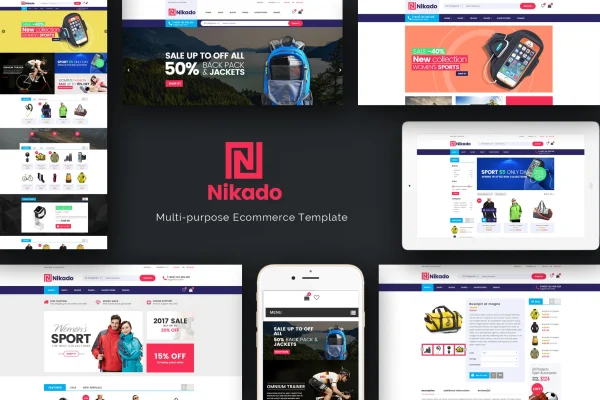
Nikado is a responsive WordPress theme built for WooCommerce stores. It gives shop owners four homepage layouts, a horizontal megamenu and a set of store modules such as daily deals, product tabs and sliders, so products are easy to find and browse on any screen size.
- Version
- 1.2.0
- Released
- Aug 11, 2026
- Developer
- Plaza-Themes
- Type
- WordPress theme
- Licence
- GPL
- Included in
- Every plan, or $3.99 on its own
What’s new in Nikado 1.2.0
Version 1.2.0 · Aug 11, 2026
Latest
What it does
Running an online store means organizing a lot of products in a way shoppers can follow. This theme handles that with a horizontal megamenu that opens a popup listing your product categories, plus homepage sections for featured, new and discounted items. It suits stores selling fashion apparel, sports gear, digital gadgets or accessories, and the clean design keeps attention on the products. The layout is fully responsive, so it adapts to desktops, laptops, tablets and phones.
On the store side, you get a Daily Deals module with a countdown timer for marked-down products, a brand logo slider, and sliders for featured, related and upsell products on category and product pages. A blog lets you post store news and updates. The theme is built on the Bootstrap framework, works with Visual Composer for page building and WPML for multilingual stores, and includes PSD files and retina ready graphics for design work.
Best for
- Fashion and apparel shops built on WooCommerce
- Sports gear, gadget and accessory stores
- Multilingual stores using WPML
Features
Four homepage layouts
Choose from four custom homepage designs to match the look of your brand and arrange products in an organized way on the front page.
Horizontal megamenu
A horizontal menu with a popup panel lists product categories logically, helping shoppers move through a large catalog without hunting for pages.
Daily deals with countdown
Highlight discounted products in a Daily Deals module that shows a countdown timer, so shoppers can see how long each offer lasts.
Product tabs
Group featured, new and discounted products into tabs on the page, letting visitors switch between product types in one compact section.
Product and brand sliders
Show featured, related and upsell product sliders on category and product pages, plus a brand logo slider for the labels you carry.
Built-in blog
Publish store updates, product news and customer feedback through the integrated blog, styled to match the rest of your shop.
Visual Composer and WPML support
The theme is compatible with Visual Composer for building pages and WPML for running your store in more than one language.
Bootstrap base and PSD files
Built on the Bootstrap framework with retina ready graphics, and PSD files are included if you want to adjust the design.
Nikado older versions
- 1.1.9May 11, 2023
Members and buyers of this product can download older versions.
Questions about Nikado
Does this theme work with WooCommerce?
Yes. It is designed specifically for WooCommerce and has been tested with it. Store features such as product tabs, sliders on category and product pages, and the Daily Deals module are built around WooCommerce products.
Can I run my store in more than one language?
The theme is compatible with WPML, a plugin for multilingual WordPress sites. With WPML in place, you can offer your store content to shoppers in several languages.
What kinds of stores does Nikado suit?
It suits stores selling fashion apparel, sports gear, digital gadgets and accessories. Its clean, fashionable design, megamenu for category browsing and four homepage layouts work well for shops with varied product ranges.
Can I build custom pages with a page builder?
Yes. The theme is compatible with Visual Composer, so you can build and arrange page layouts visually. PSD files are also included if you want to plan design changes.
Is Nikado free?
The code of Nikado is licensed under the GPL, so anyone may use, change and share it. GPL Feast is a paid service: a plan or a single purchase gives you the download and automatic updates. The developer's own support, licence key and online services are not included.
Which version of Nikado is this?
Version 1.2.0, released Aug 11, 2026. New versions appear here when the developer publishes them, and members get them as automatic updates.
How do I update Nikado?
Install the free GPL Feast Updater on your site and connect it with your API key. It installs new versions of Nikado automatically and keeps a backup, so you can roll back.