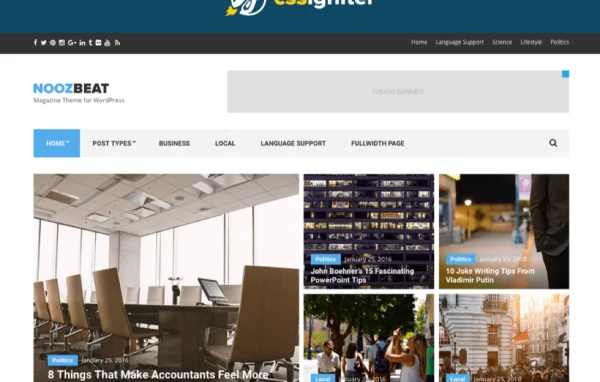
Theme
Updated
Noozbeat
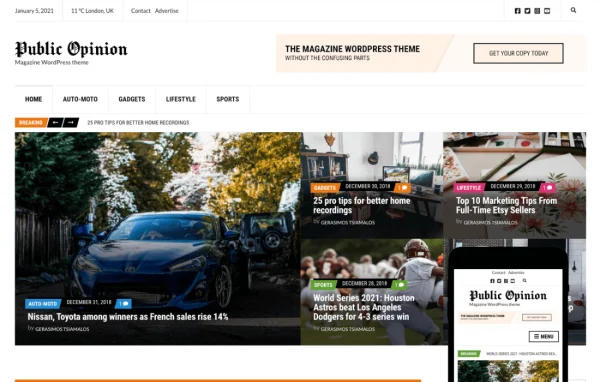
Noozbeat is a WordPress theme by CSSIgniter built for news sites, online magazines and content-heavy blogs. It gives you customizable layouts, headers and footers, and works with both the block editor and Elementor, so you can shape a publication's look without writing code.
Install this firstPlease download the Ignition Framework Plugin from here, which is needed by CSS Ignitor Themes.
Go to product- Version
- 1.3.2
- Released
- Mar 24, 2022
- Developer
- CSSIgniter
- Type
- WordPress theme
- Licence
- GPL
- Included in
- Every plan, or $4.79 a year on its own
What’s new in Noozbeat 1.3.2
Version 1.3.2 · Mar 24, 2022
Latest
- FixedAuthorbox's avatar type would fallback to an invalid type value.
- FixedDeprecated Elementor method _register_controls()
- FixedFatal errors due to Elementor\\Scheme_Typography and Elementor\\Scheme_Color class removals.
- FixedDeprecated parameter 'who' in WP_User_Query since WP 5.9
- FixedChanged version to 1.3.2
- ImprovedUpdated language file.
- ImprovedStyle.css
- ImprovedStyle.min.css
What it does
News and magazine sites need a clear structure for lots of posts, plus a consistent look from page to page. This theme handles that with customizable layouts, multiple post formats and built-in widgets for presenting content. Headers and footers can be adjusted through the WordPress Customizer with live previews, covering layouts, colors, fonts and logos. A one-click demo import lets you start from content that mirrors the theme demo and edit from there.
You can build pages with the native block editor, helped by GutenBee custom blocks, or with Elementor's drag and drop builder. A global sections system lets you design a section once and reuse it across the site. Color schemes can be set globally or tuned for specific areas such as the header, footer and top bar, and Google Fonts can be applied to different parts of the site. WooCommerce support means a publisher can also run an online store from the same site.
Best for
- News portals publishing frequent articles
- Online magazines wanting a customizable layout
- Bloggers running content-rich sites who may sell products
Features
Flexible header options
Adjust header layouts, color schemes, fonts and logos in the Customizer, with live previews so you see each change before saving it.
Customizable footers
Change footer colors, fonts and layouts, and add the links your readers need, all through an interface with real-time previews.
Block editor with GutenBee
Build pages in the native WordPress block editor, with GutenBee custom blocks adding more options for laying out articles and landing pages.
Elementor support
Design page layouts with Elementor's drag and drop builder if you prefer it over the block editor, with no coding required.
Reusable global sections
Create a section once in the block editor or Elementor, then place it across your site to keep branding consistent and avoid rebuilding it.
Custom color schemes
Set global colors for your brand or fine-tune individual areas such as the header, footer and top bar for a tailored palette.
Google Fonts typography
Pick from dozens of Google Fonts and adjust font properties for different site areas directly inside the WordPress Customizer.
WooCommerce compatibility
Add an online store to your publication with WooCommerce support for product management, inventory and checkout.
Questions about Noozbeat
Can I use Elementor with this theme, or only the block editor?
You can use either. The theme works with the native WordPress block editor, which comes with GutenBee custom blocks, and also with Elementor's drag and drop builder. Global sections can be designed in either one and reused across your site.
Can I run an online store on a news site with Noozbeat?
Yes. The theme supports WooCommerce, so you can add a store for product management, inventory and checkout alongside your articles, which suits publishers who want to sell merchandise or other products.
How much can I change the look without coding?
Quite a lot. Headers and footers have adjustable layouts, colors, fonts and logos with live previews. You can set global colors or tune specific areas, choose Google Fonts for different parts of the site, and reuse global sections for a consistent design.
Is there a quick way to get a starting layout?
The theme includes a one-click demo import that brings in content mirroring the theme demo. You can then replace the sample posts and adjust the design to match your publication.
Is Noozbeat free?
The code of Noozbeat is licensed under the GPL, so anyone may use, change and share it. GPL Feast is a paid service: a plan or a single purchase gives you the download and automatic updates. The developer's own support, licence key and online services are not included.
Which version of Noozbeat is this?
Version 1.3.2, released Mar 24, 2022. New versions appear here when the developer publishes them, and members get them as automatic updates.
How do I update Noozbeat?
Install the free GPL Feast Updater on your site and connect it with your API key. It installs new versions of Noozbeat automatically and keeps a backup, so you can roll back.
More from CSSIgniter