Theme
Updated
Nozama Theme
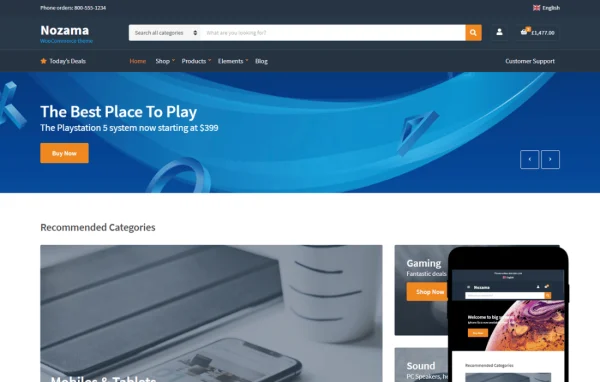
Nozama Theme is a WordPress theme by CSSIgniter built for online stores running WooCommerce. It takes its design cues from large online marketplaces and gives store owners customizable headers, footers, colors and fonts, plus block editor and Elementor support for building pages.
Install this firstPlease download the Ignition Framework Plugin from here, which is needed by CSS Ignitor Themes.
Go to product- Version
- 1.4.6
- Released
- Sep 17, 2025
- Developer
- CSSIgniter
- Type
- WordPress theme
- Licence
- GPL
- Included in
- Every plan, or $4.79 a year on its own
What’s new in Nozama Theme 1.4.6
Version 1.4.6 · Sep 17, 2025
Latest
- FixedWrong gettext domain on some strings.
- ChangedChanged version to 1.4.6
- ChangedRequiresIgnition: 3.5.0
What it does
Many store owners want a shop that feels familiar to shoppers used to big marketplace sites, without writing custom code to get there. This theme offers an Amazon-inspired layout designed around WooCommerce, so you can sell products, manage inventory and run checkout through WooCommerce while the theme handles the look. A one-click demo import brings in the demo site with sample content, giving you a working starting point to adjust instead of a blank page.
Most visual settings live in the WordPress Customizer with live previews. You can change header layouts, logos, footer content, color palettes and Google Fonts typography across the site or for specific areas like the top bar. Pages can be built with the block editor, which adds GutenBee custom blocks, or with the Elementor page builder. A global sections feature lets you design a section once and reuse it throughout the store, which helps keep pages consistent as the catalog grows.
Best for
- WooCommerce stores wanting a marketplace-style layout
- Merchants who customize design without writing code
- Freelancers building shops with Elementor or the block editor
Features
Flexible header options
Adjust header color schemes, layouts, fonts and logo settings in the Customizer, with real-time previews so you can see each change before saving it.
Customizable footers
Change footer colors, fonts and layout, and add links or store information through the WordPress Customizer without editing any template files.
Block editor with GutenBee
Build pages in the WordPress block editor using the included GutenBee custom blocks, which add extra layout options for store pages and content.
Elementor page builder support
Design page layouts with Elementor's drag-and-drop editor if you prefer it over the block editor for building your store's pages.
Reusable global sections
Create a section once in the block editor or Elementor, then place it across the site to keep repeated content consistent and easy to update.
Custom color schemes
Set your own color palette globally or per area, including headers, footers and top bars, to match the store to your brand.
Google Fonts typography
Pick from dozens of Google Fonts and fine-tune typography in specific theme areas to control how text looks throughout the store.
One-click demo import
Import the theme's demo site with sample content in one step, then replace the products and text with your own.
Nozama Theme older versions
- 1.4.5Jan 16, 20255 improvements
- 1.4.4Oct 26, 20243 improvements, 1 fix
- 1.4.3Jan 26, 20242 fixes
- 1.4.2Jan 18, 2024
- 1.4.1Jun 13, 2023
- 1.4.0Apr 18, 2023
Members and buyers of this product can download older versions.
Questions about Nozama Theme
Does this theme work with WooCommerce?
Yes. It was designed for WooCommerce stores, so you can sell products, manage inventory and handle checkout through WooCommerce while the theme provides the storefront design and layout options.
Can I build pages with Elementor?
Yes. The theme supports the Elementor drag-and-drop page builder. You can also use the WordPress block editor with the included GutenBee custom blocks, and global sections can be made with either tool.
Will my store look exactly like Amazon?
The design is inspired by large online marketplaces like Amazon, so the layout will feel familiar to shoppers. You can change colors, fonts, headers and footers to give the store your own brand identity.
Can I start from the demo design?
Yes. A one-click demo import brings in the demo site with sample content. From there you can swap in your own products, images and text and adjust the design in the Customizer.
Is Nozama Theme free?
The code of Nozama Theme is licensed under the GPL, so anyone may use, change and share it. GPL Feast is a paid service: a plan or a single purchase gives you the download and automatic updates. The developer's own support, licence key and online services are not included.
Which version of Nozama Theme is this?
Version 1.4.6, released Sep 17, 2025. New versions appear here when the developer publishes them, and members get them as automatic updates.
How do I update Nozama Theme?
Install the free GPL Feast Updater on your site and connect it with your API key. It installs new versions of Nozama Theme automatically and keeps a backup, so you can roll back.
More from CSSIgniter