
Theme
Updated
Orenburg
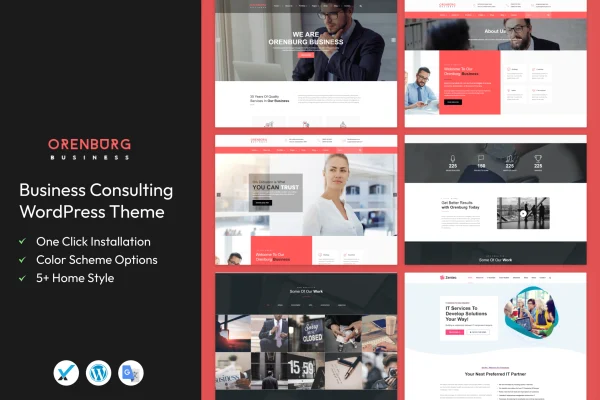
Orenburg is a WordPress theme built for business consulting firms, agencies and financial advisors. It gives you a clean, professional layout with ready-made sections for services, case studies, team members and client testimonials, so you can present your practice clearly to prospective clients.
- Version
- 2.3
- Released
- Apr 19, 2024
- Developer
- template_path
- Type
- WordPress theme
- Licence
- GPL
- Included in
- Every plan, or $3.99 on its own
What’s new in Orenburg 2.3
Version 2.3 · Apr 19, 2024
Latest
What it does
Consulting websites usually need the same set of pages: a clear list of services, proof of past work, an introduction to the team and a few words from happy clients. Building those from scratch takes time. This theme ships with pre-built sections designed for consulting firms, covering services, portfolios, case studies, team members and testimonials, so the structure is already in place and you can focus on your own content.
The design is modern and responsive, adapting to desktops, tablets and phones. Layouts are customizable through flexible options and a drag-and-drop page builder, which suits both developers and consultants with limited technical experience. The theme is built with clean, semantic code and is compatible with WooCommerce, Contact Form 7 and WPML, so you can add a shop, contact forms or multilingual content when your site needs them.
Best for
- Business consulting firms presenting services and case studies
- Financial advisors building a professional client-facing site
- Agencies wanting ready-made team and testimonial sections
Features
Responsive layout
The design adapts to different screen sizes, so your pages display properly for visitors on desktops, tablets and smartphones.
Drag and drop page building
Flexible layout options and a drag-and-drop page builder let you adjust the look and arrangement of your pages without writing code.
Consulting-specific sections
Ready-made sections cover services, portfolios, case studies, team members and client testimonials, all shaped around how consulting firms present their work.
Clear navigation menus
User-friendly menus and navigation structures help visitors find your services, team and contact details without hunting around the site.
Clean, semantic code
The theme is built with clean, semantic markup that follows common search engine best practices, giving you a tidy foundation for your content.
WooCommerce compatibility
Works with WooCommerce, so you can add a shop for selling reports, consultations or other products alongside your consulting pages.
Forms and multilingual support
Compatible with Contact Form 7 for inquiry forms and WPML for running your consulting site in more than one language.
Questions about Orenburg
Can I build pages without coding skills?
Yes. Orenburg includes flexible layout options and a drag-and-drop page builder, so you can arrange sections and customize the look of your pages visually. It is aimed at both experienced developers and consultants with limited technical skills.
What kinds of sections come with the theme?
The theme includes pre-built sections tailored to consulting firms. You get ready-made layouts for services, portfolios, case studies, team members and client testimonials, which cover the pages most consulting sites need to present their expertise.
Can I sell products or run a multilingual site with it?
The theme is compatible with WooCommerce for adding a store and with WPML for multilingual content. It also works with Contact Form 7, which is handy for building inquiry and contact forms for prospective clients.
Will my site work on mobile devices?
Yes. The layout is responsive and adjusts to different screen sizes, from large desktop monitors down to smartphones, so visitors can browse your services and contact details on any device.
Is Orenburg free?
The code of Orenburg is licensed under the GPL, so anyone may use, change and share it. GPL Feast is a paid service: a plan or a single purchase gives you the download and automatic updates. The developer's own support, licence key and online services are not included.
Which version of Orenburg is this?
Version 2.3, released Apr 19, 2024. New versions appear here when the developer publishes them, and members get them as automatic updates.
How do I update Orenburg?
Install the free GPL Feast Updater on your site and connect it with your API key. It installs new versions of Orenburg automatically and keeps a backup, so you can roll back.






