Theme
Updated
Orido
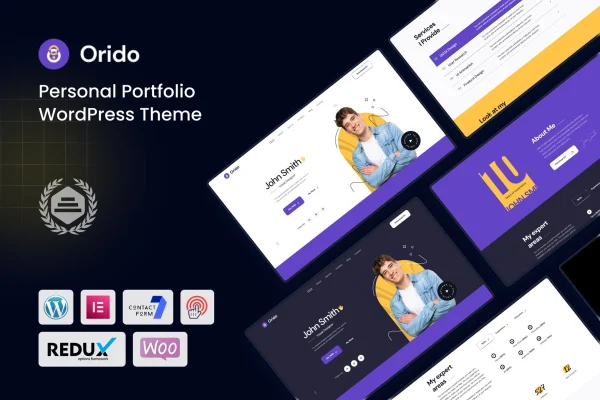
Orido is a personal portfolio WordPress theme for designers, developers, freelancers and other creatives. It is built with Elementor, so you can shape pages with drag and drop editing, and it gives you a clean, minimal look that keeps attention on your projects, skills and services.
- Version
- 1.0
- Developer
- shtheme
- Type
- WordPress theme
- Licence
- GPL
- Included in
- Every plan, or $3.99 on its own
What’s new in Orido 1.0.0
Version 1.0.0 · Aug 15, 2023
Latest
- NewFirst release.
What it does
A portfolio site has one main task: present your work clearly so visitors can judge what you do. This theme is designed around that task, pairing portfolio presentation with the pages a business site usually needs, such as services and skills. The design is clean and minimal, with layouts that leave room for your projects. Because it is built with Elementor, you edit layouts and content visually instead of writing code, which suits people who want control over their pages without touching templates.
Getting started is quicker with the one-click demo importer, which loads pre-designed demo content you can then replace with your own. From there you can pick among several portfolio and blog layouts to match how you want your work presented. The layout is responsive and retina ready for different screen sizes and high-resolution displays, and it is built for consistent display across major browsers. The theme is also listed as compatible with plugins such as WooCommerce, WPML, Gravity Forms, BuddyPress and Easy Digital Downloads, and documentation is included.
Best for
- Designers and developers building a personal portfolio
- Freelancers presenting their services and past projects
- Creative agencies and startups wanting a minimal site
Features
Built with Elementor
Edit page layouts and content through Elementor's drag and drop interface, so you can adjust your portfolio pages without writing any code.
One-click demo importer
Load the pre-designed demo content in one step, then swap in your own projects, text and images to set up your portfolio faster.
Multiple portfolio and blog layouts
Choose from several customizable portfolio and blog layouts to present your work and posts in the format that fits your personal style.
Responsive and retina ready
The layout adapts to desktops, tablets and smartphones, and is prepared for high-resolution displays so images and details stay sharp.
Clean, minimal design
A modern, uncluttered look keeps the focus on your projects and services, with room to highlight your skills and experience.
Plugin compatibility
Works with plugins including WooCommerce, WPML, Gravity Forms, BuddyPress and Easy Digital Downloads, so you can add a shop, translations, forms or community features.
Cross-browser compatibility
Built to display consistently across all major browsers, so visitors see the same portfolio regardless of the browser they use.
Questions about Orido
Do I need to know how to code to customize this theme?
No. The theme is built with Elementor, so you change layouts and content with drag and drop editing. You can rearrange sections, edit text and swap images visually, which makes it practical for people without coding experience.
Can I start from a ready-made design?
Yes. The one-click demo importer loads pre-designed demo content onto your site. You can then replace the sample projects, text and images with your own instead of building every page from a blank screen.
Can I sell products or run a multilingual site with Orido?
The theme is listed as compatible with WooCommerce for selling products and Easy Digital Downloads for digital goods, and with WPML for translations. It also works with Gravity Forms and BuddyPress if you need forms or community features.
Will my portfolio look right on phones and tablets?
The layout is fully responsive, so it adapts to screen sizes from desktops down to smartphones. It is also retina ready for high-resolution displays and built to look consistent across major browsers.
Is Orido free?
The code of Orido is licensed under the GPL, so anyone may use, change and share it. GPL Feast is a paid service: a plan or a single purchase gives you the download and automatic updates. The developer's own support, licence key and online services are not included.
Which version of Orido is this?
Version 1.0. New versions appear here when the developer publishes them, and members get them as automatic updates.
How do I update Orido?
Install the free GPL Feast Updater on your site and connect it with your API key. It installs new versions of Orido automatically and keeps a backup, so you can roll back.