Theme
Updated
Oxium
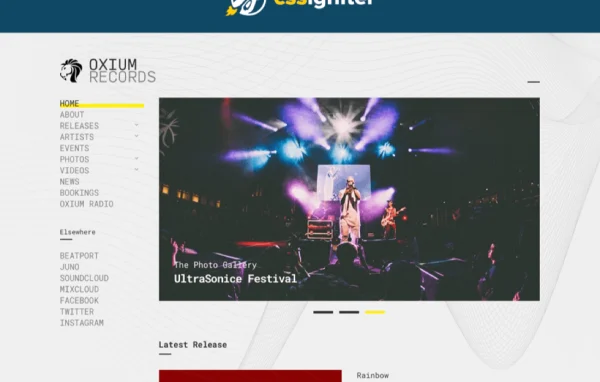
Oxium by CSSIgniter is a WordPress theme made for musicians, bands and DJs. It gives artists a modern site with a built-in music player, event listings and a discography section, so fans can hear new tracks and find upcoming gigs in one place.
Install this firstPlease download the Ignition Framework Plugin from here, which is needed by CSS Ignitor Themes.
Go to product- Version
- 1.3.2
- Released
- Mar 26, 2021
- Developer
- CSSIgniter
- Type
- WordPress theme
- Licence
- GPL
- Included in
- Every plan, or $4.79 a year on its own
What’s new in Oxium 1.3.2
Version 1.3.2 · Mar 26, 2021
Latest
- FixedConditional metaboxes wouldn't work in WP 5.7
- ImprovedTheme version to 1.3.2
What it does
Musicians often juggle a streaming profile, a social page and a separate event listing, which leaves fans hunting for basic information. This theme brings those pieces onto your own WordPress site. You can publish your latest tracks and let visitors play them through the built-in music player, list upcoming shows with the event management features, and organize past and current releases in a discography. The result is a single home base where fans can listen, see where you are playing next and browse your catalog.
The design is clean and modern, and it adapts to phones and tablets, which matters when many fans check gig details on the go. Customization options let you adjust the look of the site, such as colors, fonts and layouts, without writing code. That makes it a reasonable fit for a solo artist building a first site, a band that wants to manage its own pages, or a freelancer setting up a site for a music client.
Best for
- Solo musicians and singer-songwriters
- Bands promoting tours and new releases
- DJs listing gigs and sharing mixes
Features
Built-in music player
Play your tracks directly on the site so visitors can listen to your latest music without leaving the page or opening another service.
Event management
Create and list upcoming gigs and shows, giving fans one clear place to check dates and plan to see you perform live.
Discography support
Organize your releases into a discography so visitors can browse albums, singles and other recordings in a tidy, structured way.
Customization without code
Adjust colors, fonts and layouts through the theme options to match your band or artist identity, with no coding knowledge required.
Mobile-friendly design
Pages respond to different screen sizes, so your tracks, events and releases display properly on phones, tablets and desktop computers.
Questions about Oxium
Can visitors listen to my music on the site?
Yes. The theme includes a built-in music player, so you can add your tracks and let visitors play them right on your pages. This keeps fans on your own site while they listen to your latest work.
Is there a way to list upcoming shows?
The theme comes with event management features for listing your gigs. You can add upcoming shows so fans can see where and when you are playing next, all from your own website.
Can I display my albums and singles?
Yes. Discography support lets you organize your releases into a dedicated section. Visitors can browse your catalog and see your recordings presented in a structured, easy-to-scan format.
Do I need coding skills to change the design?
No. Oxium offers customization options for elements such as colors, fonts and layouts, so you can shape the site around your look as an artist without editing any code.
Is Oxium free?
The code of Oxium is licensed under the GPL, so anyone may use, change and share it. GPL Feast is a paid service: a plan or a single purchase gives you the download and automatic updates. The developer's own support, licence key and online services are not included.
Which version of Oxium is this?
Version 1.3.2, released Mar 26, 2021. New versions appear here when the developer publishes them, and members get them as automatic updates.
How do I update Oxium?
Install the free GPL Feast Updater on your site and connect it with your API key. It installs new versions of Oxium automatically and keeps a backup, so you can roll back.
More from CSSIgniter