Theme
Updated
Pixvent
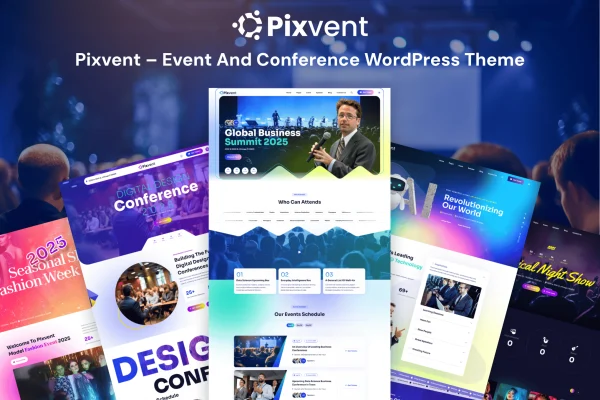
Pixvent is a WordPress theme by Gramentheme built for event organizers, conference planners and meeting coordinators. It gives you the pages an event site needs, including session schedules, speaker profiles, ticket sales and venue details, in a clean, modern design.
- Version
- 1.1
- Released
- Feb 11, 2025
- Developer
- Gramentheme
- Type
- WordPress theme
- Licence
- GPL
- Included in
- Every plan, or $3.99 on its own
What’s new in Pixvent 1.1
Version 1.1 · Feb 11, 2025
Latest
What it does
Building an event website on a general-purpose theme often means piecing together schedules, speaker pages and ticketing on your own. This theme is designed around those needs from the start. You can organize sessions by date, time and track, give each speaker a profile with a bio, photo and social links, and sell and manage tickets directly through your site. Countdown timers and event alerts help you keep visitors informed as the date approaches.
The theme suits small workshops, large conferences and multi-day seminars. It includes several pre-built layouts tailored to conferences, workshops and seminars, so you can start from a ready design and adjust it. It works with drag-and-drop page builders, which lets you change layouts without writing code. The design is responsive for attendees on phones, and it supports multiple languages and right-to-left scripts for international audiences.
Best for
- Conference organizers and meeting coordinators
- Workshop and seminar hosts selling tickets online
- Multi-day events with several tracks and speakers
Features
Customizable event schedule
Organize your program by date, time and track so attendees can see when and where each session takes place.
Speaker profiles
Present each speaker with a detailed bio, photo and social links, giving visitors a clear picture of who is on the program.
Built-in ticket sales
Sell and manage event tickets directly through your website, keeping registration in one place instead of sending visitors elsewhere.
Pre-built event layouts
Start from ready-made layouts designed for conferences, workshops and seminars, then adjust the content to match your own event.
Page builder compatibility
Customize page layouts and content with a drag-and-drop page builder, so you can make design changes without any coding knowledge.
Countdown timers and alerts
Add countdowns to your event date and post announcements so visitors stay informed about important updates and deadlines.
Social media sharing
Built-in sharing options and feeds help you promote your event across social platforms from your website.
Multilingual and RTL support
Run your event site in multiple languages, including right-to-left scripts, to reach attendees from different regions.
Questions about Pixvent
Can I show sessions across several days and tracks?
Yes. The event schedule lets you organize sessions by date, time and track, which works well for multi-day conferences or events running parallel sessions. Attendees can see the full program and plan which talks they want to attend.
Can I sell tickets on my event site with this theme?
Yes. Pixvent includes ticket sales integration, so you can sell and manage event tickets directly through your website. This keeps registration on your own site alongside the schedule, speaker details and venue information.
Do I need coding skills to customize the layouts?
No. The theme is compatible with drag-and-drop page builders, so you can change page layouts and content visually. You can also begin with one of the pre-built layouts for conferences, workshops or seminars and edit it to fit your event.
Will it work for an international event?
Pixvent supports multiple languages and right-to-left scripts, so you can present your event to audiences who read in different languages. The responsive design also helps attendees browsing from phones while traveling.
Is Pixvent free?
The code of Pixvent is licensed under the GPL, so anyone may use, change and share it. GPL Feast is a paid service: a plan or a single purchase gives you the download and automatic updates. The developer's own support, licence key and online services are not included.
Which version of Pixvent is this?
Version 1.1, released Feb 11, 2025. New versions appear here when the developer publishes them, and members get them as automatic updates.
How do I update Pixvent?
Install the free GPL Feast Updater on your site and connect it with your API key. It installs new versions of Pixvent automatically and keeps a backup, so you can roll back.