Theme
Updated
Porus
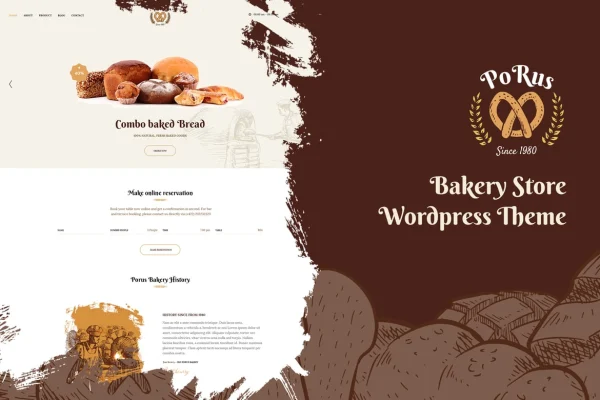
Porus is a WordPress theme built for bakeries, cake shops and other food businesses. It gives you ready-made demo designs, WooCommerce compatibility for selling baked goods, and several ways to take customer bookings, so you can put together a bakery website without writing code.
- Version
- 1.1.8
- Released
- Aug 15, 2026
- Developer
- G5Theme
- Type
- WordPress theme
- Licence
- GPL
- Included in
- Every plan, or $3.99 on its own
What’s new in Porus 1.1.8
Version 1.1.8 · Aug 15, 2026
Latest
What it does
Running a bakery leaves little time for building a website from scratch. This theme gives you three ready-to-use demos designed for food businesses, which you can import with one click and then adjust. From there you can change colors, pick typography, choose between boxed and wide layouts, and select from 27 header styles to match your shop's look. The layouts are responsive and retina ready, so pages adapt to phones, tablets and desktops.
Beyond looks, the theme covers the practical side of a bakery site. WooCommerce compatibility lets you sell cakes, pastries and other products online, while booking options include OpenTable integration, a contact form, or a built-in restaurant reservation form. A mega menu helps organize a large range of offerings, and seven single post layouts give your blog some variety. It works with WPBakery Page Builder, Visual Composer and Gutenberg, and it is translation ready for multilingual sites.
Best for
- Bakeries wanting an online shop for cakes and pastries
- Cake shops and cafes that take table or order bookings
- Freelancers building websites for food businesses
Features
Three one-click demos
Start from one of three ready-made demo designs made for food businesses, imported with one click and then adjusted to suit your bakery.
Several booking options
Take bookings through OpenTable integration, a contact form, or the built-in restaurant reservation form, depending on how your business handles reservations.
WooCommerce compatible
Set up an online store with WooCommerce to sell cakes, pastries and other bakery products directly from your website.
27 header styles
Choose from 27 header styles so the top of your site fits your branding, from simple layouts to more decorative ones.
Seven single post layouts
Pick from seven layouts for individual blog posts, giving recipes, news and announcements a presentation that suits the content.
Built-in mega menu
Organize a wide range of products, categories and pages in a mega menu so visitors can find what they want quickly.
Colors, fonts and layouts
Set unlimited colors, adjust advanced typography options, and switch between boxed and wide layouts to match your shop's personality.
Page builder and translation support
Edit pages with WPBakery Page Builder, Visual Composer or Gutenberg, and translate the site to serve customers in more than one language.
Porus older versions
- 1.1.6Aug 7, 2025
Members and buyers of this product can download older versions.
Questions about Porus
Can I sell my baked goods online with this theme?
Yes. The theme is compatible with WooCommerce, so you can set up an online store to sell cakes, pastries and other bakery products, with product pages, cart and checkout handled by WooCommerce.
How can customers make reservations?
You can choose between OpenTable integration, a contact form, or the built-in restaurant reservation form. This lets you match the booking method to how your bakery or cafe already manages customer reservations.
Which page builders does Porus work with?
Porus supports WPBakery Page Builder, Visual Composer and Gutenberg, and it also works with Bootstrap. You can use whichever editor you are comfortable with to build and adjust your pages.
Will the site look right on phones?
The theme is fully responsive and retina ready, so layouts adapt to different screen sizes and images display crisply on high-resolution screens, from desktops down to smartphones.
Is Porus free?
The code of Porus is licensed under the GPL, so anyone may use, change and share it. GPL Feast is a paid service: a plan or a single purchase gives you the download and automatic updates. The developer's own support, licence key and online services are not included.
Which version of Porus is this?
Version 1.1.8, released Aug 15, 2026. New versions appear here when the developer publishes them, and members get them as automatic updates.
How do I update Porus?
Install the free GPL Feast Updater on your site and connect it with your API key. It installs new versions of Porus automatically and keeps a backup, so you can roll back.