
Theme
Updated
QueensTown
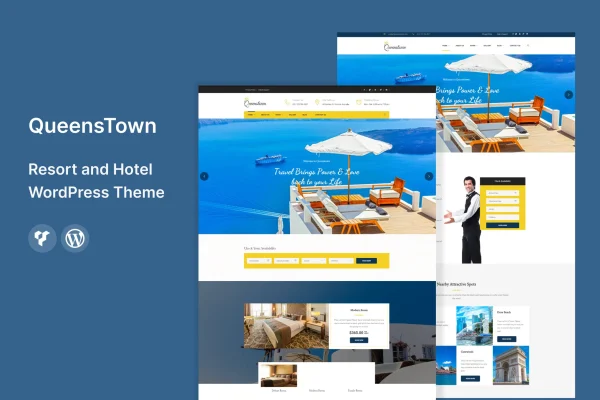
QueensTown is a WordPress theme built for hospitality businesses such as resorts, hotels, inns and vacation rentals. It gives you pre-built page templates, a customizable homepage and gallery tools so you can present rooms, amenities and special offers without writing code.
- Version
- 1.3
- Released
- Aug 13, 2024
- Developer
- template_path
- Type
- WordPress theme
- Licence
- GPL
- Included in
- Every plan, or $3.99 on its own
What’s new in QueensTown 1.3
Version 1.3 · Aug 13, 2024
Latest
What it does
A hotel or resort website has a few clear jobs: show guests what the rooms and grounds look like, explain the amenities, point out current deals and make it easy to get in touch or book. This theme is designed around those jobs. It uses a clean, modern design that is fully responsive, so pages adjust to desktops, tablets and phones, and it includes photo and video galleries for presenting your property visually.
You start from pre-built page templates and customizable layouts, then shape the homepage with drag-and-drop modules that feature rooms, amenities and special deals. Typography and color options let you match fonts and colors to your brand. The theme works with popular booking plugins so guests can check availability and reserve rooms on your site, and it includes contact forms and Google Maps embeds. It is also translation ready for multilingual sites.
Best for
- Resorts and hotels wanting a direct booking website
- Small inns and bed and breakfasts
- Vacation rental owners and property managers
Features
Responsive hospitality design
A clean, modern layout that adapts to desktops, tablets and smartphones, so guests can browse rooms and amenities comfortably on any screen size.
Pre-built page templates
Choose from a variety of pre-built page templates and customizable layouts to match the style of your resort, hotel, inn or vacation rental.
Drag-and-drop homepage modules
Arrange homepage sections for rooms, amenities and special deals using drag-and-drop modules, with no coding skills needed to build or rearrange the page.
Booking plugin compatibility
Works with popular booking plugins, letting guests check room availability and make reservations directly on your website instead of through a separate site.
Photo and video galleries
Display images and videos of your property in galleries that work like a virtual tour of rooms, common areas and surroundings.
Typography and color controls
Adjust fonts and colors through the theme options so the site lines up with your brand identity and existing printed materials.
Contact forms and Google Maps
Add contact forms so visitors can send inquiries, and embed Google Maps so guests can find your property's location easily.
Translation ready
The theme is prepared for translation, so you can run your site in multiple languages for international guests.
Questions about QueensTown
Can guests book rooms directly on my site with this theme?
The theme is compatible with popular booking plugins. Once you add one, guests can check availability and reserve rooms on your own website. The booking functionality itself comes from the plugin you choose, while the theme provides the design around it.
Do I need to know how to code to customize it?
No. The homepage uses drag-and-drop modules for rooms, amenities and special deals, and you can pick from pre-built page templates and layouts. Fonts and colors are changed through typography and color options rather than code.
Will the site work for guests from other countries?
QueensTown is multilingual and translation ready, so you can translate the site into multiple languages. That helps if you welcome international travelers who prefer to read about rooms and amenities in their own language.
Is it only for large resorts?
No. The theme is designed for a range of hospitality businesses, including resorts, hotels, inns and vacation rentals. The layout options let you scale the site to a single property or a larger operation.
Is QueensTown free?
The code of QueensTown is licensed under the GPL, so anyone may use, change and share it. GPL Feast is a paid service: a plan or a single purchase gives you the download and automatic updates. The developer's own support, licence key and online services are not included.
Which version of QueensTown is this?
Version 1.3, released Aug 13, 2024. New versions appear here when the developer publishes them, and members get them as automatic updates.
How do I update QueensTown?
Install the free GPL Feast Updater on your site and connect it with your API key. It installs new versions of QueensTown automatically and keeps a backup, so you can roll back.






