
Theme
Updated
Radium
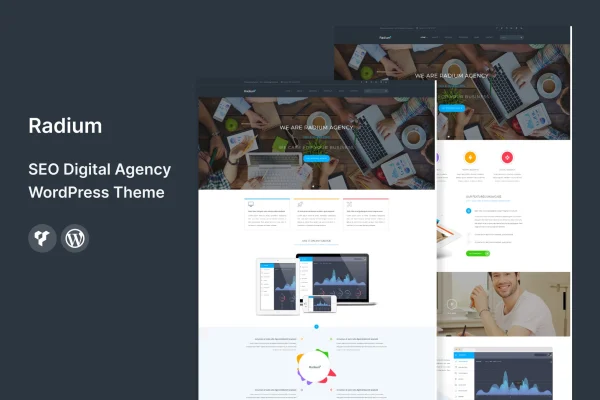
Radium is a WordPress theme built for SEO and digital agencies. It gives you pre-built homepage and inner page layouts, a drag and drop page builder and one-click demo import, so you can set up an agency website that presents your services, process and portfolio without writing code.
- Version
- 2.6
- Released
- Aug 9, 2026
- Developer
- template_path
- Type
- WordPress theme
- Licence
- GPL
- Included in
- Every plan, or $3.99 on its own
What’s new in Radium 2.6
Version 2.6 · Aug 9, 2026
Latest
What it does
An agency site has to explain what you offer, show past work and give visitors a clear way to get in touch. Building all of that from a blank theme takes time. Radium starts you off with ready-made homepage and inner page designs aimed at SEO and digital agency businesses. You import the demo content with one click, then swap in your own text, images and branding. The layouts are responsive, so pages adapt to phones, tablets and desktops, and the graphics are retina ready for high-resolution screens.
Customization happens through a drag and drop page builder, which lets you rearrange and edit page sections without code. You can adjust header and footer layouts to match your branding and navigation, and choose from several blog layouts for posting insights and case studies. The theme is described as compatible with WooCommerce, Contact Form 7 and Yoast SEO, so you can add a shop, contact forms or SEO tools alongside it. It suits both people new to WordPress and experienced site builders.
Best for
- SEO agencies building a client-facing website
- Digital marketing agencies presenting services and case studies
- Freelancers setting up agency-style sites for clients
Features
Pre-built agency layouts
Ready-made homepage and inner page designs for SEO and digital agencies that you can import and then adjust with your own content and branding.
One-click demo import
Bring in the demo content with a single click to get a working starting point for your site instead of building each page from scratch.
Drag and drop page builder
Edit and rearrange page sections visually, with no coding skills required, to shape service pages, about pages and more.
Customizable header and footer
Change header and footer layouts to fit your agency's branding and the navigation structure your site needs.
Multiple blog layouts
Choose from several blog templates for publishing articles, agency insights and case studies in the format that suits your content.
Responsive, retina ready design
Layouts adapt to different screen sizes, and graphics are prepared to display clearly on high-resolution displays.
Works with popular plugins
Described as compatible with WooCommerce, Contact Form 7 and Yoast SEO, so you can add selling, forms and SEO settings.
Radium older versions
- 2.5Aug 13, 2024
Members and buyers of this product can download older versions.
Questions about Radium
Do I need to know how to code to customize Radium?
No. The theme includes a drag and drop page builder, so you can edit and rearrange page sections visually. Header and footer layouts can also be customized to match your branding without touching code.
Can I make my site look like the demo?
Yes. Radium offers one-click demo import, which brings in the demo content so your site starts with the pre-built homepage and inner page layouts. From there you replace the sample text and images with your own.
Does Radium work with WooCommerce and contact forms?
The theme is described as compatible with WooCommerce, Contact Form 7 and Yoast SEO. That means you can add a shop, contact forms or SEO configuration using those plugins alongside the theme's layouts.
Is Radium suitable for publishing case studies and blog posts?
Yes. It includes multiple blog layouts meant for sharing insights and case studies, so you can pick the presentation that fits how your agency writes and organizes its content.
Is Radium free?
The code of Radium is licensed under the GPL, so anyone may use, change and share it. GPL Feast is a paid service: a plan or a single purchase gives you the download and automatic updates. The developer's own support, licence key and online services are not included.
Which version of Radium is this?
Version 2.6, released Aug 9, 2026. New versions appear here when the developer publishes them, and members get them as automatic updates.
How do I update Radium?
Install the free GPL Feast Updater on your site and connect it with your API key. It installs new versions of Radium automatically and keeps a backup, so you can roll back.






