Theme
Updated
Realest
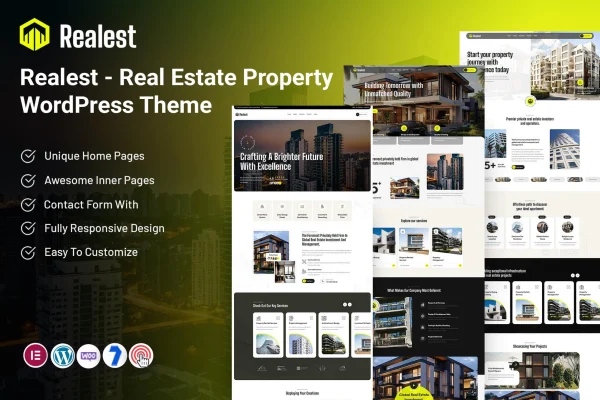
Realest is a real estate WordPress theme by ThemeMascot, made for agents, brokers and realty companies. It gives you a property listing system, search filters, agent profiles and contact forms, so you can present properties and hear from interested buyers in one place.
- Version
- 5.0
- Released
- Feb 11, 2025
- Developer
- ThemeMascot
- Type
- WordPress theme
- Requires
- Elementor
- Licence
- GPL
- Included in
- Every plan, or $3.99 on its own
What’s new in Realest 5.0
Version 5.0 · Feb 11, 2025
Latest
What it does
A real estate site has to do a lot at once: list properties with full details, help visitors narrow down what they want, show where each home sits on a map and make it easy to contact an agent. This theme bundles those pieces together. Listings carry fields for price, location, features and media such as images and virtual tours, and visitors can filter by price range, property type and location to find suitable homes.
The theme works with Elementor, so you can adjust the homepage, property pages and agent profiles with drag and drop editing instead of code. You can change layouts, colors and content to match your brand. A one-click demo import gives you a complete starting site to edit. The layout is responsive, and multi-agent support lets a company give each agent a profile with contact details and their own listings.
Best for
- Independent real estate agents presenting their own listings
- Brokerages and realty companies with several agents
- Freelancers and agencies building property websites for clients
Features
Detailed property listings
Each listing includes fields for price, location, features and multimedia, so buyers can see images, virtual tours and the details that matter before getting in touch.
Customizable search filters
Visitors can narrow results by price range, property type, location and other criteria, which helps them get to relevant properties without scrolling through everything.
Google Maps and Street View
Property locations appear on interactive maps with Street View, giving visitors a clear picture of where a home is and what surrounds it.
Multi-agent profiles
Add several agents, each with a dedicated profile showing contact details and their listings, which suits agencies and brokerages with a team.
Lead capture contact forms
Built-in contact forms let potential clients reach you directly from the site, so inquiries about properties come straight to you or your agents.
Elementor page editing
Adjust the homepage, property pages and agent profiles with drag and drop editing in Elementor, and change layouts, colors and content without writing code.
One-click demo import
Import a complete demo site in one step, then replace the sample content with your own properties, agents and branding.
Responsive layout
Pages adapt to phones, tablets and desktops, so visitors can browse listings and view property details comfortably on any screen.
Questions about Realest
Does this theme need any plugins to work?
Realest requires Elementor, the drag and drop page builder. You use it to customize the homepage, property pages and agent profiles, changing layouts, colors and content without any coding.
Can my visitors search for properties?
Yes. The theme includes customizable search filters, so visitors can narrow listings by price range, property type, location and more. This helps buyers find properties that match what they are looking for.
Will it work for an agency with multiple agents?
It will. Multi-agent support lets you create a dedicated profile for each agent, including contact details and their listings. That makes it a good fit for real estate companies with a team as well as solo agents.
Can I show where each property is located?
Yes. Realest includes Google Maps and Street View integration, so each property's location appears on an interactive map. Visitors can get a sense of the neighborhood before reaching out through the built-in contact forms.
Is Realest free?
The code of Realest is licensed under the GPL, so anyone may use, change and share it. GPL Feast is a paid service: a plan or a single purchase gives you the download and automatic updates. The developer's own support, licence key and online services are not included.
Which version of Realest is this?
Version 5.0, released Feb 11, 2025. New versions appear here when the developer publishes them, and members get them as automatic updates.
How do I update Realest?
Install the free GPL Feast Updater on your site and connect it with your API key. It installs new versions of Realest automatically and keeps a backup, so you can roll back.
What does Realest need?
Realest needs Elementor installed and active.