Theme
Updated
Reparar
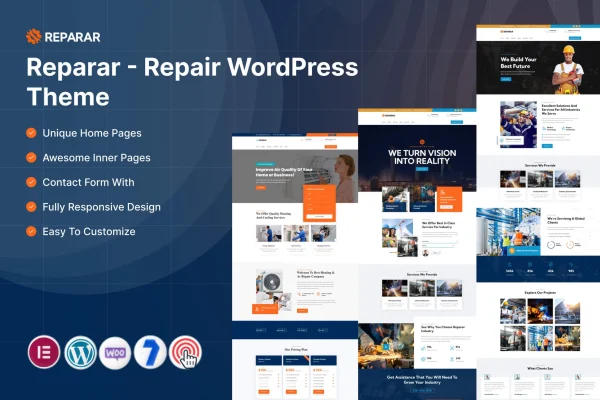
Reparar is a WordPress theme by ThemeMascot made for repair service businesses. It gives appliance, electronics and handyman services a ready-made site with sections for services, testimonials and contact details, plus customization options that need no coding. It is built to work with Elementor.
- Version
- 7.0
- Released
- Feb 11, 2025
- Developer
- ThemeMascot
- Type
- WordPress theme
- Requires
- Elementor
- Licence
- GPL
- Included in
- Every plan, or $3.99 on its own
What’s new in Reparar 7.0
Version 7.0
Latest
- NewVersion bump.
What it does
Repair businesses need a website that tells visitors what gets fixed, why they can trust the shop and how to get in touch. This theme is built around those needs. It includes dedicated sections for listing repair services, areas for customer testimonials and contact information, and pre-built page templates for About, Services, Testimonials and Contact. That gives you a working structure from the start, so you can focus on adding your own services, photos and details.
The theme uses a responsive layout, so pages adapt to phones, tablets and desktops, which matters when customers often look for a repair shop on the go. You can adjust colors, fonts and layouts through the built-in WordPress customizer without touching code. Appointment booking integration lets clients schedule through your site, and the theme is translation ready for businesses serving customers in more than one language. Elementor is required.
Best for
- Appliance repair shops wanting a professional website
- Electronics and device repair services
- Handyman and general repair businesses
Features
Responsive layout
Pages adjust to smartphones, tablets and desktops, so customers get a consistent experience whatever device they use to find your repair service.
Customizer styling options
Change colors, fonts, layouts and more through the built-in WordPress customizer, with no coding knowledge needed to match the site to your brand.
Service sections
Dedicated sections let you lay out your repair services clearly, helping visitors find the specific fix they are looking for.
Appointment booking integration
Clients can schedule appointments directly through your website, which keeps booking requests in one place for your repair business.
Pre-built page templates
Ready-made About, Services, Testimonials and Contact pages give you a starting structure that you can fill with your own content.
Testimonials and contact areas
Space for customer testimonials and contact information helps new visitors see feedback from past clients and reach you easily.
Translation ready
The theme supports multiple languages, so you can present your site to customers in your local region or a wider area.
Questions about Reparar
What kinds of repair businesses does this theme suit?
It is designed for repair service businesses in general, with appliance repair, electronics repair and general handyman services named as good fits. The service sections and page templates work for any shop that needs to list repair services and collect customer inquiries.
Can customers book appointments through the site?
Yes. The theme includes appointment booking integration, so clients can schedule a visit or service directly through your website instead of calling or emailing to arrange a time.
Do I need coding skills to customize the design?
No. Colors, fonts, layouts and other design settings can be changed through the built-in WordPress customizer. The theme also requires Elementor, which you can use to edit page content visually.
Does it come with ready-made pages?
It does. Pre-built templates for About, Services, Testimonials and Contact pages are included, giving you a complete starting structure that you can update with your own text, images and service details.
Is Reparar free?
The code of Reparar is licensed under the GPL, so anyone may use, change and share it. GPL Feast is a paid service: a plan or a single purchase gives you the download and automatic updates. The developer's own support, licence key and online services are not included.
Which version of Reparar is this?
Version 7.0, released Feb 11, 2025. New versions appear here when the developer publishes them, and members get them as automatic updates.
How do I update Reparar?
Install the free GPL Feast Updater on your site and connect it with your API key. It installs new versions of Reparar automatically and keeps a backup, so you can roll back.
What does Reparar need?
Reparar needs Elementor installed and active.