
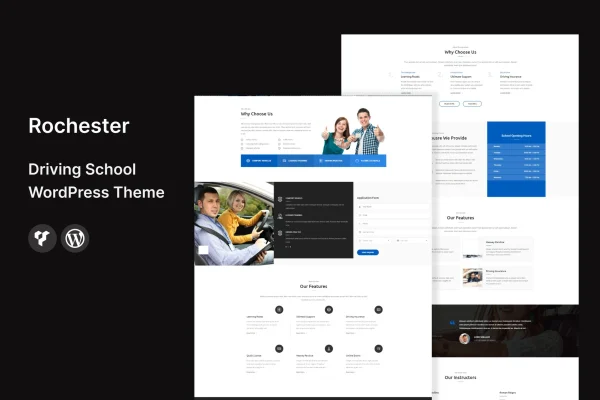
Theme
Updated
Rochester
Rochester is a WordPress theme built for driving schools, independent instructors and driving academies. It gives you a ready site structure for presenting courses, packages and instructors, along with a lesson scheduling and booking system so students can book time with you directly through your website.
- Version
- 2.1
- Released
- Nov 6, 2024
- Developer
- template_path
- Type
- WordPress theme
- Licence
- GPL
- Included in
- Every plan, or $3.99 on its own
What’s new in Rochester 2.1
Version 2.1 · Nov 6, 2024
Latest
What it does
Driving schools need a website that explains what they offer and makes it easy for new learners to get in touch or book a lesson. A general business theme often leaves you building those pieces yourself. This theme starts from the driving education niche, with templates for courses, packages and instructor profiles, plus contact forms and call-to-action buttons placed to prompt inquiries from visitors.
The built-in lesson scheduling and booking system lets students pick lesson times on your site, and it gives administrators one place to manage appointments. You can adjust homepage sections and color schemes to match your school's branding, and a one-click demo import loads pre-built content as a starting point. The layout is responsive, so pages adapt to phones, tablets and desktops, and the theme works alongside popular WordPress plugins when you want to add more features.
Best for
- Driving schools offering multiple courses and lesson packages
- Independent driving instructors who take lesson bookings
- Driving academies with several instructors to introduce
Features
Lesson scheduling and booking
An integrated booking system lets students schedule driving lessons directly on your site while administrators manage appointments from one place.
Course and package templates
Service templates present your driving courses and lesson packages in a clear, organized way so visitors can compare what you offer.
Instructor profiles
Dedicated profile layouts introduce your instructors to prospective students, helping learners see who they will be driving with.
Customizable homepage and colors
Homepage sections and color schemes can be adjusted so the site reflects your driving school's brand identity.
Contact forms and buttons
Contact forms and call-to-action buttons are placed throughout the layout to encourage visitors to send inquiries or reach out.
Responsive mobile layout
The design adapts to different screen sizes, so students can browse courses and book lessons from phones, tablets or desktops.
One-click demo import
Import the demo content in one step to get a pre-built site structure you can then edit with your own details.
Readable typography
Clean, modern typography and a tidy layout keep course details and lesson information easy to read.
Questions about Rochester
Can students book driving lessons through the site?
Yes. The theme includes an integrated lesson scheduling and booking system, so visitors can schedule lessons directly on your website. Administrators can manage those appointments, which helps keep your lesson calendar organized.
Does it work for a single instructor as well as a larger school?
It does. The theme is designed for individual instructors, driving schools and academies. A solo instructor can focus on services and booking, while a larger school can use the instructor profile templates to present its whole team.
Can I change the look to match my school's branding?
You can customize homepage sections and color schemes to fit your brand. The demo import gives you a pre-built starting point, and from there you can replace the sample content and adjust the design.
Will the site display properly on phones?
Yes. Rochester uses a responsive, mobile-friendly layout that adjusts to different devices, so students can view courses, read instructor profiles and book lessons on a phone or tablet.
Is Rochester free?
The code of Rochester is licensed under the GPL, so anyone may use, change and share it. GPL Feast is a paid service: a plan or a single purchase gives you the download and automatic updates. The developer's own support, licence key and online services are not included.
Which version of Rochester is this?
Version 2.1, released Nov 6, 2024. New versions appear here when the developer publishes them, and members get them as automatic updates.
How do I update Rochester?
Install the free GPL Feast Updater on your site and connect it with your API key. It installs new versions of Rochester automatically and keeps a backup, so you can roll back.






