
Theme
Updated
Scyla
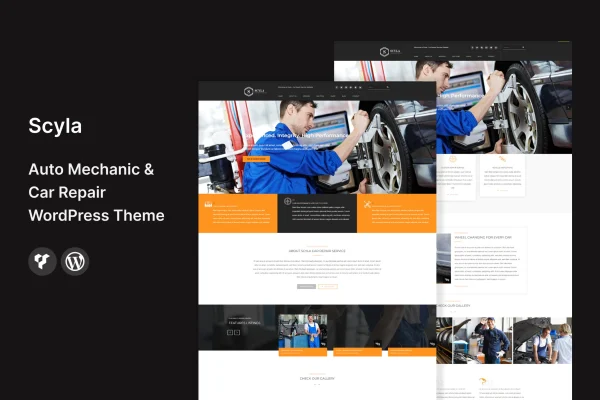
Scyla is a WordPress theme built for auto mechanics, car repair shops and automotive service centers. It gives a garage a responsive website with pages for services, team members, appointment requests and contact, all styled for the car repair trade.
- Version
- 2.7
- Released
- Aug 9, 2026
- Developer
- template_path
- Type
- WordPress theme
- Licence
- GPL
- Included in
- Every plan, or $3.99 on its own
What’s new in Scyla 2.7
Version 2.7 · Aug 9, 2026
Latest
What it does
Repair shops need a website that tells drivers what work they handle, who does it and how to book a visit. This theme covers those needs with pre-built service pages, dedicated team member sections and booking functionality for online appointment requests. Built-in contact forms give visitors a simple way to send questions or service requests, so the site works as a front desk for the business.
The layout is fully responsive, so pages adapt to phones, tablets and desktops. You can adjust colors, fonts, layouts and content through the WordPress Customizer without writing code, which helps a small garage or a larger repair center match the site to its own brand. The theme is also WooCommerce compatible, so shops that sell parts or accessories can add an online store alongside their service pages. Documentation is included to guide setup and customization.
Best for
- Independent auto repair shops and local garages
- Car mechanics who want online appointment requests
- Service centers that also sell parts or accessories
Features
Responsive layouts
Pages adjust to smartphones, tablets and desktops, so customers can read about your services and contact you from whatever device they use.
Customizer styling options
Change colors, fonts, layouts and content through the WordPress Customizer to match your shop's brand identity without touching any code.
Pre-built service pages
Ready-made pages present your range of auto repair services clearly, helping visitors find the type of work they need for their vehicle.
Appointment booking
Built-in booking functionality lets clients request appointments online, giving your shop an easy way to collect scheduling requests from the website.
Team member profiles
Dedicated sections introduce your mechanics and staff, so customers can see the people who will be working on their cars.
Built-in contact forms
Contact forms let visitors send inquiries or service requests directly from the site, keeping customer communication in one place.
WooCommerce compatibility
Works with WooCommerce, so you can add an online store for selling car parts or accessories through the same website.
Included documentation
Detailed guides walk you through customizing the theme and help with troubleshooting as you build out your site.
Scyla older versions
- 2.6Aug 26, 2024
Members and buyers of this product can download older versions.
Questions about Scyla
Can customers book appointments through a site built with this theme?
Yes. The theme includes built-in booking functionality that lets clients request appointments online. Combined with the contact forms, it gives your shop a way to collect service requests and questions from visitors without them needing to call.
Do I need to know how to code to customize the design?
No. Colors, fonts, layouts and content can be changed through the WordPress Customizer. That lets you match the site to your shop's branding using point and click settings, and the included documentation explains the customization options.
Can I sell car parts on my website with Scyla?
The theme is WooCommerce compatible, so you can add an online store for parts or accessories. Your service pages, team profiles and shop can then live on the same website under one consistent design.
Will the site work on mobile phones?
Yes. The theme uses fully responsive layouts that adapt to smartphones, tablets and desktops. Drivers looking for a mechanic on their phone will see pages sized properly for their screen.
Is Scyla free?
The code of Scyla is licensed under the GPL, so anyone may use, change and share it. GPL Feast is a paid service: a plan or a single purchase gives you the download and automatic updates. The developer's own support, licence key and online services are not included.
Which version of Scyla is this?
Version 2.7, released Aug 9, 2026. New versions appear here when the developer publishes them, and members get them as automatic updates.
How do I update Scyla?
Install the free GPL Feast Updater on your site and connect it with your API key. It installs new versions of Scyla automatically and keeps a backup, so you can roll back.






